



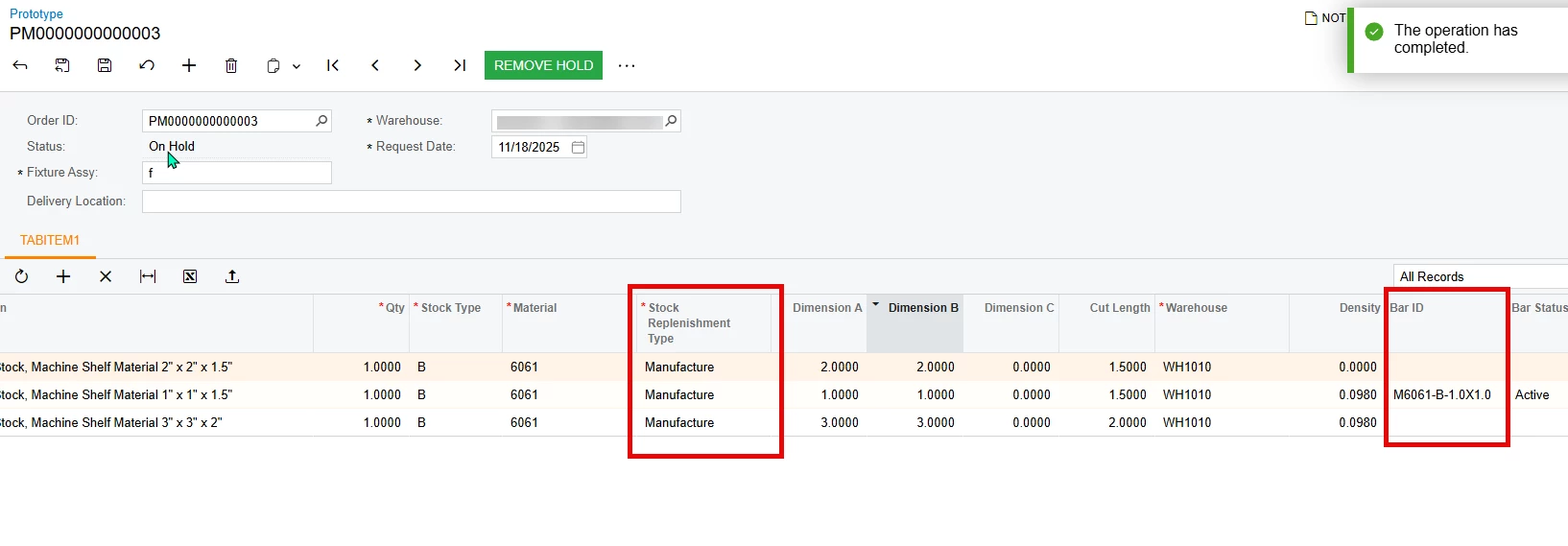
I created a new screen that has workflow code on it. i followed the T270 series to make it. I am having issues with disabling an action conditionally. I want the “Remove Hold” button to be disabled whenever a line item is added that has a “Stock Replenishment Type” of “Manufacture” and the Bar ID is null. In the below picture, the removed hold button should be disabled because line 1 and 3 are empty in the bar id. i have the field conditionally required, but it will still put it on hold even though an error will pop up saying that the field has to be filled out. i tried adding it in a row selected event. i also tried to do it in the workflow. but it doesnt ever get disabled. can someone tell me what i am doing wrong?
protected void _(Events.RowSelected<ProtoCutLine> e, PXCache cache)
{
ProtoCutLine row = e.Row;
ProtoCut lineitems = SelectFrom<ProtoCut>.Where<ProtoCut.orderID.IsEqual<ProtoCutLine.orderID.FromCurrent>>.View.Select(this);if (lineitems.Status != "OH") //return;
{
// Make the entire grid read-only
e.Cache.AllowUpdate = false;
e.Cache.AllowInsert = false;
e.Cache.AllowDelete = false;
PXDefaultAttribute.SetPersistingCheck<ProtoCutLine.barID>(cache,null,PXPersistingCheck.NullOrBlank);
}
else
{
e.Cache.AllowUpdate = true;
e.Cache.AllowInsert = true;
e.Cache.AllowDelete = true;
PXDefaultAttribute.SetPersistingCheck<ProtoCutLine.barID>(cache, null, PXPersistingCheck.Nothing);
}if (row.StkRepType == "M")
{
PXDefaultAttribute.SetPersistingCheck<ProtoCutLine.barID>(cache, null, PXPersistingCheck.NullOrBlank);}
else
{
PXDefaultAttribute.SetPersistingCheck<ProtoCutLine.barID>(cache, null, PXPersistingCheck.Nothing);}
//if (row.BarID == null) //row.StkRepType == "M" &&
//{ReleaseFromHold.SetEnabled(false);
//}
}
public class Conditions : Condition.Pack
{public Condition NotDone => GetOrCreate(b => b.FromBql<
// Where<Selector<ProtoCutLine.orderID, ProtoCutLine.stkRepType>,Equal<Manufactured>,And<ProtoCutLine.barID.IsNull>>>());
}
.WithActions(actions =>
{
actions.Add(g => g.ReleaseFromHold, c => c
.WithCategory(processingCategory)
.IsDisabledWhen(conditions.NotDone));

