manufacturing environment: there are plenty of reasons to correct a released labor ticket. I read the instruction but i just can’t figure it out.
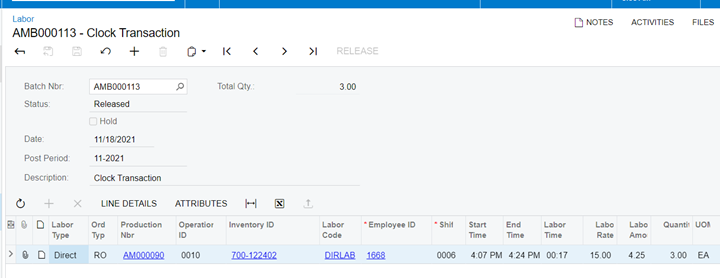
below is an example:
the end time is 4:24pm below, say employee 1668 actual end time is 4:20pm.
please help how to correct this? - Zoey
Best answer by Kristen Schneider
Hi Zoey,
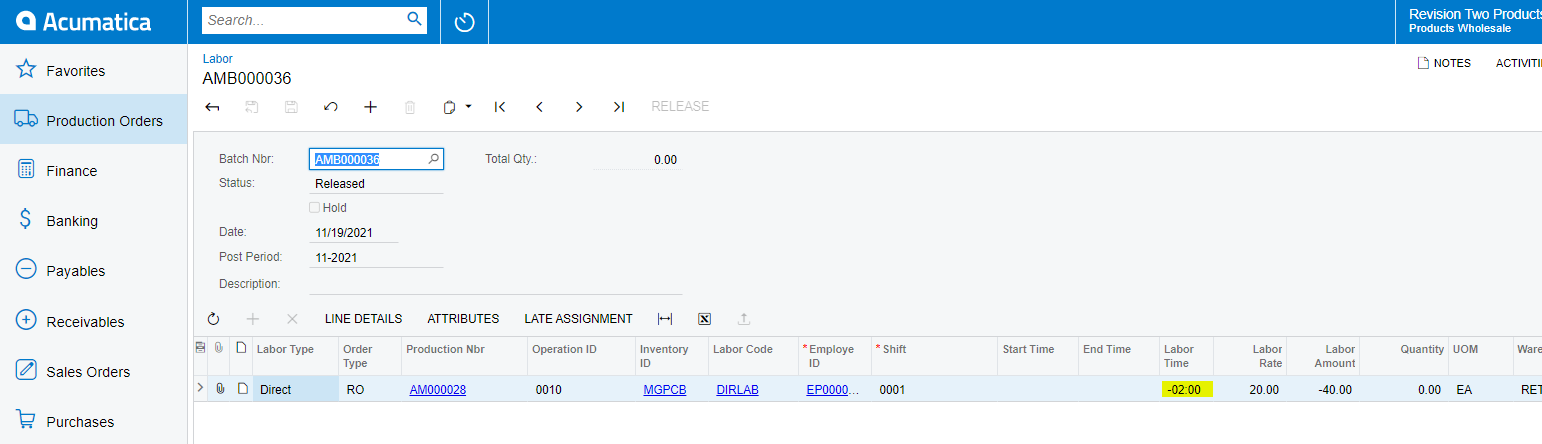
I don’t know of a way to modify the original labor transaction after it was released, but you can use the Labor screen to enter adjusting time entries. It will allow you to enter negative quantities of time so when the entry is processed, it will update the labor time and cost on the production order. It also creates a time activity with a negative quantity so the employee time is correct as well.
I don’t know of a way to modify the original labor transaction after it was released, but you can use the Labor screen to enter adjusting time entries. It will allow you to enter negative quantities of time so when the entry is processed, it will update the labor time and cost on the production order. It also creates a time activity with a negative quantity so the employee time is correct as well.
it works. I checked for any hidden field for reference to the specific labor trans ID for a time adjustment.
i was not able to find it. obviously, we can use the description field to input the labor trans id with error and create a reason code like “TIME ADJUST”
it will be really nice to know if the system itself could reference to the labor trans id for correction.