Answer

Anyone ever get this Error message when releasing production order with parent item lot on completion selected.

  • June 28, 2023
  • 7 replies
  • 171 views

MikeBasone
Freshman I
Forum|alt.badge.img

Error when trying to release production order when using parent item lot on completion selection.

 

Best answer by angierowley75

You pre-assign the Lot on the Line Details tab of Production Order Maintenance.

Have you added a lot to the grid on that tab?


7 replies

Debbie Baldwin
Acumatica Moderator
Forum|alt.badge.img+2
  • Acumatica Product Manager
  • June 28, 2023

@MikeBasone have you issued your lot and/or serial tracked components to your production order? Once you have done this and you are using “Pre-assign Lot and Serial numbers” - then you will see information on this grid. 

If you need more information on how Pre-assigning Lot/Serial numbers work - just send me an email at Debbie.Baldwin@Acumatica.com and I can help you out. 


Debbie


MikeBasone
Freshman I
Forum|alt.badge.img
  • Author
  • Freshman I
  • June 28, 2023

Thank you Debbie...I will pre-assign and let you know.


MikeBasone
Freshman I
Forum|alt.badge.img
  • Author
  • Freshman I
  • June 28, 2023

How do I pre-assign lot and serial numbers for lot tracked components?
Do a move for my assembly operation?


angierowley75
Acumatica Moderator
Forum|alt.badge.img+3
  • Acumatica Moderator
  • June 28, 2023

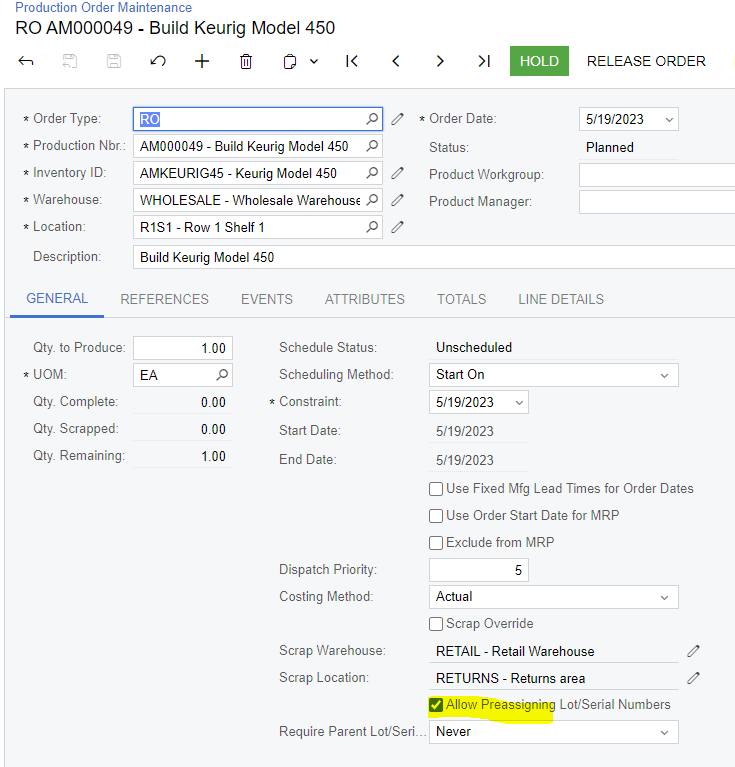
You need to set the select the “Allow preassigning lot/serial numbers” check-box on your production order


MikeBasone
Freshman I
Forum|alt.badge.img
  • Author
  • Freshman I
  • June 28, 2023

Thanks for your response.

We do have allow preassigning checked along with requires parent/lot selection as “completed on”.
See screenshot attached.


angierowley75
Acumatica Moderator
Forum|alt.badge.img+3
  • Acumatica Moderator
  • Answer
  • June 28, 2023

You pre-assign the Lot on the Line Details tab of Production Order Maintenance.

Have you added a lot to the grid on that tab?


MikeBasone
Freshman I
Forum|alt.badge.img
  • Author
  • Freshman I
  • June 28, 2023

Thanks very much!!!