Answer

Acumatica allows to use expired materials in production - any workarounds/solutions?

  • November 25, 2024
  • 14 replies
  • 203 views

Acumatica allows expired materials to be used in production despite the fact that an expiration date is set. No warning to user or hard stop.

Does anyone have a workaround for this other than a custom inquiry that allows to find expired material and remove it from the shelves?
We are in a regulated industry (medical device) and current feedback from Quality is that the workaround is not sufficient and an active warning, if not a stop, from the system is the minimum that has to be implemented.

Best answer by jharris

Acumatica allows expired materials to be used in production despite the fact that an expiration date is set. No warning to user or hard stop.

Does anyone have a workaround for this other than a custom inquiry that allows to find expired material and remove it from the shelves?
We are in a regulated industry (medical device) and current feedback from Quality is that the workaround is not sufficient and an active warning, if not a stop, from the system is the minimum that has to be implemented.

​Hi @csenger,  

Here’s another option that might be able to work in a pinch…  You could set up a business event to transfer the out of date materials to a do-not-consume location (Can also be used for expired product to transfer it to a do-not-sell location). 

You’d do this by setting up a GI of the inventory, filtered by any LOT or Expiry date older than your parameter.  Using this GI as the source data for an import scenario, the system will initiate the transfer.  Set this up daily, weekly, monthly, or even hourly or every 5 minutes depending on your needs.  

When setting up the business event, have the trigger be a change in the GI, and the transfer be a 2 step transfer to a damage location (So it requires manual intervention to complete the transfer).  Alternatively if you’re not mixing expiration dates in a locations (At issue), you could also change the location attributes to not allow production from that location as well.  Another option is to transfer it to a phantom Damage Warehouse altogether where the inventory can’t be used for production. 

While yes, preventing this in a new feature would probably be ideal, there may be a use case for overriding this and allowing it as well. Using a business event and the solution I’ve provided as a “Workaround”, might allow for even more flexibility as you can set even more parameters and maybe only set it for specific components, or a specific time after expiration. This allow much more flexibility for the business use cases.  

Hope this helps!

-James

14 replies

AndreasKleinfeld72
Varsity III
Forum|alt.badge.img+1

Hi ​@csenger,

I already entered a product idea for this requirement. Please vote for this idea: Validate "lot expiring date" in Production - Prevent the system to consume expired material


  • Author
  • Freshman I
  • November 26, 2024

@AndreasKleinfeld72 Thank you, voted on yesterday. 


jharris
Semi-Pro I
Forum|alt.badge.img+7
  • Semi-Pro I
  • Answer
  • November 26, 2024

Acumatica allows expired materials to be used in production despite the fact that an expiration date is set. No warning to user or hard stop.

Does anyone have a workaround for this other than a custom inquiry that allows to find expired material and remove it from the shelves?
We are in a regulated industry (medical device) and current feedback from Quality is that the workaround is not sufficient and an active warning, if not a stop, from the system is the minimum that has to be implemented.

​Hi @csenger,  

Here’s another option that might be able to work in a pinch…  You could set up a business event to transfer the out of date materials to a do-not-consume location (Can also be used for expired product to transfer it to a do-not-sell location). 

You’d do this by setting up a GI of the inventory, filtered by any LOT or Expiry date older than your parameter.  Using this GI as the source data for an import scenario, the system will initiate the transfer.  Set this up daily, weekly, monthly, or even hourly or every 5 minutes depending on your needs.  

When setting up the business event, have the trigger be a change in the GI, and the transfer be a 2 step transfer to a damage location (So it requires manual intervention to complete the transfer).  Alternatively if you’re not mixing expiration dates in a locations (At issue), you could also change the location attributes to not allow production from that location as well.  Another option is to transfer it to a phantom Damage Warehouse altogether where the inventory can’t be used for production. 

While yes, preventing this in a new feature would probably be ideal, there may be a use case for overriding this and allowing it as well. Using a business event and the solution I’ve provided as a “Workaround”, might allow for even more flexibility as you can set even more parameters and maybe only set it for specific components, or a specific time after expiration. This allow much more flexibility for the business use cases.  

Hope this helps!

-James


  • Author
  • Freshman I
  • January 23, 2025

@jamesh We actually implemented this solution and it works for us. Thank you!


jharris
Semi-Pro I
Forum|alt.badge.img+7
  • Semi-Pro I
  • February 4, 2025

@jamesh We actually implemented this solution and it works for us. Thank you!

That’s great!!!  :)  Happy to help! 


Forum|alt.badge.img+1
  • Semi-Pro II
  • April 28, 2025

Hey ​@jamesh 


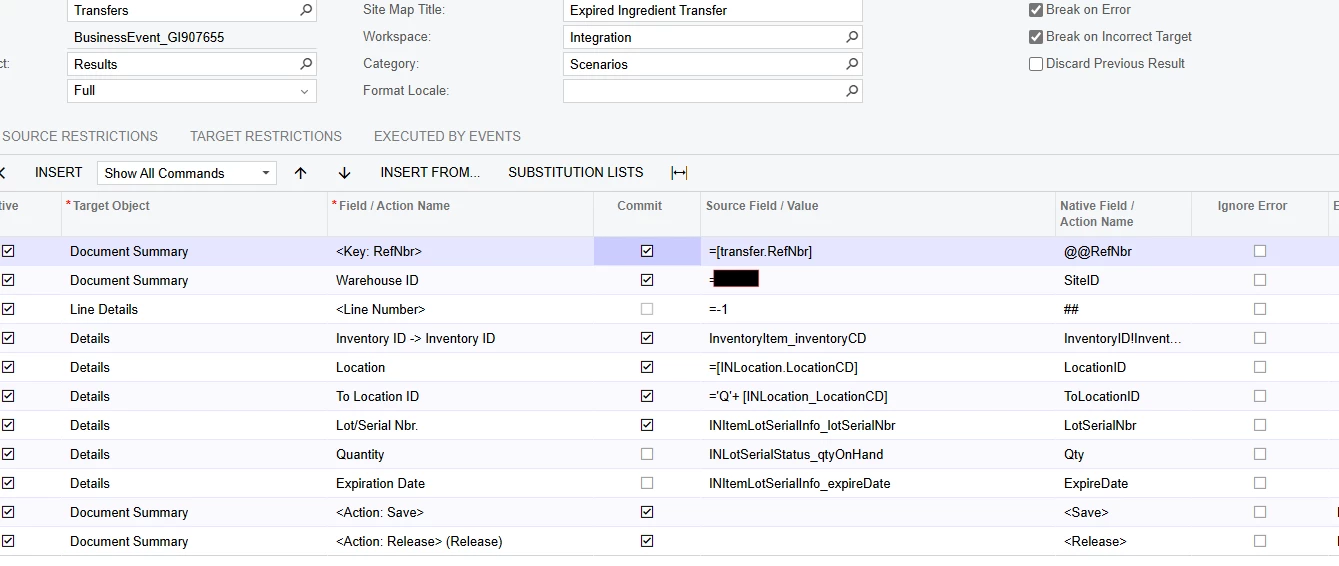
Do you think you could take a look at my Import Scenario for this exact issue?


My Business Event is triggering like it should, but I keep getting errors on the import scenario.

After some trial and error, I now don’t get any error, yet there is no transfer that occurs.


We have a phantom warehouse that is the exact same locations but they start with a ‘Q’ 

So the idea is to take the inventory and send it to the same location but add the Q.


Do you see anything off with this?


Forum|alt.badge.img+1
  • Semi-Pro II
  • April 28, 2025

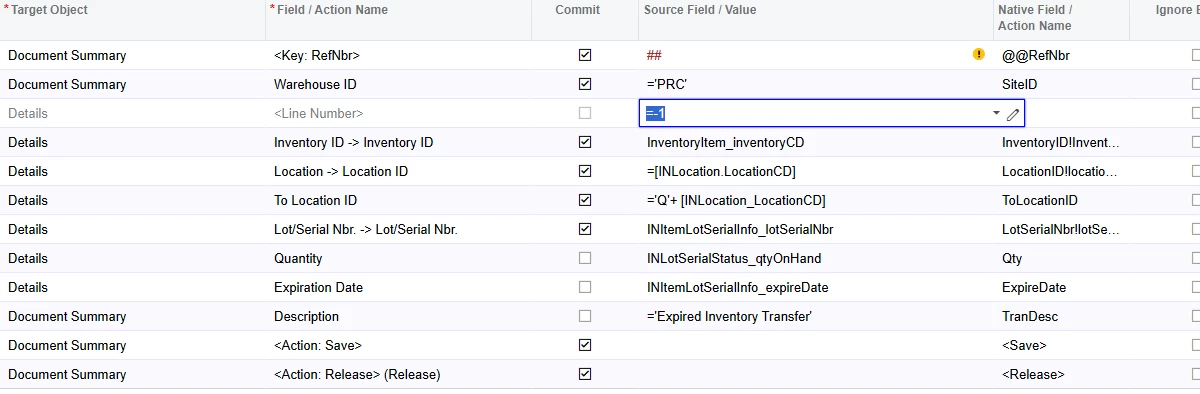
@jamesh, my fear is that it is searching for a refnbr, instead of creating a new one, and since I don’t have a refnbr on my GI, It doesn’t process anything.


But my Source Field does not allow me to put <NEW> as an expression to create a new RefNbr,


Is there a different way to go about this?


jharris
Semi-Pro I
Forum|alt.badge.img+7
  • Semi-Pro I
  • April 28, 2025

@bodiec - 

It looks like your Business Event isn’t creating the transfer document, which is why the process seems to stop without any errors. The issue stems from the RefNbr mapping. You’ll need to configure the Business Event to create a new transfer document with an auto-generated RefNbr instead of trying to map an existing RefNbr (which doesn’t exist in your Generic Inquiry).

•  Issue: The current mapping [=transfer.RefNbr] is incorrect because there’s no existing transfer.RefNbr in your GI to map from.

•  Fix: Instead of mapping RefNbr to a source value, let Acumatica auto-generate the RefNbr for the new transfer document.

Steps:

1.  In the Business Event setup, go to the “Document Summary” section where <KEY: RefNbr> is defined.

2.  Change the “Source Field/Value” for <KEY: RefNbr> from [=transfer.RefNbr] to ##.

The ## placeholder tells Acumatica to auto-generate a new RefNbr for the transfer document based on the numbering sequence defined for inventory transfers (which you’ve already confirmed is set to auto-number rather than manual).

Try this change and let me know if you see the transfer document being created in the Inventory Transfers screen or if you get any other errors. Everything else in your setup looks fine. Also, the reason you’re not seeing errors is that no document is being created to trigger a validation error in the first place.


Forum|alt.badge.img+1
  • Semi-Pro II
  • April 28, 2025

Thanks ​@jamesh that’s where I thought it was going wrong, I just can’t seem to get it to generate a new reference number.


I just tried as you said to put ##, but it does not recognize it as a field.

I get ‘This Field Does Not Exist’


jharris
Semi-Pro I
Forum|alt.badge.img+7
  • Semi-Pro I
  • April 28, 2025

Thanks ​@jamesh that’s where I thought it was going wrong, I just can’t seem to get it to generate a new reference number.


I just tried as you said to put ##, but it does not recognize it as a field.

I get ‘This Field Does Not Exist’


The <KEY: RefNbr> syntax is more typical in Business Events (Sorry about that - I overlooked it), where you’re defining a key field to identify a record. In Import Scenarios, you don’t need the <KEY> prefix—you simply map the RefNbr field to ##.


Forum|alt.badge.img+1
  • Semi-Pro II
  • April 28, 2025

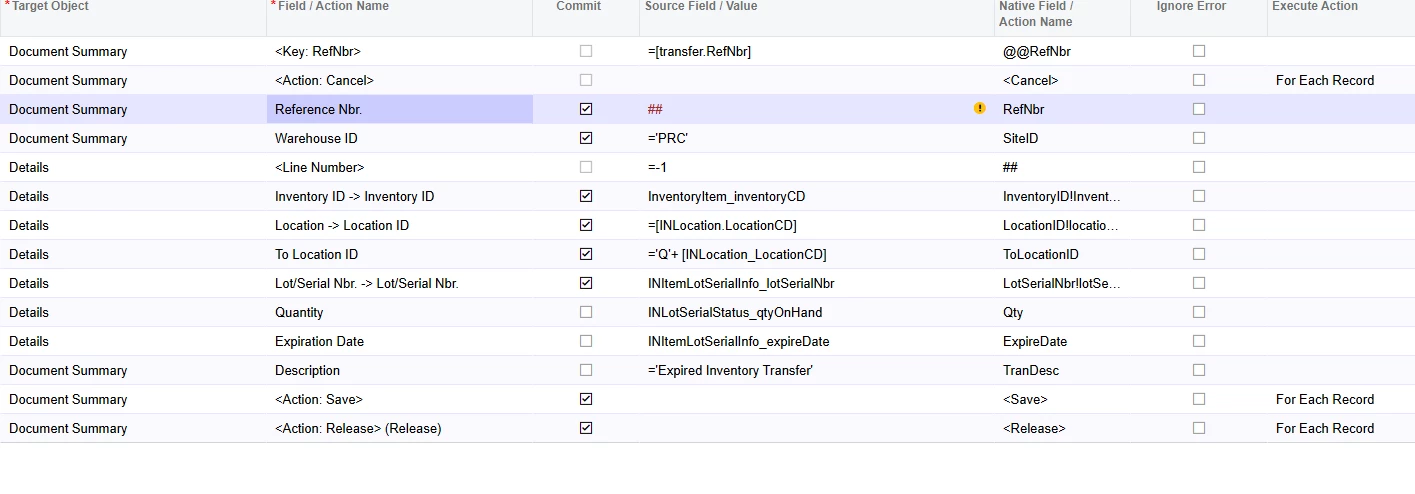
@jamesh  I changed the Field to just Reference Nbr. But it automatically adds the <Key:RefNbr> back in, with an additional <Action:Cancel>


Is that an issue? Or is it Canceling instead of looking for a Reference Number to match?


Also, ## still gives me the ‘field doesn’t exist’ error.


Forum|alt.badge.img+1
  • Semi-Pro II
  • April 28, 2025

@jamesh  I changed the Field to just Reference Nbr. But it automatically adds the <Key:RefNbr> back in, with an additional <Action:Cancel>


Is that an issue? Or is it Canceling instead of looking for a Reference Number to match?


Also, ## still gives me the ‘field doesn’t exist’ error.

Sorry here is a screen shot 


Forum|alt.badge.img+1
  • Semi-Pro II
  • April 29, 2025

-


Forum|alt.badge.img+1
  • Semi-Pro II
  • April 29, 2025

 Update ​@jamesh 


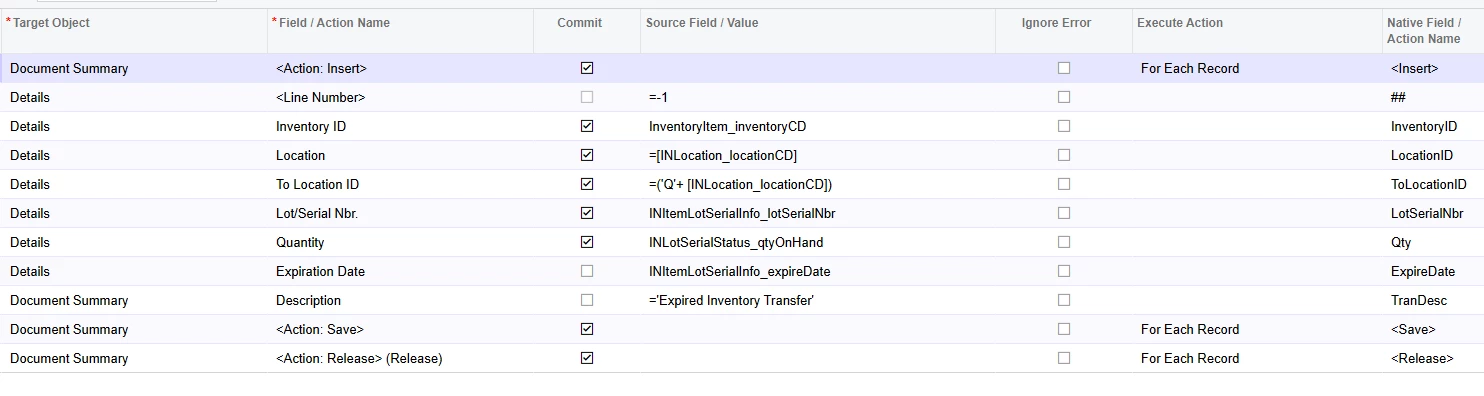
I actually got this to work without using a reference number at all.


What I was actually missing was to start with <Action: Insert> Which is why the transfer was not happening, it was not clicking the plus sign to insert a line at all.


This import scenario is working perfectly now, Thanks for your help ​@jamesh