Answer

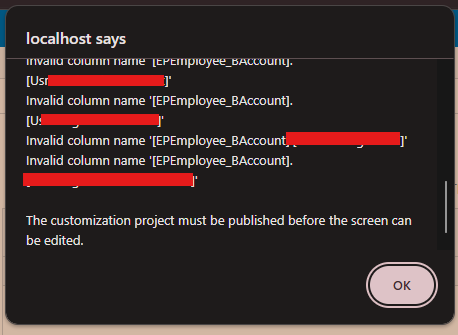
Why do I get Invalid column name

  • March 30, 2025
  • 4 replies
  • 79 views

Forum|alt.badge.img

I altered the EPEmployee table and added the above columns using a script. After that, I added the corresponding DAC records. However, even after publishing the customization, I still encounter this issue. Why am I getting this error?

Script e.g:
ALTER TABLE EPEmployee ADD  
    Usr____ VARCHAR(150) NULL,  
    Usr____ VARCHAR(50) NULL;

 

Best answer by Naveen Boga

@rashmikamudalinayake10 I recommend below steps.

  • Remove the .DLL File

    • Navigate to the Bin folder of the respective instance and remove the .DLL file.

    • This will prevent errors and allow you to log in to the instance.

  • Review Customization Projects

    • Open Customization Projects and access the relevant customization package.

    • Review the Database Scripts for any missing fields or discrepancies.

  • Update and Publish the Customization

    • Ensure all required database fields are included in the customization package.

    • Once updated, publish the package to apply the changes.

Following these steps should help resolve the issue. Let me know if you need further assistance.

4 replies

Naveen Boga
Captain II
Forum|alt.badge.img+19
  • Captain II
  • Answer
  • March 30, 2025

@rashmikamudalinayake10 I recommend below steps.

  • Remove the .DLL File

    • Navigate to the Bin folder of the respective instance and remove the .DLL file.

    • This will prevent errors and allow you to log in to the instance.

  • Review Customization Projects

    • Open Customization Projects and access the relevant customization package.

    • Review the Database Scripts for any missing fields or discrepancies.

  • Update and Publish the Customization

    • Ensure all required database fields are included in the customization package.

    • Once updated, publish the package to apply the changes.

Following these steps should help resolve the issue. Let me know if you need further assistance.


Yuriy Zaletskyy
Jr Varsity I
Forum|alt.badge.img+3

And the DAC itself, along with Acumatica version will remain secret?


Forum|alt.badge.img

@Naveen Boga Thanks. It worked. After that I created a new DB Script and the corresponding DAC records. Then Could able to create the fields.


Naveen Boga
Captain II
Forum|alt.badge.img+19
  • Captain II
  • April 1, 2025

@rashmikamudalinayake10 Awesome! Thanks for sharing the update. Glad I could help resolve this problem.