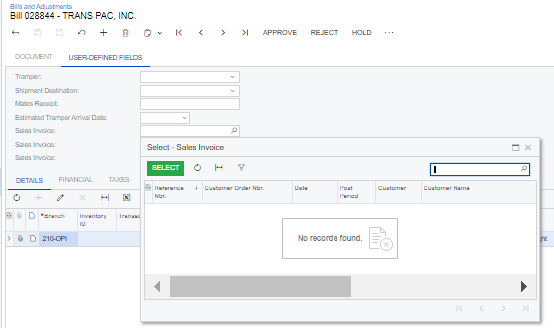
I have been adding some User Defined Fields to our AP Invoices today. I would like the user to be required to select from a list of Sales invoices for one of them so I used the Schema Selector option. However, nothing shows in the list for the selection.
I have read this previous topic, but I’m not sure I understand if I’m using an Attribute or a UDF as I am setting up both.
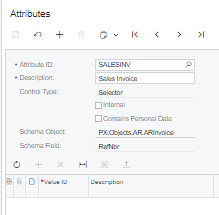
I began by creating an Attribute:
Attribute
And then a UDF, however nothing shows in the drop down menu.
Can anyone give me any hints?
Thank you.
Helen
Best answer by Laura03
Hello,
I think your Attribute is properly set up and correctly attached as a user-defined field.
I suspect the Invoice # lookup list is blank because the ARInvoice table has a Composite Primary Key: we need both Document Type and Reference number, to look up an ARInvoice document.
I wonder if a customization is required, to achieve a successful Lookup in this case. We need some help from more experienced developers/customizers to be certain… an expert will come along soon to confirm or contradict, and add details for you. 🙂
I think your Attribute is properly set up and correctly attached as a user-defined field.
I suspect the Invoice # lookup list is blank because the ARInvoice table has a Composite Primary Key: we need both Document Type and Reference number, to look up an ARInvoice document.
I wonder if a customization is required, to achieve a successful Lookup in this case. We need some help from more experienced developers/customizers to be certain… an expert will come along soon to confirm or contradict, and add details for you. 🙂
@hgilbert and @kokjietan , @Laura02 is correct. you are gonna have to use customizations for such UDF.
following were the engineering comments last time such issue as reported:
“selector for RefNbr depends on the DocType parameter. When the parameter is missing, selection will be based on the Default Type as configured in Preferences they can add such field only via code customization now, it is not possible to add it using UDF”