

Question

Percentages are larger when exporting into Excel

  • March 5, 2026
  • 7 replies
  • 31 views

Forum|alt.badge.img

Hello, 

We have created a rather large report. One column is for AR Margin Percent. This shows as a standard 2 digit number in Acumatica (no % sign). When we export into Excel, then format to a percentage, the number grows by 1000. Example 33 would equal 3300%. 

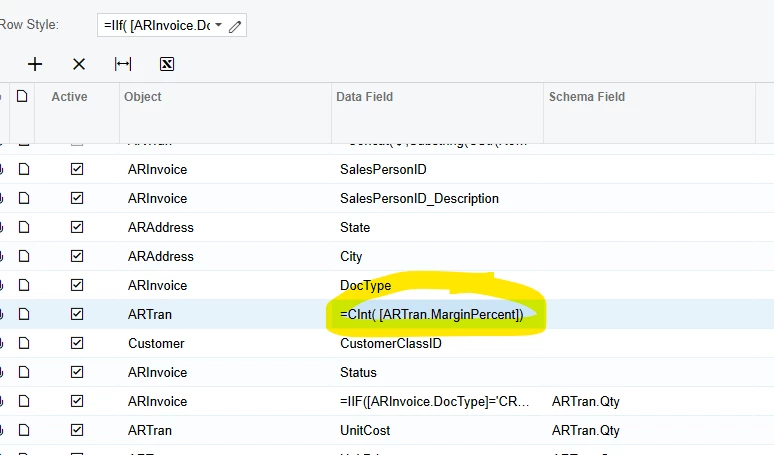
I know how to correct this in Excel, but seeing as we pull this report often, then the adjustment can become very time consuming. I would like to correct the GI in Acumatica so I do not have to correct it in Excel. Any ideas how to accomplish this? Below is a screenshot of the formula in the GI: 
 

7 replies

rkenna
Captain II
Forum|alt.badge.img+1
  • Captain II
  • March 5, 2026

Hi ​@ChantellBeaty,

Often when things are exported, the formatting can be tricky. There are 2 things that come to mind you could try.

  1. In the Schema Field, put a field that is a % for the formatting. That will lock in how it displays, and it should display out properly.
  2. If that does not work, expose the GI to OData, then correct the formatting in Excel. When you need to re-pull the date into Excel, just refresh it via OData in Excel and the formatting will remain the same. Don’t export from Acumatica, just Refresh in Excel.

Hope those help,

RJ


Forum|alt.badge.img
  • Author
  • Jr Varsity II
  • March 5, 2026

Hi ​@ChantellBeaty,

Often when things are exported, the formatting can be tricky. There are 2 things that come to mind you could try.

  1. In the Schema Field, put a field that is a % for the formatting. That will lock in how it displays, and it should display out properly.
  2. If that does not work, expose the GI to OData, then correct the formatting in Excel. When you need to re-pull the date into Excel, just refresh it via OData in Excel and the formatting will remain the same. Don’t export from Acumatica, just Refresh in Excel.

Hope those help,

RJ

I have tried the percentage field, but that also does not work. I tried O data, but the report always adds at least one line (per AR transaction) to the data set, so I have to continually re-format the new data. 


rkenna
Captain II
Forum|alt.badge.img+1
  • Captain II
  • March 5, 2026

@ChantellBeaty, what do you mean it adds at least one line? From a new AR Transaction that has been put in the system?

You could always add a default parameter to only run for the time you want, or exclude @Today. Then pull from OData. Not ideal but would exclude those additional lines.

It is going to spit out whatever it has in the for that AR Tran DAC Source Data.


Forum|alt.badge.img
  • Author
  • Jr Varsity II
  • March 5, 2026

@ChantellBeaty, what do you mean it adds at least one line? From a new AR Transaction that has been put in the system?

You could always add a default parameter to only run for the time you want, or exclude @Today. Then pull from OData. Not ideal but would exclude those additional lines.

It is going to spit out whatever it has in the for that AR Tran DAC Source Data.

This report grows each time a sales order is invoiced


rkenna
Captain II
Forum|alt.badge.img+1
  • Captain II
  • March 5, 2026

Gotcha, so you would be able to set a parameter, maybe @Today-1 depending on what you need, then to “cut off” that growth in order to pull into Odata. It is tricky for sure, but that would be my recommendation. 


Forum|alt.badge.img
  • Author
  • Jr Varsity II
  • March 5, 2026

Gotcha, so you would be able to set a parameter, maybe @Today-1 depending on what you need, then to “cut off” that growth in order to pull into Odata. It is tricky for sure, but that would be my recommendation. 

Thank you, but for this report, that simply would not work as this report is designed to grow and retain the data that is added. A formula in the GI would be the only way to preserve what the report is meant to achieve. 


rkenna
Captain II
Forum|alt.badge.img+1
  • Captain II
  • March 6, 2026

@ChantellBeaty , understood. I hope you’re able to get it sorted out, and please share with the community if you’re able to!

