Solved

outlook add-in for shared mailbox

  • February 2, 2021
  • 12 replies
  • 570 views

sean21
Varsity III
Forum|alt.badge.img+1

Is it possible to install the outlook add-in for a shared mailbox? I have it installed for my inbox, but it’s much more useful if I can access from the shared mailbox. When I click the inbox for the shared mailbox, the add-in disappears from the ribbon. 

Best answer by jyounker18

I don’t think this is possible.  You can’t directly log in to a shared mailbox so there would be no way to load the add-in through OWA.


12 replies

  • Jr Varsity I
  • Answer
  • March 3, 2021

I don’t think this is possible.  You can’t directly log in to a shared mailbox so there would be no way to load the add-in through OWA.


sean21
Varsity III
Forum|alt.badge.img+1
  • Author
  • Varsity III
  • March 7, 2021

@jyounker18 yeah I figured that out after doing a little bit more research. This is a Microsoft dilemma… Would be nice though! 


Colin MacMillan
Jr Varsity II
Forum|alt.badge.img+1

@sean21  - One of our clients came up with the following workaround that you might want to try.

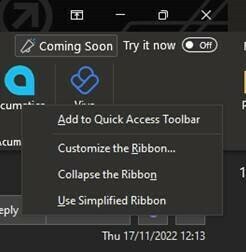
if you right click on the plugin when in the primary mailbox you get the option to Add to Quick Access Toolbar which adds the plugin option to the top-left menu.  

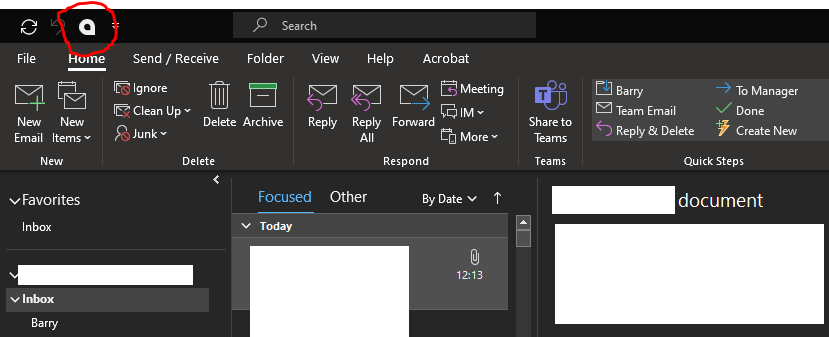
This can then be used even when focused on the Shared Mailboxes.


sean21
Varsity III
Forum|alt.badge.img+1
  • Author
  • Varsity III
  • November 18, 2022

@Colin MacMillan thanks for sharing. I’ll have to test that out as well. Looks like a pretty creative solution! 


  • Jr Varsity II
  • August 24, 2023

@sean21  - One of our clients came up with the following workaround that you might want to try.

if you right click on the plugin when in the primary mailbox you get the option to Add to Quick Access Toolbar which adds the plugin option to the top-left menu.  

This can then be used even when focused on the Shared Mailboxes.


This was so helpful. Thank you!


  • Freshman II
  • August 2, 2024

You can see the outlook plug in using the workaround. however none of the functionality works ! cannot create a contact, cant log an activity. Did anyone figure out how to get it to actually work? 


  • Freshman II
  • August 14, 2024

You can see the outlook plug in using the workaround. however none of the functionality works ! cannot create a contact, cant log an activity. Did anyone figure out how to get it to actually work? 

Update! it works SOME of the time. when it works its great! But sometimes it does not pick up on the email contents. 


Glen Martin
Acumatica Moderator
Forum|alt.badge.img+1
  • Acumatica Moderator
  • January 8, 2026

I have created a Product Idea for this feature here: 

Upvoting ideas will help with exposure. Adding details of a use case scenario, and how it is envisioned for the product to function is also useful when our team is reviewing these ideas.

Please feel free to submit a support case to request this feature. This will also help us gauge demand.


Forum|alt.badge.img+1
  • Semi-Pro I
  • January 10, 2026

Has anyone that has run into this tried configuring the Shared mailbox as a full licensed mailbox, and then adding the plugin (via OWA) to that licensed user?  I’m frustrated that anyone in this decade would design an Outlook plugin that wouldn’t recognize the benefit of Shared Mailboxes (we are hoping to use it to Create AP Documents, which is an included feature), but I’m not opposed to licensing our AP mailbox if it helps.


Glen Martin
Acumatica Moderator
Forum|alt.badge.img+1
  • Acumatica Moderator
  • January 10, 2026

@lairdtim If the mailbox is licensed, it is no longer a Shared Mailbox by Microsoft’s definition: https://learn.microsoft.com/en-us/exchange/collaboration/shared-mailboxes/shared-mailboxes. The Outlook add-in should work with any regular licensed mailbox.


Forum|alt.badge.img+1
  • Semi-Pro I
  • January 10, 2026

@lairdtim If the mailbox is licensed, it is no longer a Shared Mailbox by Microsoft’s definition: https://learn.microsoft.com/en-us/exchange/collaboration/shared-mailboxes/shared-mailboxes. The Outlook add-in should work with any regular licensed mailbox.

Agreed.  But that doesn’t mean it’ll work.  I’m worried that it will only show up in Outlook for the primary mailbox (the end user), even if the AP mailbox is licensed and the end user has full access to it within Outlook.


Glen Martin
Acumatica Moderator
Forum|alt.badge.img+1
  • Acumatica Moderator
  • January 12, 2026

@lairdtim If the mailbox is licensed, it is no longer a Shared Mailbox by Microsoft’s definition: https://learn.microsoft.com/en-us/exchange/collaboration/shared-mailboxes/shared-mailboxes. The Outlook add-in should work with any regular licensed mailbox.

Agreed.  But that doesn’t mean it’ll work.  I’m worried that it will only show up in Outlook for the primary mailbox (the end user), even if the AP mailbox is licensed and the end user has full access to it within Outlook.

@lairdtim Thanks for clarifying. My understanding is that it is desired to use the Outlook add-in with multiple mailboxes concurrently, from the same user and mail client. I haven’t seen that setup and I don’t believe we have documentation for it, so it would definitely need to be tested. Interesting idea If you do wind up testing it, please let us know the results.