

Question

Email Templates not formatting correctly since 26R1 upgrade

  • June 26, 2026
  • 2 replies
  • 46 views

Forum|alt.badge.img

Hi,

Does anyone have experience with Email Templates using ((Case.Description)) or ((Tasks.Body)) in the layout but the notification when sent is almost certainly treating ((Case.Description)) or ((Tasks.Body)) as plain text and lumping every thing that should be on separate lines together?
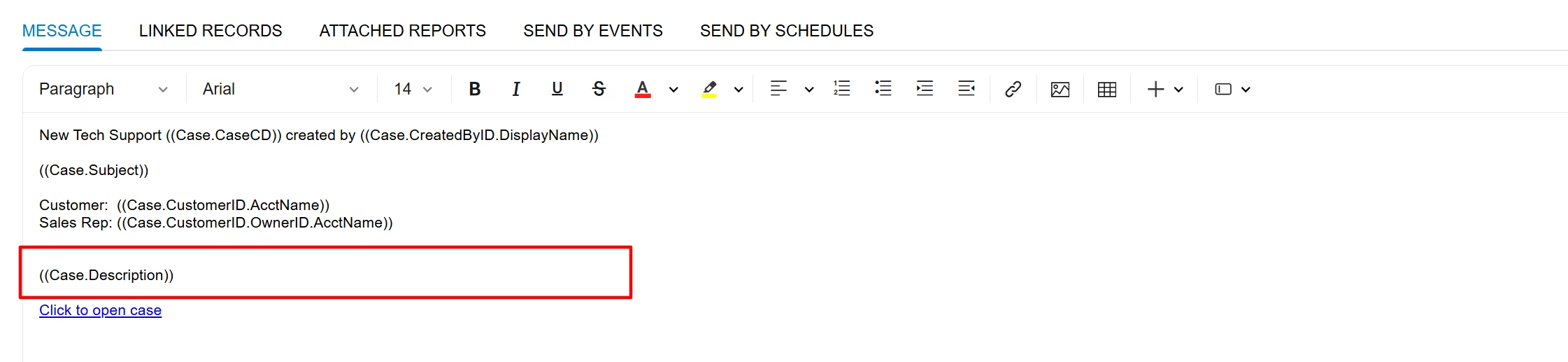

 

Email Template using ((Case.Description))
Case Description on a Case CR306000 which is prepopulated from the Workflow inside the customization project


All Emails GI record shows the ((Case.Description)) is plain text / squashed together


This started happening with 26R1 but it doesn’t happen on every Case/Task Email Template where ((Case.Description)) or ((Tasks.Body)) is being used.

I tried to replicate it many times but can’t.

2 replies

chameera71
Varsity III
Forum|alt.badge.img+4
  • Varsity III
  • July 8, 2026

We've observed similar behavior in 2026 R1, although it hasn't been consistent enough to identify a clear root cause.

Based on your description, it appears the Case Description is stored correctly, but when the email notification is generated, the line breaks are lost and the content is rendered as plain text. Since this only affects certain Case/Task notifications, it doesn't seem to be an issue with the email template alone.

I'd recommend comparing a working and non-working example by checking:

  • Whether the notification is generated as HTML or Plain Text.

  • How the description is populated (workflow, automation, API, or manual entry).

  • The generated All Emails records to determine whether formatting is lost during field substitution or email generation.

Because the issue began after upgrading to 2026 R1 and is difficult to reproduce, it could be a regression in the notification engine rather than a configuration problem.

If the configuration is identical between working and non-working cases, I'd suggest logging a support case with sample records, the email template, and the related workflow. That should help determine whether this is an intermittent product issue affecting the rendering of ((Case.Description)) or ((Tasks.Body)).


Forum|alt.badge.img
  • Author
  • Jr Varsity III
  • July 8, 2026

@chameera71 - likewise, the unformatted emails are not consistent at all, we narrowed it down to two templates, but it isn’t every email sent with those two templates.

I did end up logging a case with support 527672, it is now with their RND team.
