

Answer

Does Not Equal Condition Not Filtering

  • July 18, 2023
  • 1 reply
  • 308 views

I’m trying to create a condition so that I can hide an action if the customer doesn’t have terms or if their terms require some prepayment. Below are is the condition I created in the customization. 
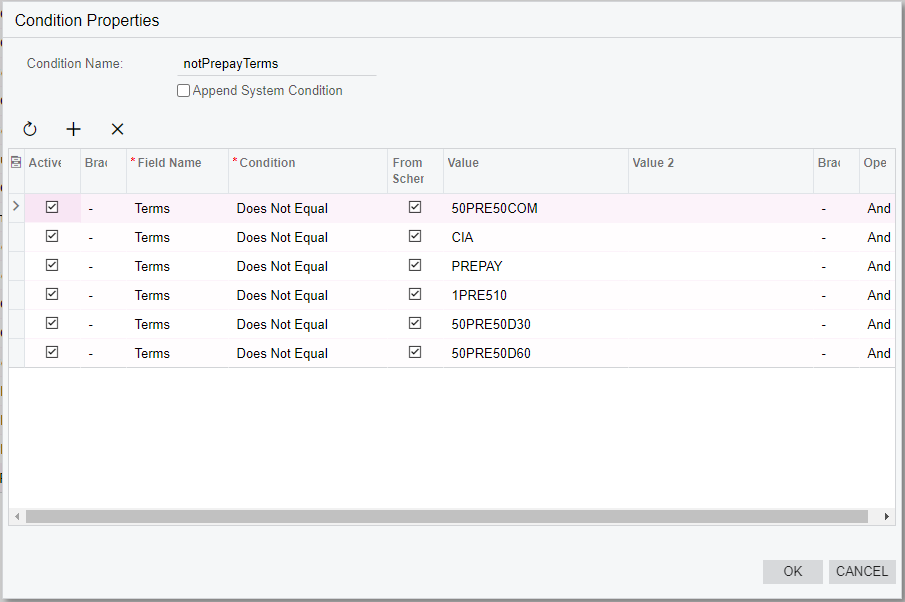
 

I then set the Hidden option for the action to the above condition 


However, the action is never not available. How do I get it so that the action is hidden whenever the terms are not any of the prepay options?

Best answer by darylbowman

Try changing all of the condition ANDs to ORs

As it is, all lines must be true, which is impossible.


Edit:

Sorry, these could all be true at the same time. The problem is that the field will be hidden if the resulting value is true, and I believe this is the inverse of what you’re hoping for.


Try changing all Conditions to ‘Equals’ and all Operators to ‘Or’.

This means that if any of the lines are true, the result will be true, and the field will be hidden in that case.


1 reply

darylbowman
Captain II
Forum|alt.badge.img+15
  • Answer
  • July 21, 2023

Try changing all of the condition ANDs to ORs

As it is, all lines must be true, which is impossible.


Edit:

Sorry, these could all be true at the same time. The problem is that the field will be hidden if the resulting value is true, and I believe this is the inverse of what you’re hoping for.


Try changing all Conditions to ‘Equals’ and all Operators to ‘Or’.

This means that if any of the lines are true, the result will be true, and the field will be hidden in that case.
