


Answer

Determine what has Changed on a SO

  • October 7, 2024
  • 1 reply
  • 51 views

cmoreland
Semi-Pro III
Forum|alt.badge.img

Happy Monday! 

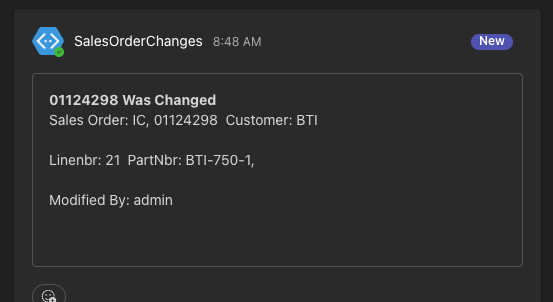
I have been spending some time with teams-based notifications, which has some incredible potential. I would love to be able to send a message when a SO line has been changed and what has changed. The use case would be if a Customer changed the QTY or we had to remove a line, it would be nice to keep everyone involved on the same page via teams. While I can notify when a line has changed (see image), I can’t really say what has changed. Is that possible? 


Best answer by craig2

Hi @cmoreland ,

I don’t have Teams Notifications set up, but the template looks about the same as Email.  I’ve got a decent number of similar scenarios running around, and I use the Datafield/Previous Datafield options for the specific fields I want to monitor changes for. 

Then, I’ll do something like:

“There have been critical changes to SO ((SOOrder.OrderNbr)) on Line ((SOLine.LineNbr)).  Please be advised.

Item:  ((SOLine.InventoryID))

Prev. Item: PREV((SOLine.InventoryID))

Qty.:

Prev. Qty:

Price:
Prev. Price:

Etc.

Prev. Etc.”


You may have to set up several Business Events to cover all the scenarios (like Line Delete vs. Modified).  Hopefully that at least gets you pointed in the right direction!

1 reply

craig2
Pro I
Forum|alt.badge.img+3
  • Pro I
  • Answer
  • October 7, 2024

Hi @cmoreland ,

I don’t have Teams Notifications set up, but the template looks about the same as Email.  I’ve got a decent number of similar scenarios running around, and I use the Datafield/Previous Datafield options for the specific fields I want to monitor changes for. 

Then, I’ll do something like:

“There have been critical changes to SO ((SOOrder.OrderNbr)) on Line ((SOLine.LineNbr)).  Please be advised.

Item:  ((SOLine.InventoryID))

Prev. Item: PREV((SOLine.InventoryID))

Qty.:

Prev. Qty:

Price:
Prev. Price:

Etc.

Prev. Etc.”


You may have to set up several Business Events to cover all the scenarios (like Line Delete vs. Modified).  Hopefully that at least gets you pointed in the right direction!


