Solved

DAC created from SQL view returns empty fields in GI

  • April 29, 2024
  • 4 replies
  • 123 views

Forum|alt.badge.img

We have a customization project that creates a SQL view, DAC, and GI 

But since upgrading from 2021 R2 to 2023 R2 the GI is empty but looking on the SQL server the fields are not empty.

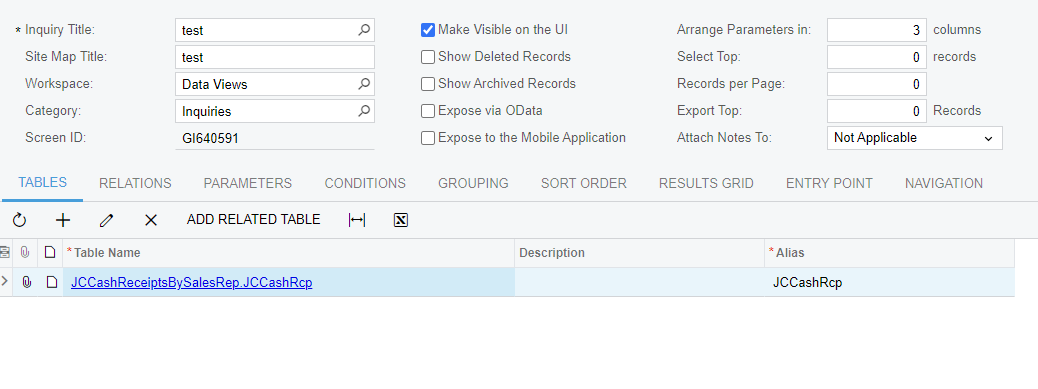
I’ve tried to recreate the DAC, GI, and View with no change. Attached are images for reference as well as the customization project.


Can anybody help shed some light as to why these are coming back empty?


Thanks,

Best answer by jcox43

Hi ​@jcox43 were you able to find a solution? Thank you!

Hi

Did you manage to resolve this?

Hey sorry for the late response on this, I had a few reports that I had this issue with during this time. 


Some of them I could explicitly define the field like:

“=CashRcptbySalesRep.aRInvoice_CuryOrigDocAmt]”


But some still did not work, it’s been a while but think I ended up using default tables to get the information I needed.

4 replies

  • Freshman I
  • October 20, 2024

Hi

Did you manage to resolve this?


Chris Hackett
Community Manager
Forum|alt.badge.img
  • Acumatica Community Manager
  • December 24, 2024

Hi ​@jcox43 were you able to find a solution? Thank you!


corey63
Freshman I
  • Freshman I
  • July 1, 2025

One possibility is that your DAC does not look to have any key’s defined.  (looked at your project file) -    You need to add the IsKey=true to the fields that are true keys (for both interger and string based keys) . 

This is the exact result I get if I don’t have any keys defined for some of my views. 


example:

    #region InventoryID
    [PXDBInt(IsKey=true)]
    [PXUIField(DisplayName = "Inventory ID")]
    public virtual int? InventoryID { get; set; }
    public abstract class inventoryID : PX.Data.BQL.BqlInt.Field<inventoryID> { }
    #endregion

    #region Upc_count
    [PXDBInt()]
    [PXUIField(DisplayName = "Upc_count")]
    public virtual int? Upc_count { get; set; }
    public abstract class upc_count : PX.Data.BQL.BqlInt.Field<upc_count> { }
    #endregion


Forum|alt.badge.img
  • Author
  • Freshman II
  • Answer
  • July 1, 2025

Hi ​@jcox43 were you able to find a solution? Thank you!

Hi

Did you manage to resolve this?

Hey sorry for the late response on this, I had a few reports that I had this issue with during this time. 


Some of them I could explicitly define the field like:

“=CashRcptbySalesRep.aRInvoice_CuryOrigDocAmt]”


But some still did not work, it’s been a while but think I ended up using default tables to get the information I needed.


corey63
Freshman I
  • Freshman I
  • July 1, 2025

I also FORGOT to mention the view has to have COMPANYID column to work correctly (Which yours had) for others playing along at home.   Also don’t filter or filter where companyid > 0 the avoid snapshots.