Answer

Customer Portal Default Checkbox

  • May 28, 2024
  • 3 replies
  • 106 views

Hi 

We have just started using the customer portal for customers to use the portal for ordering. In the catalogue we have a checkbox for “Show Available Items Only”. By default this box in unticked, hoping there is an easy way to change this default to ticked instead. 

Have tried adding a field in the customization screen for that screen 70.00.00 and selecting “Required” as “True” as I think I found in another discussion 

 

but when when i try to publish it says below. is there an easy/easier way to do this ?

  

Best answer by DipakNilkanth

Hi @MattH ,

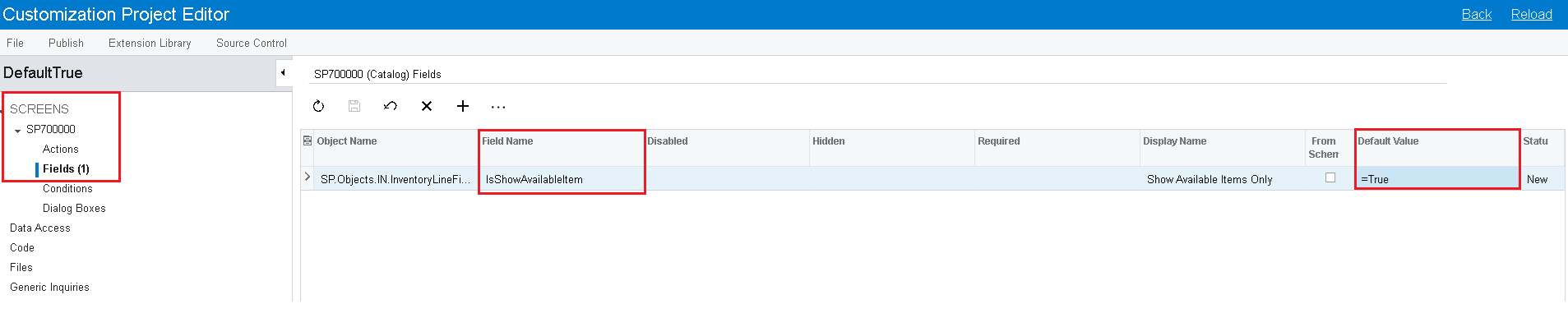
You just need to declare =True in the default value as per below screenshot, It will defaulted  “Show Available Items Only” to the True value.(selected).

Attached is the Customization Package.


Hope, it helps!

3 replies

DavidEichner
Captain II
Forum|alt.badge.img+13

Hi @MattH 

This would require a customization in which the PXDefault value is defined.  Check with your partner to see if they have developers on staff.  If not, you could reach out to Acumatica to get a quote for the customization.  

Best,

David


DipakNilkanth
Pro III
Forum|alt.badge.img+13

Hi @MattH ,

You just need to declare =True in the default value as per below screenshot, It will defaulted  “Show Available Items Only” to the True value.(selected).

Attached is the Customization Package.


Hope, it helps!


Naveen Boga
Captain II
Forum|alt.badge.img+19
  • Captain II
  • July 9, 2024

@MattH  The issue might related to other code. Can we get your customization package here to check, if possible ?