


Question

Business Event Not Triggering as Expected When Using CustomerID as Condition (24R1)

  • August 3, 2025
  • 4 replies
  • 80 views

variuxDavidE
Varsity I
Forum|alt.badge.img

Hi everyone,

I’m trying to create a business event to trigger a branch-specific email invoice template from the Invoices and Memos screen (AR.30.10.00). Since Branch is not available as a condition on the Business Event screen, I attempted to use CustomerID as a workaround—our customer IDs are prefixed by branch, so it seemed like a logical substitute.

However, it appears that the Business Event is evaluating the CustomerID field as the database row ID rather than the actual Customer CD (e.g., D1001). Because of this, conditions like CustomerID CONTAINS 'D' fail to trigger correctly.
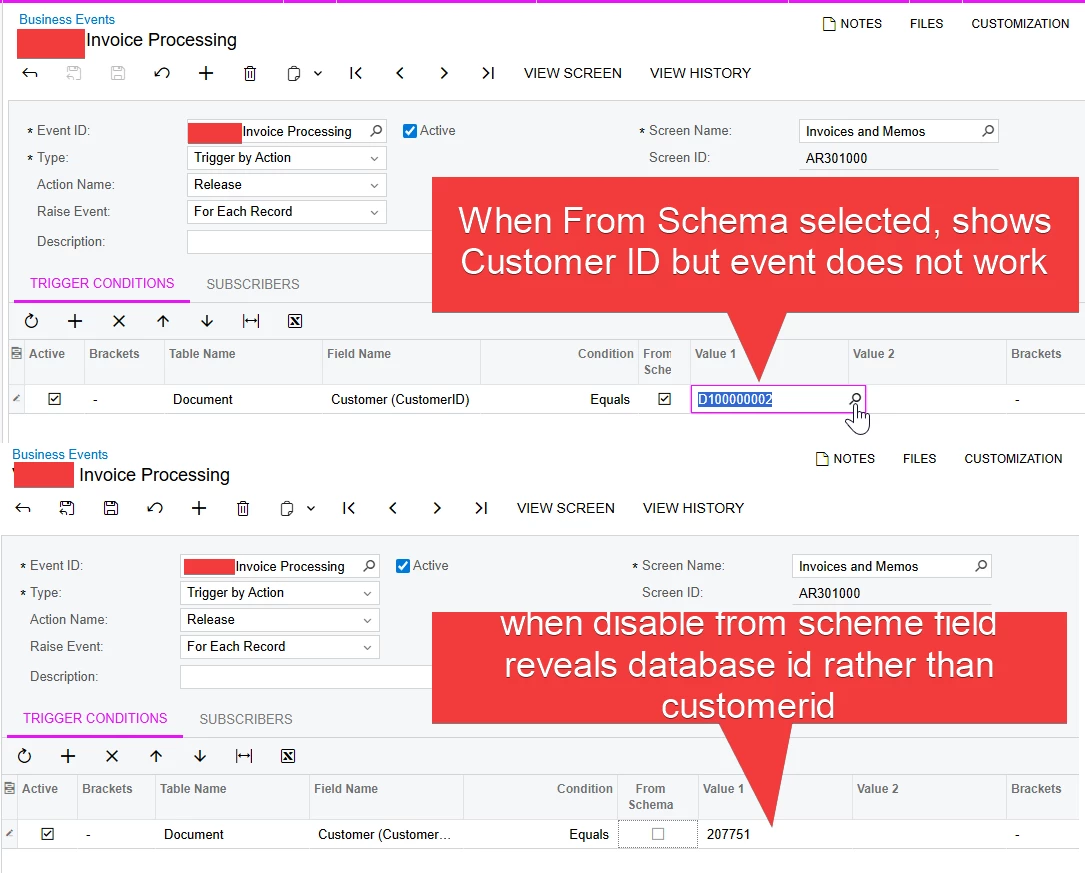
I confirmed that using RefNbr as a condition works as expected, which leads me to believe this is a limitation with how the Business Event engine handles keys versus user-facing fields.

Has anyone else experienced this behavior in 24R1?
Any workarounds other than changing to branch-specific invoice numbering?

Thanks in advance!

4 replies

Forum|alt.badge.img
  • Acumatica Employee
  • August 4, 2025

Hi ​@variuxDavidE How about creating a GI with simple conditions like below (either using the contains or using the branch) and tied the Business Event to it and trigger on Record inserted


variuxDavidE
Varsity I
Forum|alt.badge.img
  • Author
  • Varsity I
  • August 4, 2025

@OlaAyanlaja62 I tried that, but I think my skills in making a Business Event work from a GI still needs some practice. I was able to get the business event to recognize the new record being added to the GI, but it would not actually trigger the email. 

For now I was able to work around the issue by updating the sequence numbers for the branches. I will give your solution more effort and report back. 


Chris Hackett
Community Manager
Forum|alt.badge.img
  • Acumatica Community Manager
  • September 25, 2025

Hi ​@variuxDavidE were you able to find a solution? Thank you!


variuxDavidE
Varsity I
Forum|alt.badge.img
  • Author
  • Varsity I
  • September 25, 2025

Hi ​@variuxDavidE were you able to find a solution? Thank you!

No, Acumatica support acknowledged the issue but said that they do not consider it a bug. This screen uses the entity id which is an integer, not the actual AccountCD.

