Answer

Auto update of Sales Order line discount through business event when order total hits the specified amount.

  • January 22, 2025
  • 6 replies
  • 118 views

Forum|alt.badge.img

Hi Experts, i need to create business event to trigger sales order and update line level discount when order total hits specified amount.

So is there any idea for this scenario. Any input would be much appreciated. Thank you. 

Best answer by DrewNisley
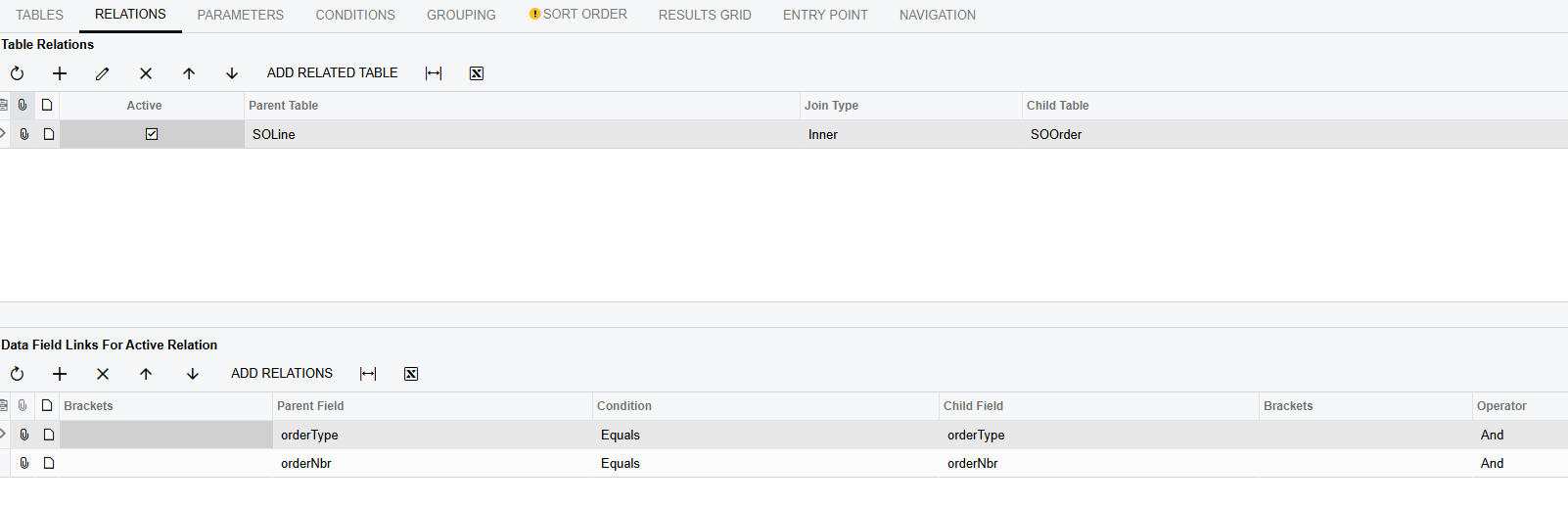
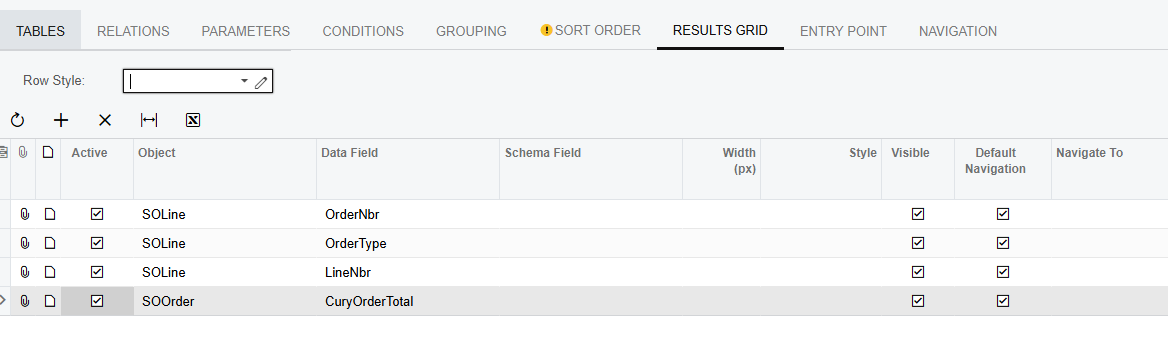
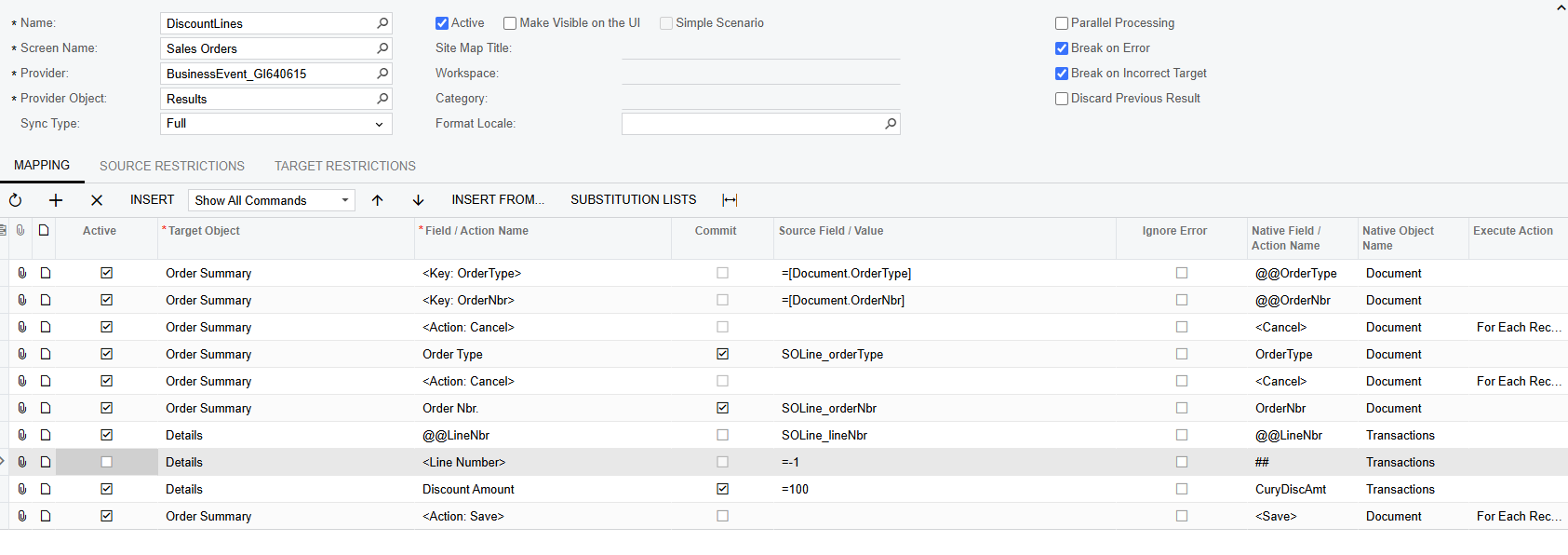
@aiwan had the business event part right, but to have it properly fire the import scenario, you should create a new GI with the SOLine and SOOrder tables on it. Then create your business event off of that GI and create the following import scenario. I’ve tested it and it seems to work well for me.


6 replies

Forum|alt.badge.img+8
  • Captain II
  • January 22, 2025

Hi ​@vishalsharma49 


This could be done with an import scenario and business event, however, I think a code customisation would perform better.

A FieldUpdated handler could be used similar to this:

protected virtual void _(Events.FieldUpdated<SOOrder, SOOrder.orderTotal> e, PXFieldUpdated b)
{
b?.Invoke(e.Cache, e.Args);

SOOrder row = e.Row;
if (row == null) return;

SOLine line = SelectFrom<SOLine>.
Where<SOLine.orderType.IsEqual<P.AsString>.
And<SOLine.orderNbr.IsEqual<P.AsString>>>.View.Select(Base, row.OrderType, row.OrderNbr);
if(line == null) return;

if (row.OrderTotal > someNumber)
{
line.CuryDiscAmt = someDiscountNumber;
line.DiscPct = someDiscountPercentage;

}
}

Fill in the someNumber, someDiscountNumber/Percentage with actual figures rather than the phrases.

Hope this helps,

Aleks


Forum|alt.badge.img
  • Author
  • Freshman I
  • January 22, 2025

Hi ​@vishalsharma49 


This could be done with an import scenario and business event, however, I think a code customisation would perform better.

A FieldUpdated handler could be used similar to this:

protected virtual void _(Events.FieldUpdated<SOOrder, SOOrder.orderTotal> e, PXFieldUpdated b)
{
b?.Invoke(e.Cache, e.Args);

SOOrder row = e.Row;
if (row == null) return;

SOLine line = SelectFrom<SOLine>.
Where<SOLine.orderType.IsEqual<P.AsString>.
And<SOLine.orderNbr.IsEqual<P.AsString>>>.View.Select(Base, row.OrderType, row.OrderNbr);
if(line == null) return;

if (row.OrderTotal > someNumber)
{
line.CuryDiscAmt = someDiscountNumber;
line.DiscPct = someDiscountPercentage;

}
}

Fill in the someNumber, someDiscountNumber/Percentage with actual figures rather than the phrases.

Hope this helps,

Aleks

Thanks Aleks i appreciate your reply but i was looking through business event to trigger this condition.


Forum|alt.badge.img+8
  • Captain II
  • January 24, 2025

@vishalsharma49 


Personally, I haven’t been able to configure an import scenario to run from a business event, they can be quite finnicky, hence the code version.

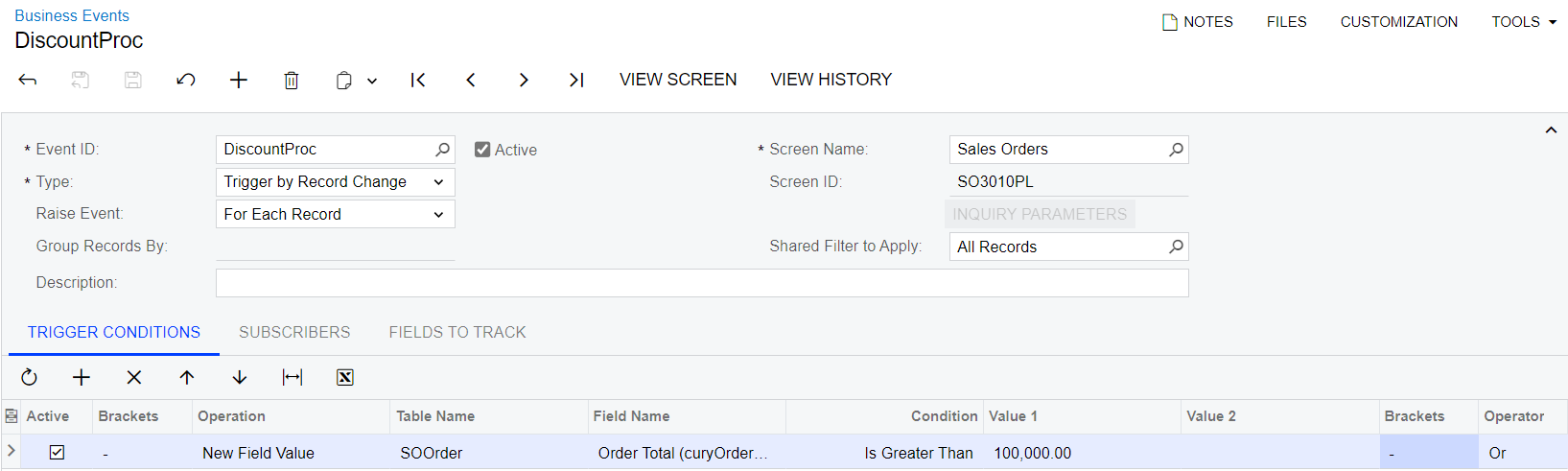
You would want to configure the business event to run similar to this:

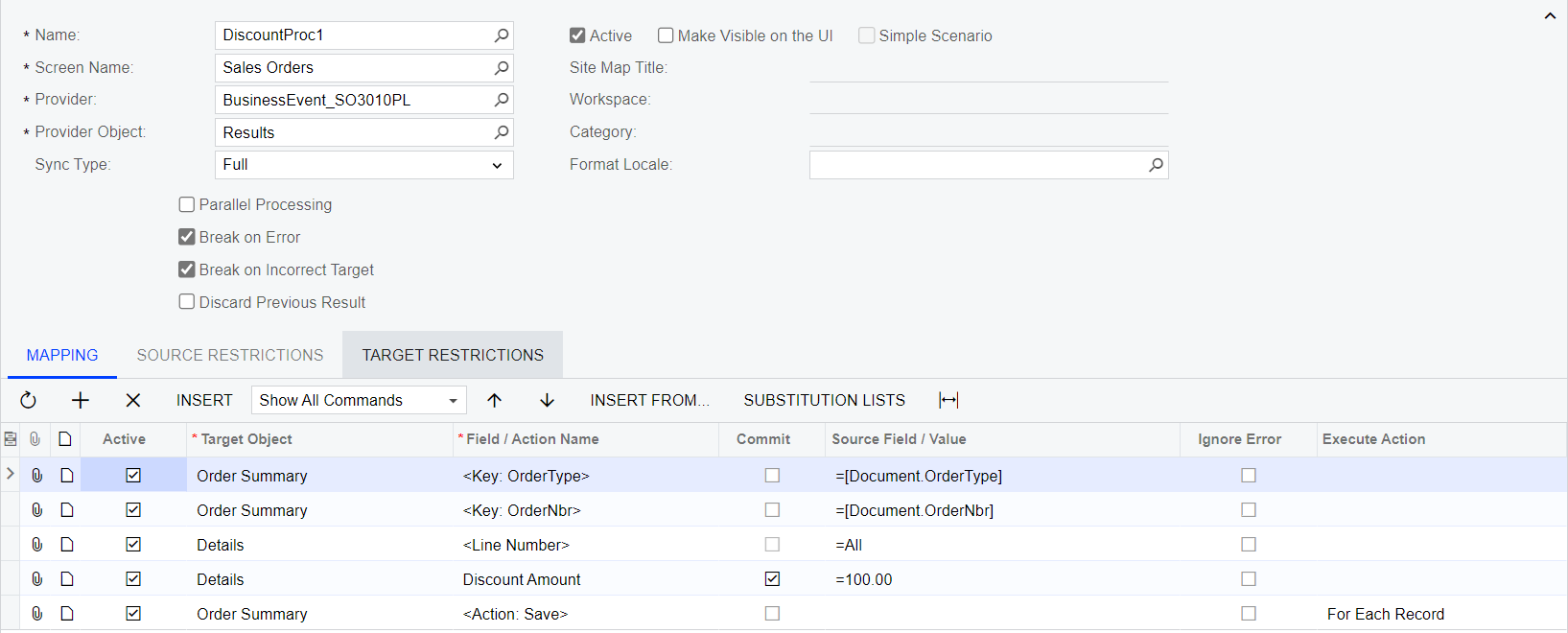
Are you familiar with import scenarios, if not, it would look something like this:

But unfortunately, the business event fires but the import scenario does not:


DrewNisley
Pro I
Forum|alt.badge.img+3
  • Pro I
  • Answer
  • January 24, 2025

@aiwan had the business event part right, but to have it properly fire the import scenario, you should create a new GI with the SOLine and SOOrder tables on it. Then create your business event off of that GI and create the following import scenario. I’ve tested it and it seems to work well for me.


Forum|alt.badge.img+8
  • Captain II
  • January 27, 2025

Thanks for that ​@DrewNisley!


Forum|alt.badge.img
  • Author
  • Freshman I
  • January 27, 2025

Thanks ​@DrewNisley and ​@aiwan for your solutions.