Solved

Adding standard value for requested Date in sales order

  • July 15, 2025
  • 11 replies
  • 127 views

Bravo94
Freshman I
Forum|alt.badge.img

Hello guys,


im trying to achieve to set an standard value for the date field "requested on" in the sales orders. I executed it as follows:
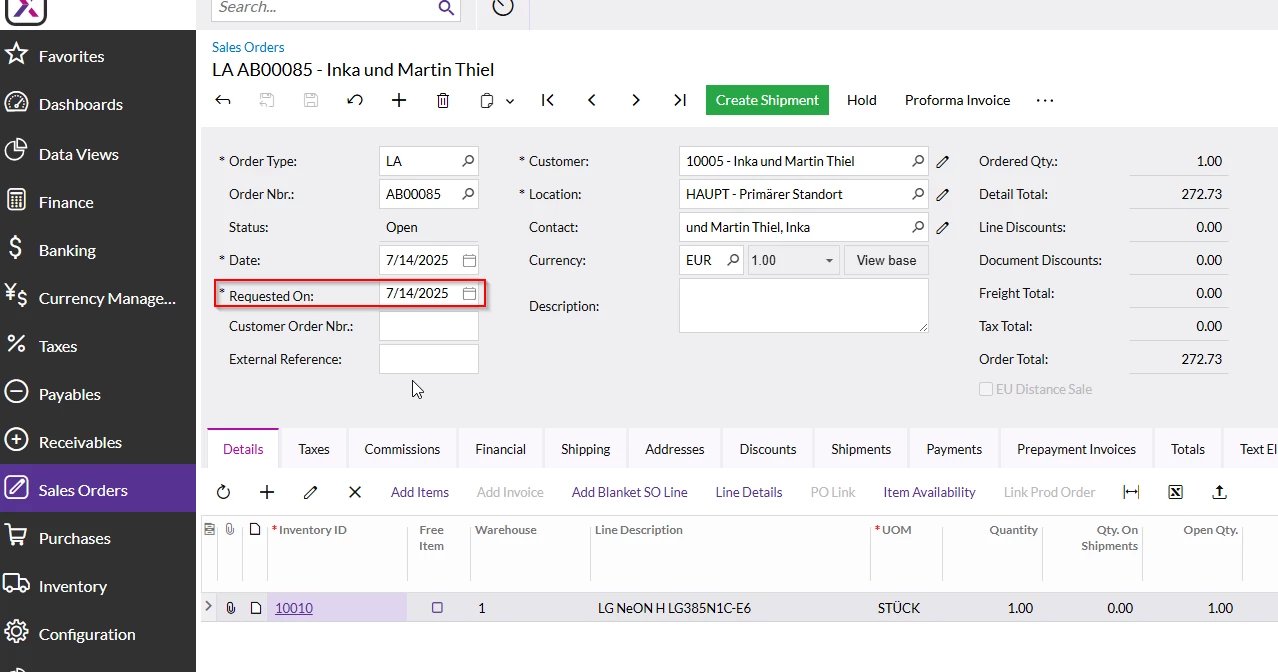
 

  1.  Adding the field to the screen, trying to set standard values (different formats like 09.09.9999, 09/09/9999 or 9999-09-09…) -> didnt work out
    1. Editing the DAC (i tried to fill in code that chatGPT gave me, didnt work out)


namespace PX.Objects.SO

{

      [PXNonInstantiatedExtension]

  public class SO_SOOrder_ExistingColumn : PXCacheExtension<PX.Objects.SO.SOOrder>

  {

      #region RequestDate  

        [PXMergeAttributes(Method = MergeMethod.Append)]


      public DateTime? RequestDate { get; set; }

      #endregion

  }

}


Can you help me here, please? Thanks in advance!

Best answer by DipakNilkanth

Hi ​@Bravo94,

You just need to add an else condition for the other data types as well, and assign the current date to the RequestDate field.

Code Snippet :

protected virtual void SOOrder_RowInserted(PXCache sender, PXRowInsertedEventArgs e)
{
SOOrder row = e.Row as SOOrder;
if (row == null) return;

if (row.OrderType == "SO")
{
row.RequestDate = new DateTime(9999, 9, 9); // Future default for "SO"
}
else
{
row.RequestDate = Base.Accessinfo.BusinessDate; // Default to business date for other types
}
}

Note: The above code works only when inserting records. If you need the Request Date to be conditionally updated based on the selection of Order Type, you will need to write code in the FieldUpdated event of the Order Type field.

Hope, it helps!

11 replies

dcomerford
Captain II
Forum|alt.badge.img+15
  • Captain II
  • July 15, 2025

@Bravo94 What are you trying to set the Date to be ?


FinnSystemAG
Freshman II
Forum|alt.badge.img
  • Freshman II
  • July 15, 2025

@Bravo94 What are you trying to set the Date to be ?


Hello,

i’m a colleague of bravo94. We want to set it to 09.09.9999. Reason is, that the customer wants it to be mandatory for the user to set an rquest date, and some kind of blockade if the user forgots, before he creates an delivery note. An request date in the future does exactly that, when you try to create an outgoing delivery note, it throws an error.


DipakNilkanth
Pro III
Forum|alt.badge.img+13

Hi ​@Bravo94,
 

  1. Open the Customization Editor.

  2. Navigate to the DAC where the RequestDate field is declared.

  3. Locate the [PXDefault] attribute on the RequestDate field and replace:

    [PXDefault(typeof(AccessInfo.businessDate))]

    with:

    [PXDefault(typeof(RequestDateDefault))]

  4. Declare the default value constant class in your DAC file:

    public class RequestDateDefault : PX.Data.BQL.BqlDateTime.Constant<RequestDateDefault> { public RequestDateDefault() : base(new DateTime(9999, 09, 09)) { } }

  5. Ensure the merge method is set to replace the existing attributes:

    [PXMergeAttributes(Method = MergeMethod.Replace)] 
     

  6. Publish the Customization project.

Below is the whole code snippet.

     [PXNonInstantiatedExtension]
public class SO_SOOrder_ExistingColumn : PXCacheExtension<PX.Objects.SO.SOOrder>
{
#region RequestDate
[PXMergeAttributes(Method = MergeMethod.Replace)]
[PXDBDate()]
[PXDefault(typeof(RequestDateDefault))]
[PXUIField(DisplayName = "Requested On", Visibility = PXUIVisibility.SelectorVisible)]
public DateTime? RequestDate { get; set; }
#endregion

public class RequestDateDefault : PX.Data.BQL.BqlDateTime.Constant<RequestDateDefault>
{
public RequestDateDefault() : base(new DateTime(9999, 09, 09)) { }
}
}

Hope it helps!


Forum|alt.badge.img+2

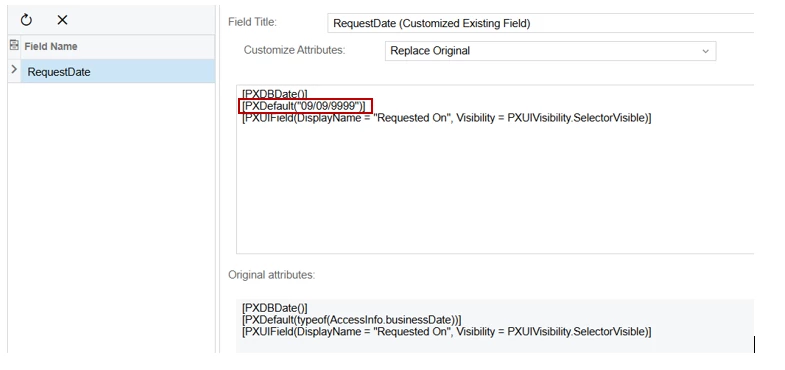
Hi ​@Bravo94, You can also try through Customization Attribute Option:


Just replace 

[PXDefault(typeof(AccessInfo.businessDate))]

with

[PXDefault("09/09/9999")]

and Publish Project.


I hope it Helps!


FinnSystemAG
Freshman II
Forum|alt.badge.img
  • Freshman II
  • July 16, 2025

Hi ​@Bravo94, You can also try through Customization Attribute Option:


Just replace 

[PXDefault(typeof(AccessInfo.businessDate))]

with

[PXDefault("09/09/9999")]

and Publish Project.


I hope it Helps!

Thank your very much! Worked out just fine.


Bravo94
Freshman I
Forum|alt.badge.img
  • Author
  • Freshman I
  • July 17, 2025

Hi ​@Bravo94, You can also try through Customization Attribute Option:


Just replace 

[PXDefault(typeof(AccessInfo.businessDate))]

with

[PXDefault("09/09/9999")]

and Publish Project.


I hope it Helps!

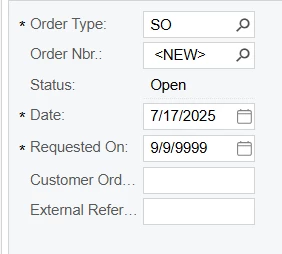
I have a customer who wants the "Requested On" field to only have this value if the Order Type is "SO".

I tried this here, but it did not work :


namespace PX.Objects.SO
{
public class SOOrderExtensions : PXCacheExtension<SOOrder>
{
#region RequestDate
[PXDBDate()]
[PXUIField(DisplayName = "Request Date", Visibility = PXUIVisibility.SelectorVisible)]
public DateTime? RequestDate { get; set; }
#endregion

// Field Defaulting Event-Handler for RequestDate
protected void _(Events.FieldDefaulting<SOOrder.requestDate> e)
{
var row = (SOOrder)e.Row;
if (row == null) return;

// Check if OrderType is "SO" (Sales Order)
if (row.OrderType == "SO")
{
e.NewValue = new DateTime(9999, 9, 9); // Set default value
}
}
}
}

Forum|alt.badge.img+2

Hello, ​@Bravo94 I tried with RowInserted and It worked for me.
You can use following in SOOrderEntry Graph:
 

        [PXDBDate()]
[PXUIField(DisplayName = "Request Date", Visibility = PXUIVisibility.SelectorVisible)]
public DateTime? RequestDate { get; set; }
#endregion

protected virtual void SOOrder_RowInserted(PXCache sender, PXRowInsertedEventArgs e)
{
SOOrder row = e.Row as SOOrder;
if (row == null) return;

if (row.OrderType == "SO")
{
row.RequestDate = new DateTime(9999, 9, 9);
}
}


I hope it helps!


Bravo94
Freshman I
Forum|alt.badge.img
  • Author
  • Freshman I
  • July 18, 2025

@Abhishek Niikam 

right now i used this in SOOrder Extensions :


namespace PX.Objects.SO
{
      [PXNonInstantiatedExtension]
  public class SO_SOOrder_ExistingColumn : PXCacheExtension<PX.Objects.SO.SOOrder>
  {
      #region RequestDate  
      [PXDBDate()]
    [PXUIField(DisplayName = "Requested On", Visibility = PXUIVisibility.SelectorVisible)]
      public DateTime? RequestDate { get; set; }
      #endregion
  }
}


and this in SOOrderEntry :

namespace PX.Objects.SO
{
    public class SOOrderEntry_Extension : PXGraphExtension<PX.Objects.SO.SOOrderEntry>
    {
        #region Event Handlers

        // RowInserted Event for SOOrder
        protected virtual void SOOrder_RowInserted(PXCache sender, PXRowInsertedEventArgs e)
        {
            SOOrder row = e.Row as SOOrder;
            if (row == null) return;

            // Check if OrderType is "SO"
            if (row.OrderType == "SO")
            {
                row.RequestDate = new DateTime(9999, 9, 9); // Set default value for RequestDate
            }
        }

        #endregion
    }
}


And it works, thanks to you so far.
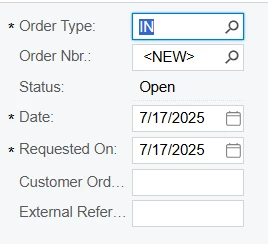
The only issue is that when I switch the Order type, the field “Requested on” is empty. Previously, it used to automatically display the current date."


DipakNilkanth
Pro III
Forum|alt.badge.img+13
  • Pro III
  • Answer
  • July 18, 2025

Hi ​@Bravo94,

You just need to add an else condition for the other data types as well, and assign the current date to the RequestDate field.

Code Snippet :

protected virtual void SOOrder_RowInserted(PXCache sender, PXRowInsertedEventArgs e)
{
SOOrder row = e.Row as SOOrder;
if (row == null) return;

if (row.OrderType == "SO")
{
row.RequestDate = new DateTime(9999, 9, 9); // Future default for "SO"
}
else
{
row.RequestDate = Base.Accessinfo.BusinessDate; // Default to business date for other types
}
}

Note: The above code works only when inserting records. If you need the Request Date to be conditionally updated based on the selection of Order Type, you will need to write code in the FieldUpdated event of the Order Type field.

Hope, it helps!


Forum|alt.badge.img+2

Hello, ​@Bravo94 You can try ​@Nilkanth Dipak snippet or if you still have that previous customization in editor for Request On field i.e.

 [PXDefault("09/09/9999")

Just remove that from customization editor and publish project again.


Bravo94
Freshman I
Forum|alt.badge.img
  • Author
  • Freshman I
  • July 18, 2025

Thank you very much