Question

Access to Modern UI Screen Configuration

  • October 28, 2025
  • 5 replies
  • 67 views

sroberts29
Freshman II
Forum|alt.badge.img+1

How do we give access to the Screen Configuration for a user without granting ‘Administrator’ role?

5 replies

cramesh00
Freshman II
Forum|alt.badge.img
  • Freshman II
  • October 28, 2025

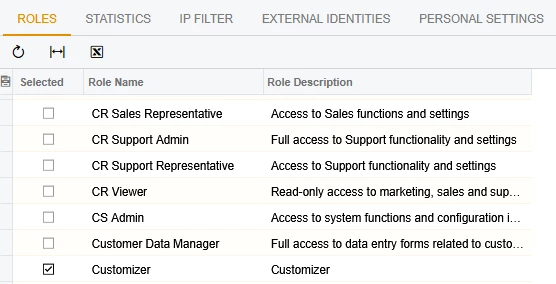
I believe if you select Customizer in the Roles section on the Users screen for that particular user. This should give them access to some configuration capabilities.


  • Freshman II
  • October 28, 2025

I put a case into support with this question as was told that only users with Admin and Customizer roles can access screen configuration. This applies to screen config that edits the UI for all users, they can still edit their “view” but it’s only visible to that user.

This is what I received from Support. If you look at the documentation it does say they must have Admin and Customizer:

Access Rights to the Screen Configurations Page

By default, users with the Administrator or AcumaticaSupport roles can access the Screen Configurations (AU230010) page. However, you’ll also need to have the Customizer role since this role is required to access the Customization Project Editor.

https://acumatica-builds.s3.amazonaws.com/builds/25.2/ReleaseNotes/AcumaticaERP_2025R2_ReleaseNotes.pdf

That excerpt was pulled from page 323 of the Initial Release Notes for version 2025 R2.

The section is entitled Customization: Including Your Screen Personalizations in Customization Projects and it starts on page 320.

Initial release notes can be found in the Product section of the Community website.

https://community.acumatica.com/supported-releases-67/acumatica-2025-r2-downloads-and-release-notes-32455


sroberts29
Freshman II
Forum|alt.badge.img+1
  • Author
  • Freshman II
  • October 28, 2025

This is what I’m finding. Customizer gives some permissions, but only Administrator can ‘share’ configuration. 

This is not optimal since we need to allow screen configuration - for example for a Projects Admin user - without allowing access to financial data.
I suppose I could try copying the Administrator role and strip the financial modules.


  • Freshman II
  • October 28, 2025

This is what I’m finding. Customizer gives some permissions, but only Administrator can ‘share’ configuration. 

This is not optimal since we need to allow screen configuration - for example for a Projects Admin user - without allowing access to financial data.
I suppose I could try copying the Administrator role and strip the financial modules.

I did try this as well. Copied Admin and took away the permissions the user did not need, and it did not work. This is what prompted us to submit the case to Support. 
If you find otherwise, please let us know! We are hoping to find a work around as well. 


Chris Hackett
Community Manager
Forum|alt.badge.img
  • Acumatica Community Manager
  • November 6, 2025

Hi ​@sroberts29 were you able to find a solution? Thank you!