Using Business Events to Email Pending Approval Reminders

  • August 15, 2025
  • 8 replies
  • 365 views

Since we started using them, Business Events have played a large role in the administrative side of our company.  Sending out late approval reminders, automating import scenarios to help with security, and notifications going out to inform employees of data integrity errors are a few of the use cases that we have found for business events. I wanted to share how I created one of our most used Business Events.


Our most common use for Business Events is ‘Late Approval Reminders’.  Previously, we started running into issues where approvals during the purchasing processes weren’t getting done in a timely manner, which was slowing everything down. The Purchasing team didn’t have the bandwidth to keep an eye on what was still pending approval, then trying to hunt the employee down to get the approval completed, before often learning the employee is out of office and that the item needed to be rerouted for approval again.

To sum up the lengthy tutorial, a generic inquiry is created to show any Purchase order that has been pending approval since the previous day. The Business Event schedule triggers during business days to send out notifications to the approvers and their supervisors reminding them to do the approval.


Creating a Business Event for Late Approval Reminders starts with a Generic Inquiry first.  In the example below I have a GI made for Late Purchase Order Approval reminders.


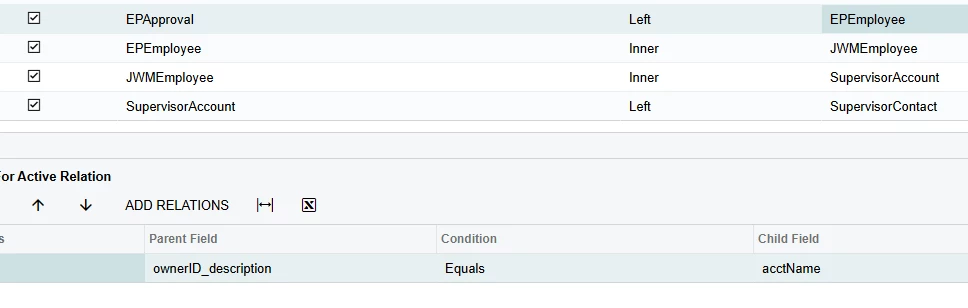
Creating this notification we wanted the email to route to the Owner of the PO, the approver who is getting the reminder, and the approver’s supervisor.  This required the following tables.

I know I left out the Relationships between the tables. Let me know if you have any questions on joining them.


For the Conditions, I wanted this GI to look at the following criteria

  • The Purchase Order needs to be Pending Approval
  • Only show the name of approvers who have not approved (Still in pending status)
  • The PO was routed for approval during the previous day (This is what we defined as being late on an approval)

 

In the results grid, the following fields were added:

  • PO Order Number,
  • Order Description
  • Name and Employee ID of the Owner
  • Name and Employee ID the late approver
  • Email address of the approver’s supervisor

Other fields could be added if you want to include further information or email anyone else.
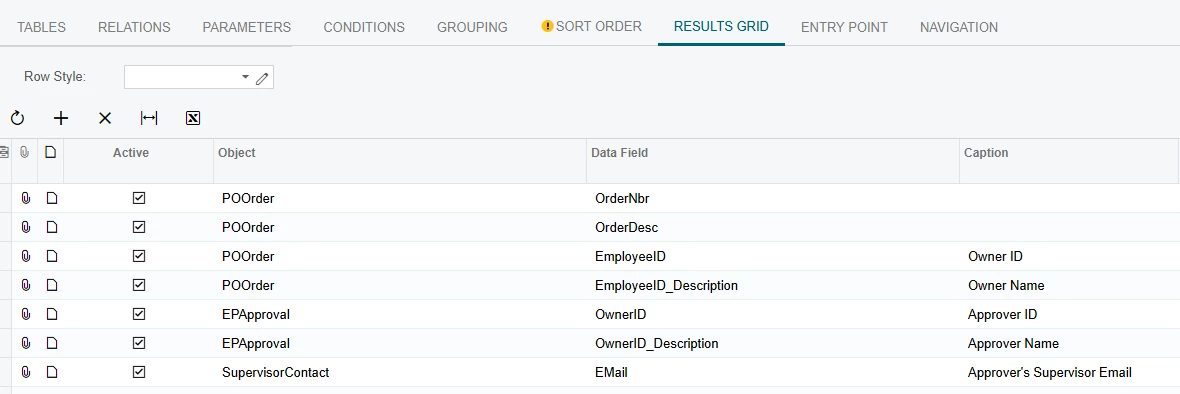
 

With that the GI is done.

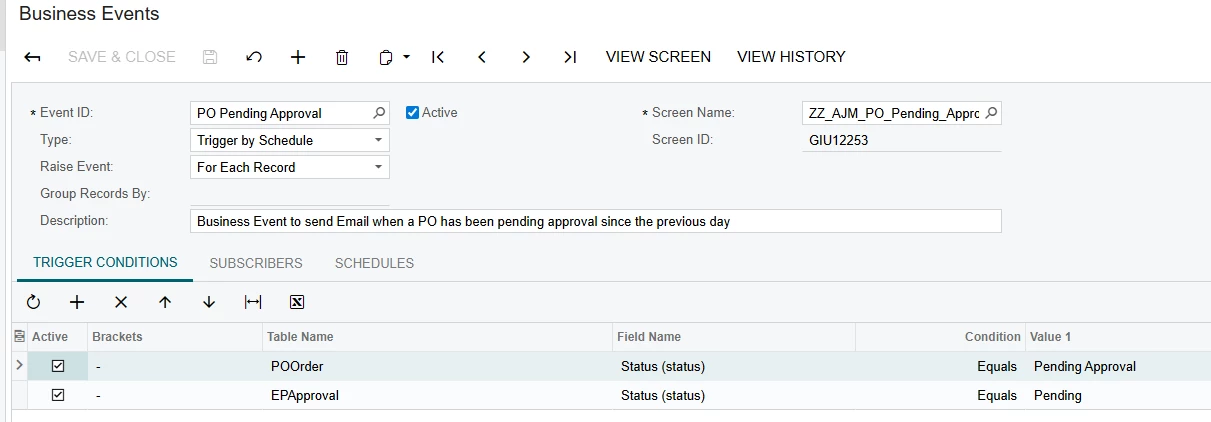
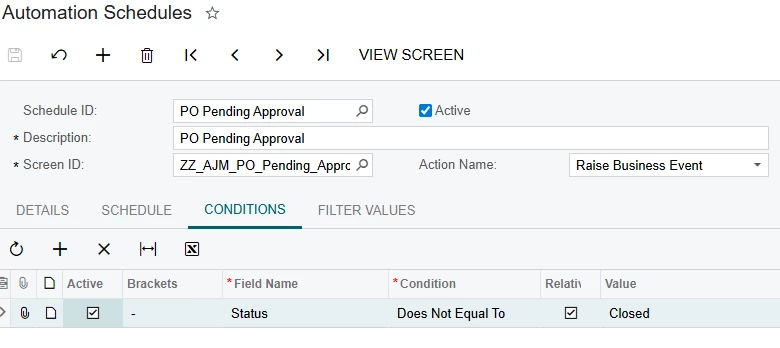
Creating The business event, we chose to run it off of a schedule, and have the Trigger Conditions be similar to the Conditions on the GI.


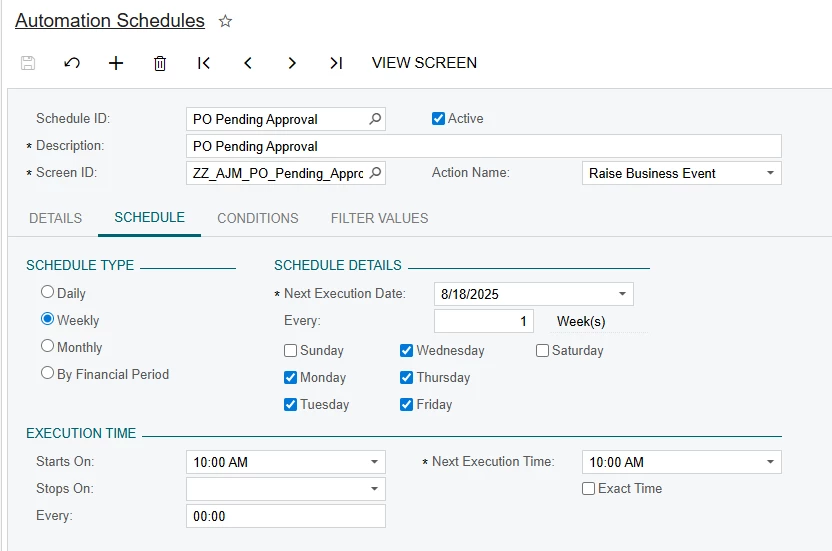
For the schedule, we decided that 10:00 AM was when approvals from the previous day were now considered late. For Schedule type I chose Weekly, as you can customize what days of the week you want the notifications to send, and I didn’t want people being told they were late over the weekend.


The Condition I set is included within both the condition for the Generic Inquiry, and the Business Event. I didn’t want anything excluded by this so I left it simple.
 

Finally is the notification itself. 
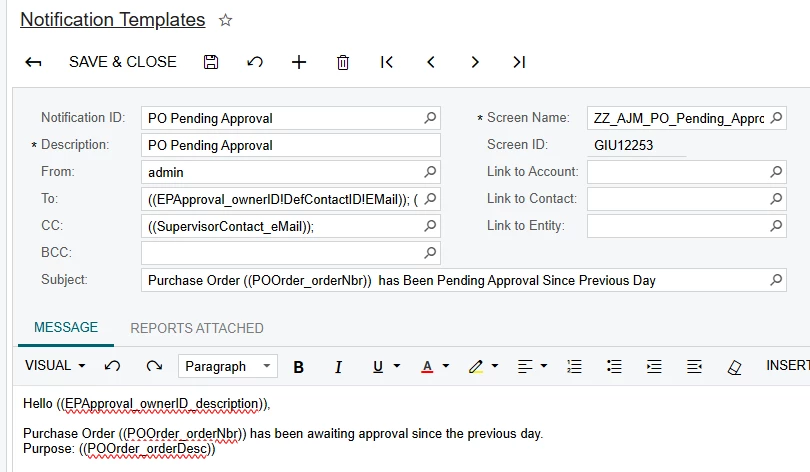


In the ‘To’ field we have the Approver who is being reminded to do the approval, and you can’t see it, but the Owner on the PO is included as well. The Approver’s supervisor is CC’d below, as we want someone to see this email if the employee is out of office.

This is a pretty simple notification, just mentioning what the PO number is, and a brief description.

8 replies

whecht
Freshman I
  • Freshman I
  • August 15, 2025

This is a great example of automating this kind of thing!

I’ve done similar set-ups as this to catch AP/AR Documents that still have remaining balances after payments have been issued/received!


satkins
Jr Varsity III
Forum|alt.badge.img
  • Jr Varsity III
  • August 22, 2025

I must say, Business Events can definitely help with automating processes and cutting down manual work. Very Good!


  • Freshman I
  • March 31, 2026

Hello ​@AMcCallon, could you show how you joined the EPApproval and EPEmployee tables? 


  • Author
  • Freshman I
  • March 31, 2026

Hello ​@AMcCallon, could you show how you joined the EPApproval and EPEmployee tables? 

I joined on ownerID_Description = acctName as shown below.  You may be able to do ownerID=acctCD but we have a data error on employee ID that makes joining on acctCD not work.


  • Freshman I
  • March 31, 2026

Hello ​@AMcCallon, could you show how you joined the EPApproval and EPEmployee tables? 

I joined on ownerID_Description = acctName as shown below.  You may be able to do ownerID=acctCD but we have a data error on employee ID that makes joining on acctCD not work.


Thanks! ownerID=acctCD was not working for me, but ownerID_Description=acctName just worked. 


kvinson
Freshman I
Forum|alt.badge.img
  • Freshman I
  • May 21, 2026

So if I’m understanding correctly, a good functioning business event requires 4 steps:

  1. Generic Inquiry
  2. Business Event
  3. Automation Schedule
  4. Notification Template

Does the generic inquiry need to be created specifically or is it possible to piggyback off an existing one? We’re wanting to trigger notifications based off an attribute field (a date) on the vendor list. I’m wondering if I need to make a generic inquiry to show just a few specific columns or if we can just use the main list.


  • Author
  • Freshman I
  • May 21, 2026

So if I’m understanding correctly, a good functioning business event requires 4 steps:

  1. Generic Inquiry
  2. Business Event
  3. Automation Schedule
  4. Notification Template

Does the generic inquiry need to be created specifically or is it possible to piggyback off an existing one? We’re wanting to trigger notifications based off an attribute field (a date) on the vendor list. I’m wondering if I need to make a generic inquiry to show just a few specific columns or if we can just use the main list.


You can either create a new generic inquiry or use an existing one, and I usually make that decision based on what fields are already available in that query, and what the query is supposed to be doing. I tend to make new ones that limit visibility if I am doing a business event that triggers on a schedule. To me, generic inquiries allow for greater control over what data is returned, and by extension send out through the business event.  


To use a similar example, I had a business event that is supposed to trigger on an attribute field (date) on the vendor list 30 days before the date and on the date itself (This was two different business events and I made 2 separate but similar inquiries)

For those I found it easier to create a new generic inquiry. The only fields I brought in were:

  • Vendor ID
  • Vendor Name
  • The attribute date

I sent the conditions for the GI (For the 30 days out) to look like this:


Now, my business event will only show vendors when we are 30 days out from the date in the attribute.


The business event is then configured to trigger by a schedule. If the generic inquiry returns a result, it will send according to the schedule. If the generic inquiry is blank that day then nothing sends.


On the other hand, I have a business event that sends information on our opportunities if specific fields change. Since we already had a generic inquiry that shows all relevant data on the opportunities, I was able to use that one.


kvinson
Freshman I
Forum|alt.badge.img
  • Freshman I
  • May 21, 2026

Thanks, that helps a lot!