
Using Attributes to customize reports

  • January 26, 2026
  • 4 replies
  • 41 views

kvinson
Freshman I
Forum|alt.badge.img

Our company is working on internal controls and streamlining some processes and one of the ones that came up was a vendor-monitoring system to track contract renewal dates, department which uses the vendor, ownership of the account, etc. At first, leadership wanted to make a listing in Sharepoint that would have required a lot maintenance, not to mention it would have been double-entry since we already maintain a vendor list within Jamis. So we convinced them we could customize the vendor list in Jamis by adding the required user-defined fields under Attributes. The best part is each attribute can be customized - some as text fields, a calendar, a list to select from, even a list with multiple selections. Then all that was needed was to add the fields to the Vendor Inquiry, and we have the resource the executives needed without having to maintain two lists in separate places.
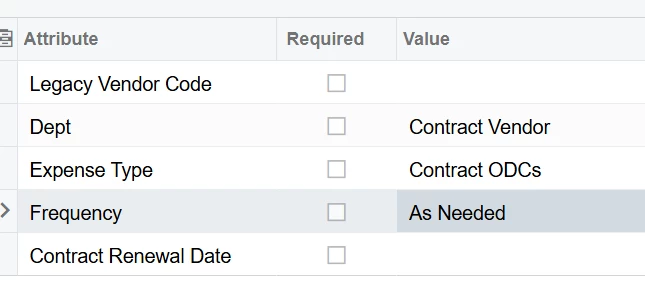
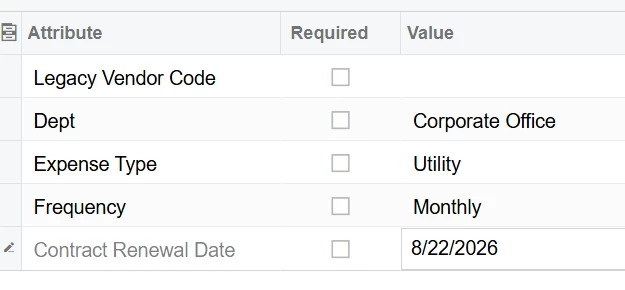


Other examples we have used this for are to track Revenue by State under the Job lists. (We used to manually type the state abbreviations but that left too much room for human error so we are in the process of converting to a combo list.) And we are exploring adding attributes to the Employee setup to help sort various reports by Contract.

Are you using custom attributes? What are some examples where you have found them especially helpful.



4 replies

  • Freshman I
  • January 26, 2026

We use custom attributes in several screens, most recently I created a custom GI that feeds a dashboard tile and a business event for COI notifications. 


nhatnghetinh
Captain II
Forum|alt.badge.img+13
  • Captain II
  • January 27, 2026

Hi ​@kvinson 

One of Acumatica's greatest features is Attributes. After creating Attributes, the system will create DACs and data fields in SQL so we can create reports to get data.


Best Regards,

NNT


  • Freshman I
  • January 27, 2026

One of our most-used attributes is on fixed price Projects/BRs for labor. While the Project holds the actual Funded Amount, we have an attribute to hold the “loaded” funded amount that we aim to spend below for profitability. In inquiries, we show managers their spending compared to the attribute amount instead of the full funded amount.

We also have attributes on Projects/BRs for reporting by funding year. Many of our contracts have multiple Projects (e.g. labor, travel, consultants, etc) in each of the Base Year, Option 1, Option 2, etc. To identify which Projects are part of which year, we use an attribute and then sum cost and billing amounts by the attribute. Some of our customers want to see that on billing invoices, so we also group by that in some invoice templates.


nbryantjamis
Jr Varsity I
  • Jr Varsity I
  • January 29, 2026

To build off of ​@ddaims we recommend use of Attributes at all levels of the WBS. I like how you’re using Attributes for Option Periods, I’ve actually never thought about that usage, but I’ll be adding it to our list of recommendations moving forward.

I also want to make sure to highlight the point you’re making of how we can leverage Attributes at different WBS levels to keep our most critical data right where the work happens. By tagging these at the right level, you "set it and forget it," and the system handles the heavy lifting for downstream reporting.

At the Contract or Project levels, these attributes are your best friend for federal reporting and risk management.

  • Place of Performance: Don't guess on this especially if you have multiple locations.

  • Type of Work: Categorizing by SETA, DEV, Both, or Other 

  • OCI Status: Use this to track OCI Concerns, Waivers, or Mitigation Plans. It’s much better to have this visible than buried in a legal folder.

  • Deliverables & Ops: Track CDRLs, DD882s, Primary NAICS, and whether a Small Business Plan or NDA is required.

At the Invoice Level (The "Get Paid" Level)

To keep the cash flowing and the client happy, use attributes to define the "rules of engagement" for billing:

  • Backup Required?: Flags exactly what to attach (Labor, ODC, Travel, or All).
  • Invoice Due Date: Keeps the Billing team aligned with the client’s specific clock.

At the Job Level (The "History" Link)

  • Legacy Job: Use this attribute to bridge the gap between our current WBS and any old system IDs. It’s a lifesaver for long-term project history and data migration cleanup.

Why do this?

When we populate these attributes, we move away from "tribal knowledge" and toward a single source of truth. It makes our FSRS reporting faster, our OCI tracking transparent, and our invoicing much more accurate.


!!!Caution!!!

While we want you to use Attributes to help with all of your business needs, we also need you to be conservative. With that in mind:

  • Consider what it is you THINK is missing. Then make sure it’s not already being captured elsewhere. Reach out to Support or Training if you’re unsure!
  • Next, consider where this information makes the most sense to be gathered. (Like having Invoice details at the Invoice level or Subs Place of Performance in the SubK Agreement.)
  • Be intentional. Whatever Attributes you create, you will have to live with.