
Using Attributes to customize reports

  • January 26, 2026
  • 3 replies
  • 28 views

kvinson
Freshman I
Forum|alt.badge.img

Our company is working on internal controls and streamlining some processes and one of the ones that came up was a vendor-monitoring system to track contract renewal dates, department which uses the vendor, ownership of the account, etc. At first, leadership wanted to make a listing in Sharepoint that would have required a lot maintenance, not to mention it would have been double-entry since we already maintain a vendor list within Jamis. So we convinced them we could customize the vendor list in Jamis by adding the required user-defined fields under Attributes. The best part is each attribute can be customized - some as text fields, a calendar, a list to select from, even a list with multiple selections. Then all that was needed was to add the fields to the Vendor Inquiry, and we have the resource the executives needed without having to maintain two lists in separate places.
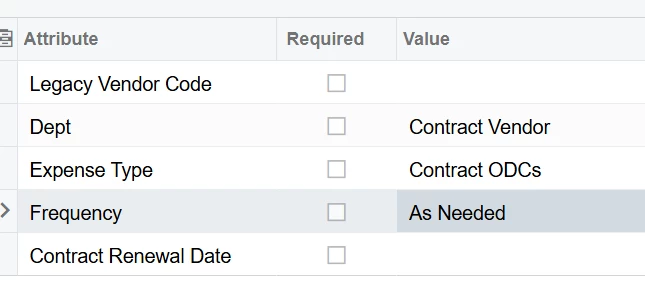
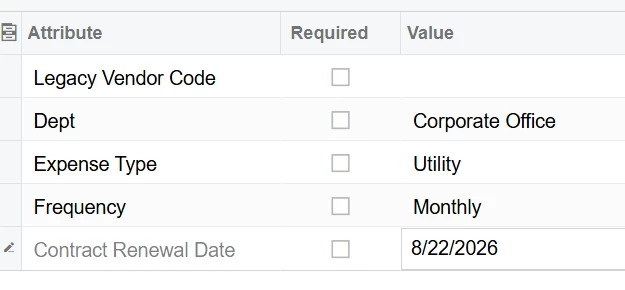


Other examples we have used this for are to track Revenue by State under the Job lists. (We used to manually type the state abbreviations but that left too much room for human error so we are in the process of converting to a combo list.) And we are exploring adding attributes to the Employee setup to help sort various reports by Contract.

Are you using custom attributes? What are some examples where you have found them especially helpful.



3 replies

  • Freshman I
  • January 26, 2026

We use custom attributes in several screens, most recently I created a custom GI that feeds a dashboard tile and a business event for COI notifications. 


nhatnghetinh
Captain II
Forum|alt.badge.img+13
  • Captain II
  • January 27, 2026

Hi ​@kvinson 

One of Acumatica's greatest features is Attributes. After creating Attributes, the system will create DACs and data fields in SQL so we can create reports to get data.


Best Regards,

NNT


  • Freshman I
  • January 27, 2026

One of our most-used attributes is on fixed price Projects/BRs for labor. While the Project holds the actual Funded Amount, we have an attribute to hold the “loaded” funded amount that we aim to spend below for profitability. In inquiries, we show managers their spending compared to the attribute amount instead of the full funded amount.

We also have attributes on Projects/BRs for reporting by funding year. Many of our contracts have multiple Projects (e.g. labor, travel, consultants, etc) in each of the Base Year, Option 1, Option 2, etc. To identify which Projects are part of which year, we use an attribute and then sum cost and billing amounts by the attribute. Some of our customers want to see that on billing invoices, so we also group by that in some invoice templates.