


Question

Subcontract Agreement Best Practices

  • February 26, 2026
  • 1 reply
  • 41 views

kvinson
Freshman I
Forum|alt.badge.img

We’ve noticed that the total funded amount from subcontracts populates in the Job Costs Transactions Summary, “total burdened cost amount” column. Which makes sense but also skews the numbers as option years pass.

Also, in the Job Costs Transactions Detail, the subcontract populates (& decrements as bills are entered), but when the Subcontract is closed, the subcontract funding entry disappears but all the decremental SC entries remain, which makes the detail report not add up correctly when exported to Excel unless you filter to remove all the SC source lines.

When do you find it best practice to close subcontract agreements? We often keep contracts open for years as they get wrapped up, but I’m not certain we want to treat subcontracts the same if it affects the burdened cost. Or is it a good idea to de-obligate funds via change orders as new options come along, just so the total burdened cost is more accurate?

1 reply

cdmartin
Freshman I
  • Freshman I
  • June 5, 2026

You can always run the JCT Summary excluding commitments, which is honestly my go to unless I am specifically looking for the info to contain commitments. Everyone is different, but I do think it is good practice to de-obligate funds from subcontracts both in the system and with the vendor. 

Also, in the Job Costs Transactions Detail, the subcontract populates (& decrements as bills are entered), but when the Subcontract is closed, the subcontract funding entry disappears but all the decremental SC entries remain, which makes the detail report not add up correctly when exported to Excel unless you filter to remove all the SC source lines.


I am not sure that I entirely understand what is happening, but I use the PO system much more than the Subcontract. In the PO system (and I assume the SubK) when you create the commitment, it stays in the period that is was created, and the decrements are in the period that they occurred. So if you have the decrements but not the original commitment, I’m inclined to believe that perhaps it is just a reporting period thing where you are isolating the SC Open outside the range. In the JCT Detail, for a closed commitment, they should cancel out to zero if you run it for all periods. 

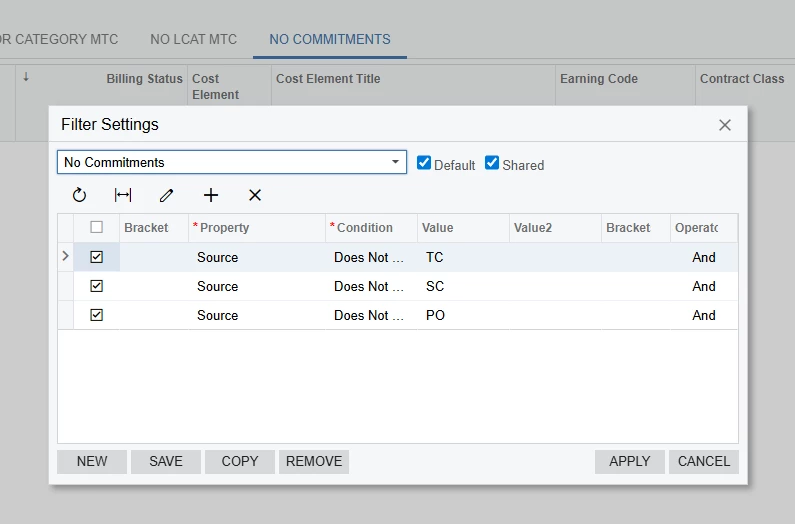
A suggestion, if you aren’t already doing it, is create a saved/shared filter (which for us is also the default) that excludes commitments. Then when you export, those records are not there.

Here is what my filter looks like:


Last suggestion, if you don’t already you should have a GI that replicates the JCT Detail so you can setup odata feeds and create dashboards/pivots. In that case, you could save a filter to exclude commitments records and pivot it in JAMIS (or in excel). Then the data you are using is only “real” costs.