




It’s a simple hack but did you know you can rename menu items for clarity? This is especially useful when you have multiple menu items named the same thing, but they are actually different forms/reports. (Yes, you can hover over the item and see if it has a different ScreenID, and pay close attention to the category, but not every user knows to pay attention to that, plus it’s an extra step.)
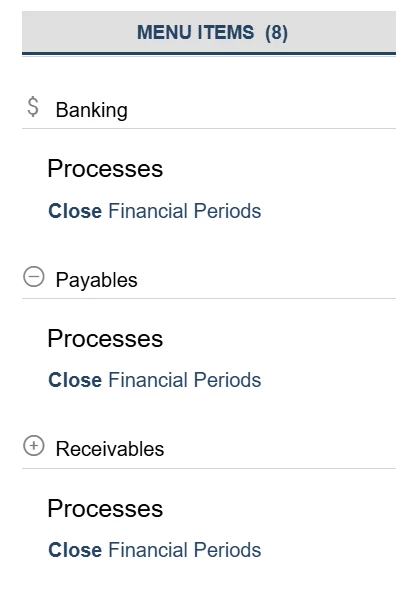
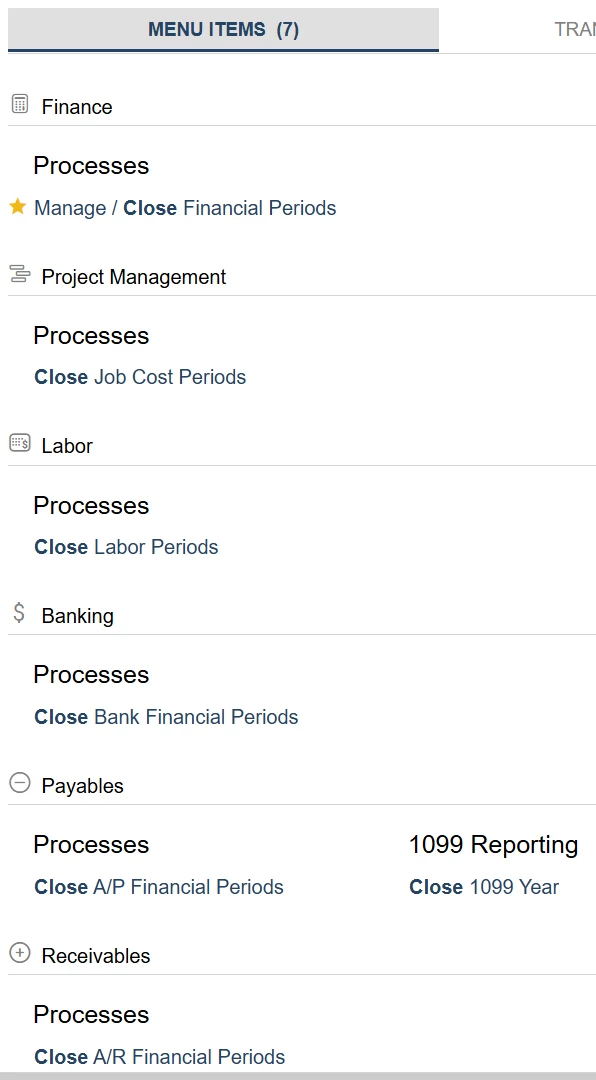
For example, back in JAMIS 7, the default was to have “Close Financial Periods” be the name for several of the forms - Banking, A/P, A/R, etc. This caused confusion because our team didn’t realize they were different forms. They would check for Unreleased Documents in one, assume there were none anywhere, and then hit issues later because they had only checked A/P, not A/R, and so on. So we renamed them. Now our team can work their way down the list and know exactly where they are every step of the way. I’ve noticed that this specific scenario is no longer a problem with 8 & 9 but it was a great workaround that served us well at the time, and is still applicable as there are many other forms/reports/inquiries with the same name.
BEFORE:
AFTER:
You can also rearrange and copy or regroup reports/forms to wherever makes the most sense for your team. Create a new workspace for a specific workflow, and bring in each form & report needed. Eliminate categories or add new ones. And edit the default Quick Menu to whatever works best for your company/employees.
Have you found renaming menu items helpful? What custom workspaces have you made to streamline efficiency in your company?

