Answer

reference custom field in bql statement

  • May 23, 2025
  • 7 replies
  • 116 views

Forum|alt.badge.img

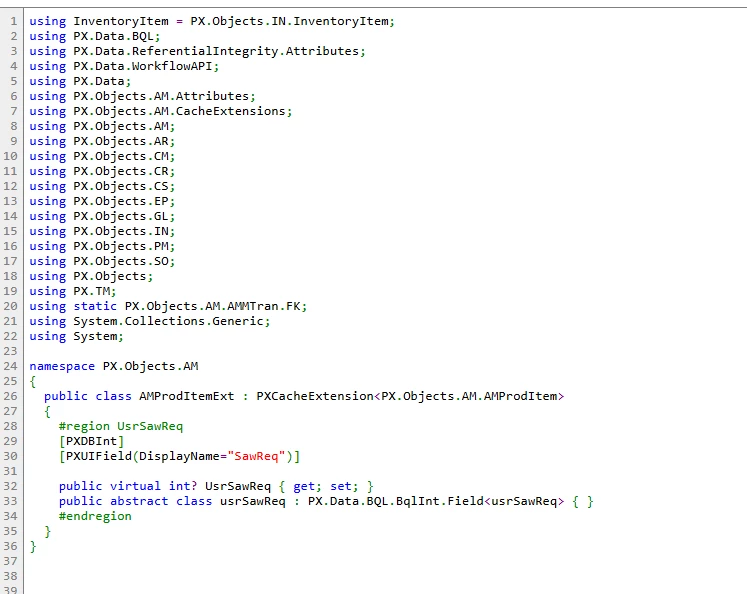
I created a new screen where our users can request that a production order be made for items. If a production order has been created for that item, i want it to show up on the screen. i added a custom field to the production order maintenance screen where we can add in the key ID field from the new screen so that it could be connected to that specific record. i am having issues with referencing this custom field in the view of the screen. When i go to build it, it says “CS0426 the type name ‘usrSawReq’ does not exist in the type amproditem. when i google i find that it should be “ .getextension<AmProdItemExt>” that would allow me to use this field, but when i have tried it, the amproditemext doesnt show as available. can anyone tell me how this should be done?

 

Best answer by harutyungevorgyan

@harutyungevorgyan the code for the new screen is in a dll. i didnt move the graph extension to a dll. do i need to move it or possibly put it in the same customization project and then move it over?

In Visual Studio, your code can only access what's within your own assembly and the DLLs you've added as references. However, when working with runtime-generated code, that source code isn't available to the compiler. Because of that, you'll need to either include your Cache Extension in the same project, or your graph in the package together with the Cache Extension. I recommend putting everything into a DLL to keep things modular and easily maintainable.

7 replies

DipakNilkanth
Pro III
Forum|alt.badge.img+13

Hi ​@justen0351,

Please use below code snippet.

  public SelectFrom<MaterialRequest>
.LeftJoin<AMProdItem>
.On<Brackets<MaterialRequest.materialID.IsEqual<AMProdItem.inventoryID>>
.And<MaterialRequest.siteID.IsEqual<AMProdItem.siteID>>
.And<Brackets<AMProdItem.statusID.IsEqual<constantP>>>
.Or<AMProdItem.statusID.IsEqual<constantR>
.And<MaterialRequest.requestID.IsEqual<AMProdItemExt.usrSawReq>>
>>
.Where<MaterialRequest.createdDateTime.IsGreater<MyDate>>
.OrderBy<Asc<MaterialRequest.requestID>>
.View PTMMaterial;

Hope, it helps!


harutyungevorgyan
Jr Varsity I
Forum|alt.badge.img+2

Hello ​@justen0351 ,

Solution given by ​@Nilkanth Dipak will solve your problem for sure, but I want to explain how it works in Acumatica Framework and BQL.

  1. BQL and Abstract Classes for Properties

    • In Acumatica, each DAC property is represented in BQL by its own abstract class, which maps to a real database column name.

    • When you type AMProdItem., you only see the base DAC’s properties—your custom fields (which live in your extension) aren’t listed there.

  2. CacheExtensions to the Rescue

    • To expose your custom fields in BQL, you define a CacheExtension (e.g., AMProdItemExt).

    • There’s no separate SQL table for your extension; under the hood, Acumatica still queries the AMProdItem table.

  3. Why Your Filter Needs the Extension Class

    • In a Where<…IsEqual<…>> filter, BQL expects a column name (i.e., an abstract class for a property), not a table name.

    • Since your LeftJoin<…> already set the table to AMProdItem, BQL just needs to know which column to compare.

    • By referencing AMProdItemExt.usrSawReq, you’re pointing BQL to the correct abstract property class, which it translates to the real usrSawReq column name in AMProdItem.

Always use your extension’s abstract classes for properties (e.g., AMProdItemExt.usrSawReq) when filtering on custom fields. The system already knows the table; your extension tells it which column name to use.

Hope that clears it up! Let me know if you have any other questions.


Forum|alt.badge.img
  • Author
  • Varsity III
  • May 26, 2025

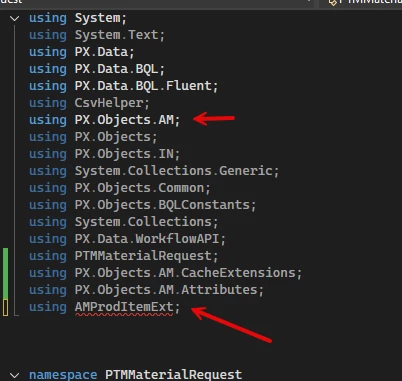
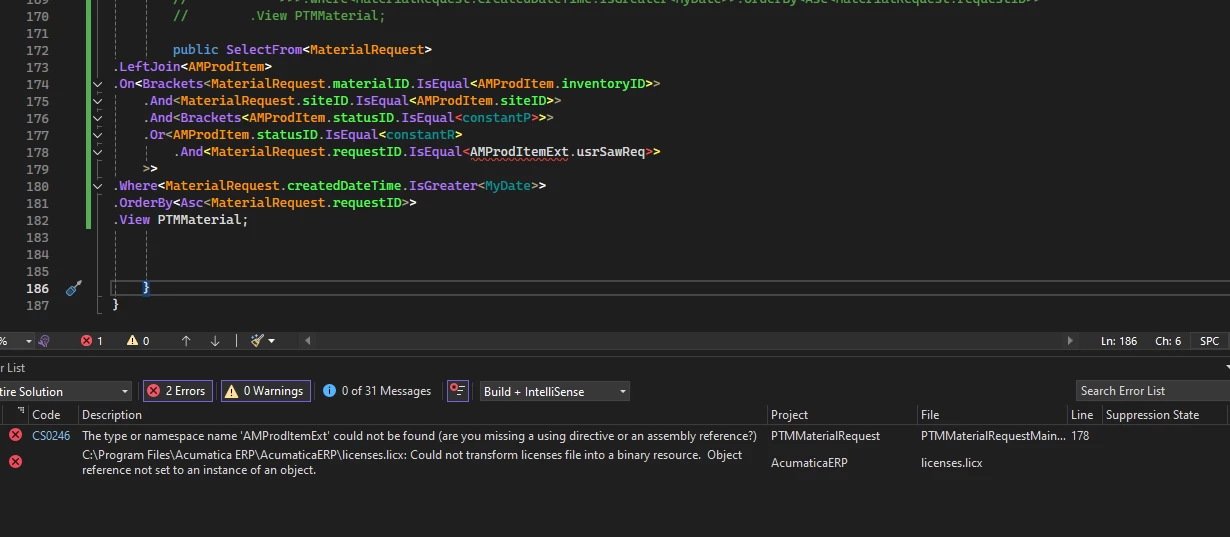
@Nilkanth Dipak thank you for your response. i tried putting that code in and it looks like it recognizes the field name now but not the extension itself . it already has the namespace definied (px.objects.am) so i tried adding a using directive for the extension but that didnt work. screenshot below. any idea on what i am missing or doing wrong?


@harutyungevorgyan thank you for the explanation I really appreciate it. that makes alot more sense to me now. i have been struggling with the references in here. i previously couldnt get this code to reference the table itself (materialrequest) but i rewatched the T200 series and realized that i had added the using directive but hadnt actually added the reference to the reference section. that had solved that, but in this case, i have added the table itself so its confusing why it doesnt recognize it.Knowing that i have to reference the extension helps alot, but it seems im still missing something.


harutyungevorgyan
Jr Varsity I
Forum|alt.badge.img+2

@justen0351 it's strange because you already use PX.Objects.AM could you please tell me if the code you show is in your dll or in the package, I mean in AppRuntimeCode folder of your instance?

Because if your DAC extension is in the package and you want to have access to it from the Visual Studio, from your actual dll where graph is located, it can be the reason of your problem.


Forum|alt.badge.img
  • Author
  • Varsity III
  • May 26, 2025

@harutyungevorgyan the code for the new screen is in a dll. i didnt move the graph extension to a dll. do i need to move it or possibly put it in the same customization project and then move it over?


harutyungevorgyan
Jr Varsity I
Forum|alt.badge.img+2

@harutyungevorgyan the code for the new screen is in a dll. i didnt move the graph extension to a dll. do i need to move it or possibly put it in the same customization project and then move it over?

In Visual Studio, your code can only access what's within your own assembly and the DLLs you've added as references. However, when working with runtime-generated code, that source code isn't available to the compiler. Because of that, you'll need to either include your Cache Extension in the same project, or your graph in the package together with the Cache Extension. I recommend putting everything into a DLL to keep things modular and easily maintainable.


Forum|alt.badge.img
  • Author
  • Varsity III
  • May 30, 2025

@harutyungevorgyan thank you very much! moving it to the dll with everything else made it find the reference. i dont think the join is working right, but i can play with it a little and get it working.