

Hello Everyone,
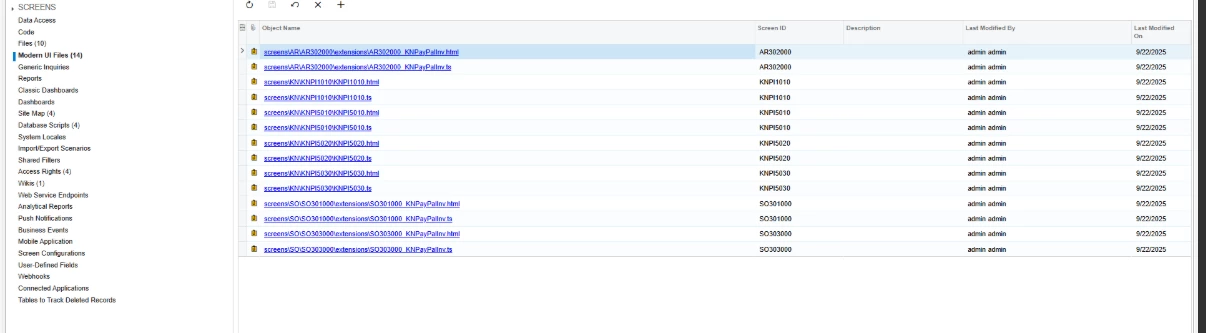
We have converted our custom screens to Modern UI, as well as the default screens that contain custom fields, by creating extension files. These have also been converted to Modern UI.
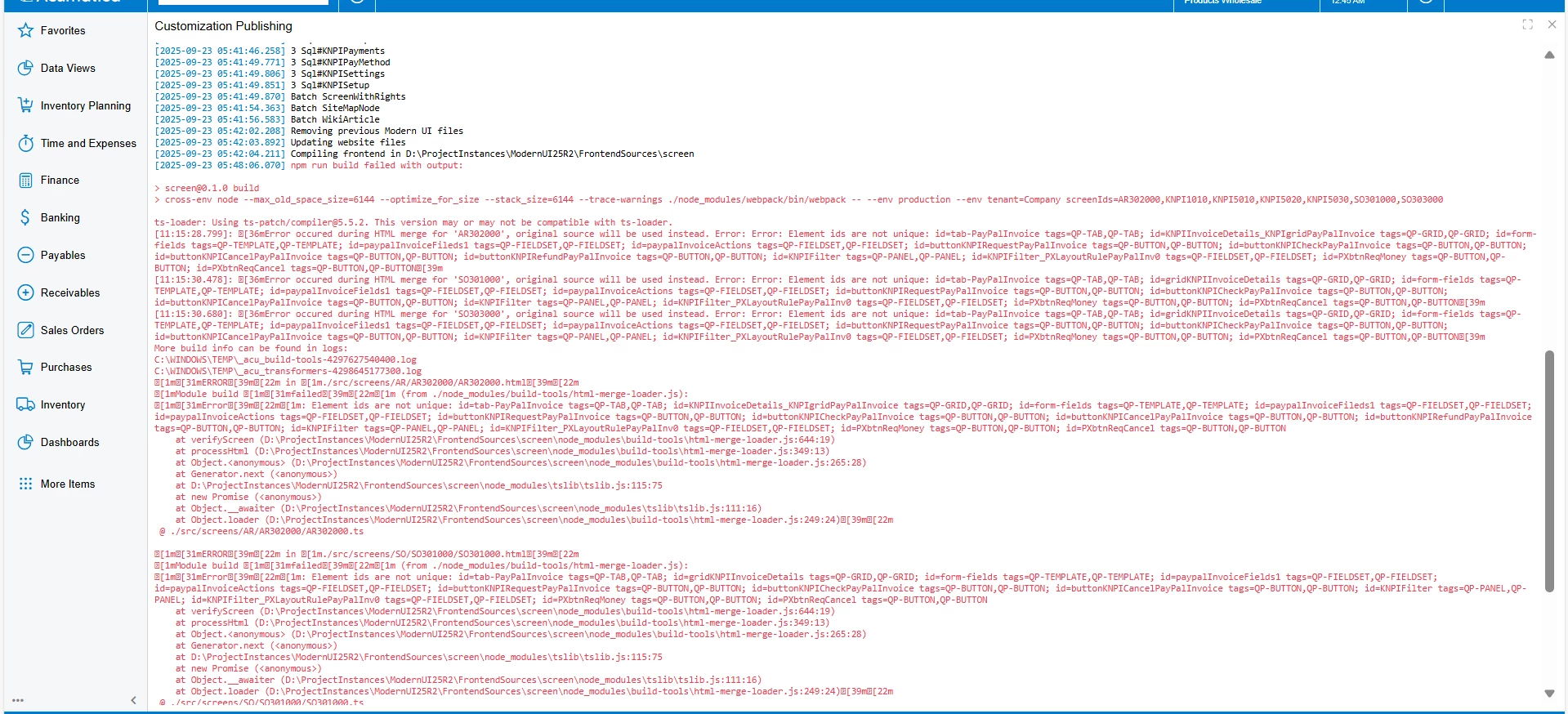
We then added the corresponding .ts and .html files into the Modern UI folder of the customization package. However, when we tried to publish the package, we encountered issues, primarily with the default screen extension files. The package is not being published, and we are experiencing errors related to the' npm run' while publishing the package.
Any insights or suggestions would be appreciated.
Thanks in advance
Custom screen:
KNPI1010.html:
<template>
<qp-fieldset id="form_00" wg-container="KNPISetups_form" view.bind="KNPISetups" >
<field name="PayInvNameCD" class="label-size-m control-size-l" ></field>
<field name="Description" class="label-size-m control-size-l" ></field>
<field name="IsActive" ></field>
</qp-fieldset>
<qp-tabbar id="tab">
<qp-tab id="tab_0" caption="Settings">
<qp-grid id="KNPIDetails_grdDetails" view.bind="KNPIDetails"></qp-grid>
</qp-tab>
<qp-tab id="tab_1" caption="Payment Methods">
<qp-grid id="KNPIPaymentMethods_grdPaymentMethods" view.bind="KNPIPaymentMethods"></qp-grid>
</qp-tab>
</qp-tabbar>
</template>
KNPI1010.ts:
import { Messages as SysMessages } from "client-controls/services/messages";
import { createCollection, createSingle, PXScreen, graphInfo, PXActionState, viewInfo, handleEvent, CustomEventType, actionConfig, RowSelectedHandlerArgs, PXViewCollection, PXPageLoadBehavior, ControlParameter, PXView, PXFieldState, gridConfig, treeConfig, fieldConfig, controlConfig, headerDescription, ICurrencyInfo, disabled, PXFieldOptions, linkCommand, columnConfig, GridColumnShowHideMode, GridColumnType, TextAlign, GridPreset, GridFilterBarVisibility, GridFastFilterVisibility } from "client-controls";
// Views
export class KNPISetup extends PXView {
PayInvNameCD : PXFieldState<PXFieldOptions.CommitChanges>;
Description : PXFieldState;
IsActive : PXFieldState;
}
export class KNPISettings extends PXView {
@columnConfig({width: 150}) DetailID : PXFieldState;
@columnConfig({allowNull: false, width: 250}) Description : PXFieldState;
@columnConfig({width: 350}) Value : PXFieldState;
}
export class KNPIPayMethod extends PXView {
@columnConfig({width: 150}) AcmPaymentMethod : PXFieldState<PXFieldOptions.CommitChanges>;
}
@graphInfo({graphType: "KNPayInvoice.KNPISetupMaint", primaryView: "KNPISetups", })
export class KNPI1010 extends PXScreen {
KNPISetups = createSingle(KNPISetup);
@viewInfo({containerName: "Settings"})
KNPIDetails = createCollection(KNPISettings);
@viewInfo({containerName: "Payment Methods"})
KNPIPaymentMethods = createCollection(KNPIPayMethod);
}
Default screen extension
AR302000_KNPayInvInv.html:
<template>
<qp-tab id="tab-PayInvoice" after="#tabCharges" caption="PayInvoice" view.bind="Document">
<!-- Grid -->
<qp-grid id="KNPIInvoiceDetails_KNPIgridPayInvoice" view.bind="KNPIInvoiceDetails"></qp-grid>
<qp-template id="form-fields" name="17-17-14" wg-container="CurrentDocument_PayInv">
<qp-fieldset id="PayInvoiceFileds1" slot="A" view.bind="KNPICurrentInvoice">
<field name="PayInvoiceNbr"></field>
<field name="PayInvoiceStatus"></field>
</qp-fieldset>
<qp-fieldset id="PayInvoiceActions" slot="B" view.bind="KNPICurrentInvoice" transparent-section no-label>
<field name="fieldRequestPayInvoice" unbound replace-content>
<qp-button id="buttonKNPIRequestPayInvInvoice"
state.bind="KNPIRequestPayInvoice"
class="col-12"
wg-name="Request Payment Via PayInvoice">
</qp-button>
</field>
<field name="fieldCheckPayInvoice" unbound replace-content>
<qp-button id="buttonKNPICheckPayInvoice"
state.bind="KNPICheckPayInvoice"
class="col-12"
wg-name="Check PayInv Invoice Payment Status">
</qp-button>
</field>
<field name="fieldCancelPayInvoice" unbound replace-content>
<qp-button id="buttonKNPICancelPayInvoice"
state.bind="KNPICancelPayInvoice"
class="col-12"
wg-name="Cancel PayInv Invoice">
</qp-button>
</field>
<field name="fieldRefundPayInvoice" unbound replace-content>
<qp-button id="buttonKNPIRefundPayInvInvoice"
state.bind="KNPIRefundPayInvInvoice"
class="col-12"
wg-name="Refund PayInv Invoice">
</qp-button>
</field>
</qp-fieldset>
</qp-template>
</qp-tab>
<qp-panel id="KNPIFilter" caption="RequestPayment" auto-repaint="true">
<qp-fieldset id="KNPIFilter_PXLayoutRulePayInv0" wg-container="KNPIFilter_PXfrmReqMoney" view.bind="KNPIFilter">
<field name="PayInvOrderNbr"></field>
<field name="PayInvCustEmail"></field>
<field name="PayInvOrderTotal"></field>
<field name="PayInvPayerNote"></field>
</qp-fieldset>
<footer>
<qp-button id="PXbtnReqMoney" caption="Request Money" dialog-result="OK"></qp-button>
<qp-button id="PXbtnReqCancel" caption="Cancel" dialog-result="Cancel"></qp-button>
</footer>
</qp-panel>
</template>
AR302000_KNPayInvInv.ts:
import {
PXView,
PXActionState,
PXFieldState,
PXFieldOptions,
createCollection,
createSingle,
viewInfo,
featureInstalled,
FeaturesSet,
controlConfig,
gridConfig,
GridPreset,
GridFastFilterVisibility,
PXScreen,
graphInfo,
columnConfig,
GridColumnShowHideMode,
} from "client-controls";
import { AR302000 } from "src/screens/AR/AR302000/AR302000";
export interface AR302000_PayInvInvoice extends AR302000 { }
export class AR302000_PayInvInvoice {
@viewInfo({ containerName: "KNPIInvoiceDetails" })
KNPIInvoiceDetails = createCollection(KNPIPayments);
@viewInfo({ containerName: "KNPICurrentInvoice" })
KNPICurrentInvoice = createSingle(KNPIPayments1);
@viewInfo({ containerName: "Request PayInv Payment" })
KNPIFilter = createSingle(KNPIFilter);
}
@gridConfig({
showFastFilter: GridFastFilterVisibility.False,
actionsConfig: {
insert: { hidden: true },
refresh: { hidden: false },
delete: { hidden: true },
KNPIRequestPayInvInvoice: { hidden: true },
KNPICheckPayInvInvoice: { hidden: true },
KNPICancelPayInvInvoice: { hidden: true },
KNPIRefundPayInvInvoice: { hidden: true }
}
})
export class KNPIPayments extends PXView {
CreatedDateTime: PXFieldState;
PayInvInvoiceNbr: PXFieldState;
PayInvInvoiceStatus: PXFieldState;
PayInvInvoiceRefNbr: PXFieldState;
PayInvCustEmail: PXFieldState;
PayInvNote: PXFieldState;
Amount: PXFieldState;
PayInvOrderNbr: PXFieldState;
PayInvOrderTotal: PXFieldState;
PayInvPayerNote: PXFieldState;
}
export class KNPIPayments1 extends PXView {
PayInvInvoiceNbr: PXFieldState;
PayInvInvoiceStatus: PXFieldState;
KNPIRequestPayInvInvoice: PXActionState;
KNPICheckPayInvInvoice: PXActionState;
KNPICancelPayInvInvoice: PXActionState;
KNPIRefundPayInvInvoice: PXActionState;
}
export class KNPIFilter extends PXView {
PayInvOrderNbr: PXFieldState;
PayInvCustEmail: PXFieldState;
PayInvOrderTotal: PXFieldState;
PayInvPayerNote: PXFieldState;
}


