Solved

Validation of Import of Customer Data in Import Scenario

  • February 8, 2022
  • 3 replies
  • 172 views

Forum|alt.badge.img+2

We have a requirement where customer data from a third party is sent over to Acumatica by dropping an encrypted zipped file containing the excel or CSV file of the customer data to a FTP server. We are planning to configure file synchronization to get this file to Acumatica and mapping the import scenario and then using the process import scenario screen to automate import of these records to the customer screen. How can we validate these import of records or get better error feedback?

Best answer by Yuri Karpenko

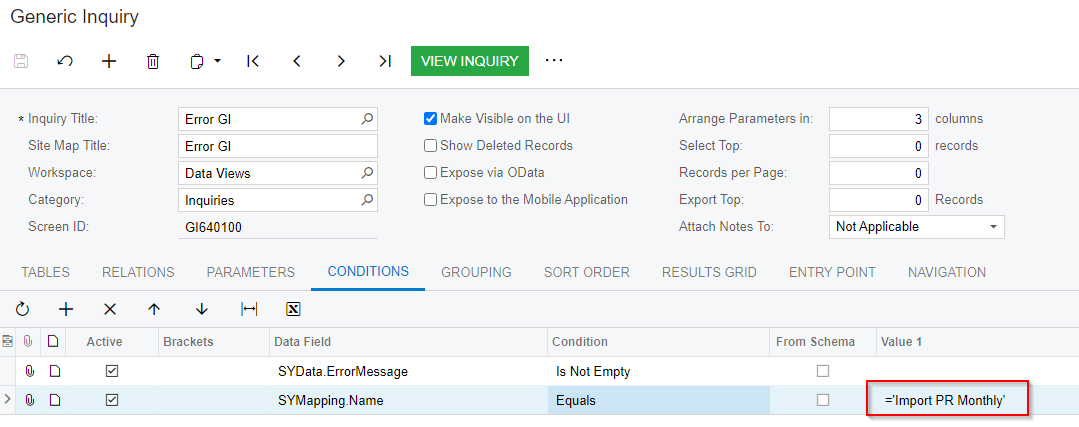
@TharidhiP , this is a very very good question! I would suggest to build a generic inquiry on the SYData and SYMapping tables, that would show errors in the specific import scenario. Then, you can either set up a Business Event to notify somebody to take care of the errors. Let me know if you would like more details around the GI. Thanks!

3 replies

Yuri Karpenko
Captain II
Forum|alt.badge.img+6
  • Captain II
  • Answer
  • February 8, 2022

@TharidhiP , this is a very very good question! I would suggest to build a generic inquiry on the SYData and SYMapping tables, that would show errors in the specific import scenario. Then, you can either set up a Business Event to notify somebody to take care of the errors. Let me know if you would like more details around the GI. Thanks!


Forum|alt.badge.img+2
  • Author
  • Pro III
  • February 9, 2022

@yurik05 Thank you for the suggestion! It would be great if you could elaborate on the GI creation.


Yuri Karpenko
Captain II
Forum|alt.badge.img+6

@TharidhiP , something as simple as the attached XML will do a trick for you. Just don’t forget to change the name of the import scenario to your scenario’s value: