Question

Updating Tax Total Not working - AR invoice Screen

  • September 16, 2026
  • 2 replies
  • 31 views

Forum|alt.badge.img

Hi Folks,

I'm trying to apply tax manually rather than having it auto-calculated — the tax should be applied after the invoice has already been saved.

I'm able to do this through the UI, but I can't get it working via the import scenario. I've tried following the approach in the threads below, but the old (auto-calculated) tax value keeps overriding the manual one I try to set.

I've also tried creating the tax manually first, but that approach didn't work either.

What I have working so far:

  • Import the data → Save ✅
  • Add the manual tax, then Save again → not working ❌

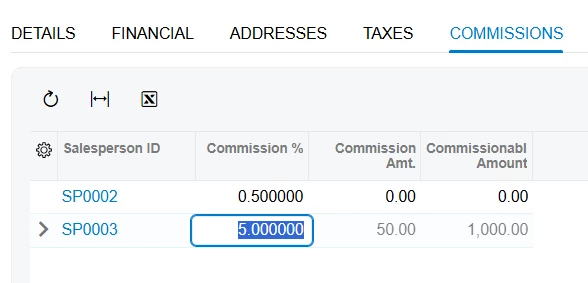
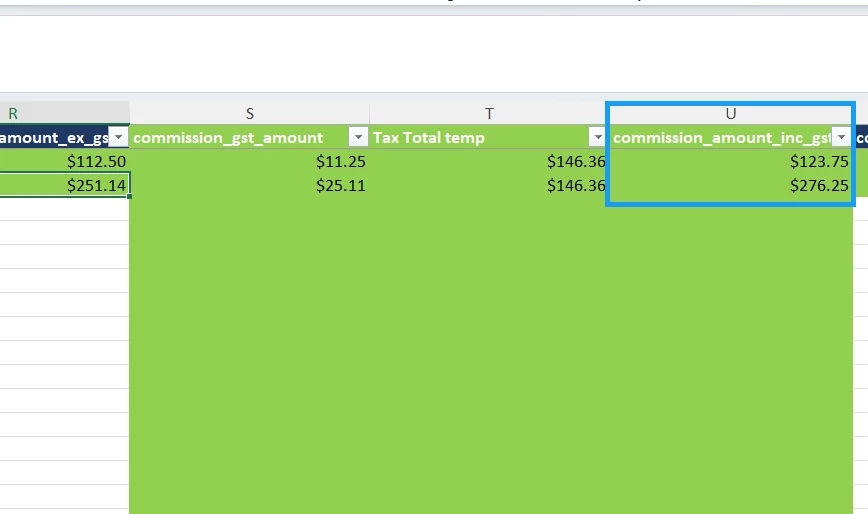
Separately, I'd also like to check whether it's possible to add a separate commission line based on column values — for example, the setup below should generate 2 lines on the same sales invoice. There are also zero value commisions lines in it shouldn’t create lines for it.

I've attached my import scenario and DP for reference. Any help or guidance in the right direction would be appreciated.

 

2 replies

lauraj46
Captain II
Forum|alt.badge.img+9
  • Captain II
  • September 16, 2026

Hi ​@amitkaryekar ,

If the tax code G1SALES GST has been configured with a rate then it will overwrite your manual taxes.

I would suggest creating a dedicated manual tax zone as described by ​@gusl on this thread:

As regards the commissions, the information on the commissions tab is calculated by the system for detail lines where the ‘Commissionable’ checkbox is selected.  The percentages for each salesperson default from the customer screen but can be overwritten.  To get to a specifc amount, I think you would need to calculate this percentage in Excel based on the amount, sum the total per order, and in your scenario populate this total value on the commissions tab.

Hope this helps!

Laura


Steve Milner
Varsity III
Forum|alt.badge.img+2
  • Varsity III
  • September 16, 2026

@amitkaryekar Laura's right that the auto-calculated tax is what keeps overriding yours.

A tax amount you enter by hand on the Taxes tab of AR301000 only holds until something recalculates the invoice: a new line, a changed line amount or tax category, or a new date, tax zone, currency or terms. Every tax row is then rebuilt from the lines.

Two things work against doing this in one scenario. The whole mapping runs for every row in the file. And both of your Save rows are set to Once, for Last Detail Line, so an invoice isn't saved until its last row. Each row's line lands after the previous row's tax step.

Split it into three scenarios on the same provider. Keep your current one up to the first Save. The second finds the invoice by Type and Reference Nbr. and adds the commission as an invoice line from commission_amount_inc_gst and commission_gl_account. On its Source Restrictions tab, add commission_amount_inc_gst Does Not Equal 0, then click Prepare on Import by Scenario (SM206036) and check the zero rows are gone. The third keeps only the invoice search, your Tax ID search, Tax Amount and Save. Both new scenarios need your agent_slug restriction too.

Run the tax scenario last. The commission lines would recalculate the tax, and Tax Total temp already includes their GST. Try all three in a test tenant first.