Solved

Update SOLine 'Requested On' field with import scenario

  • July 24, 2024
  • 16 replies
  • 666 views

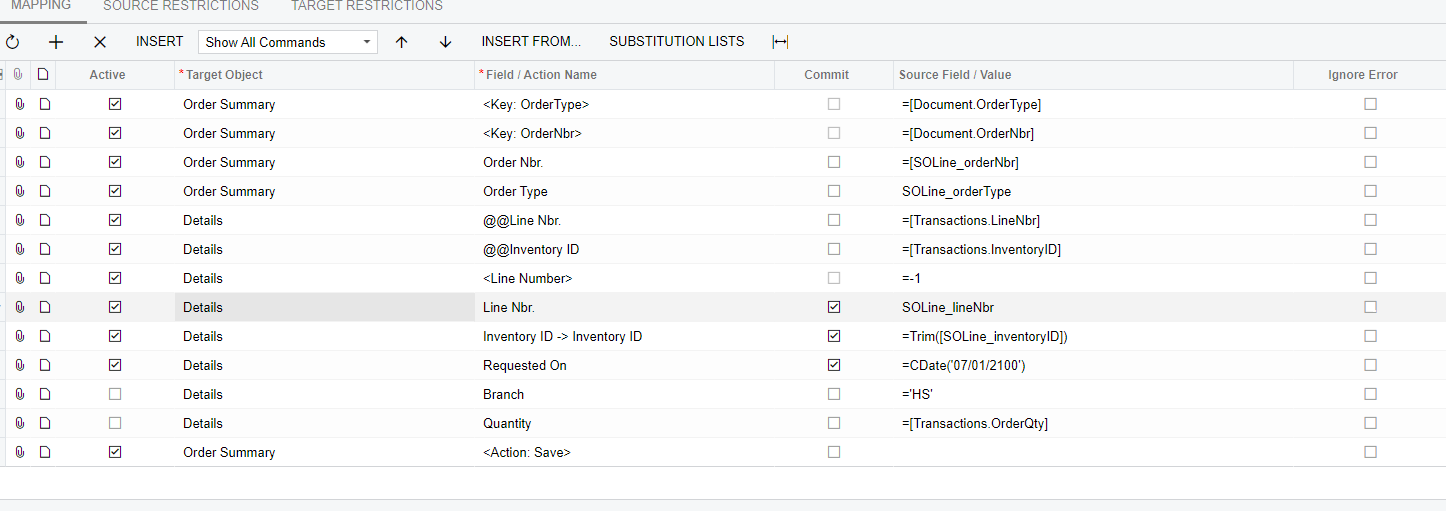
I’m trying to make an import scenario that will update individual lines on a sales order to set the requested ship date to a date further in the future. The issue I’m having is the scenario will only add a line to the order instead of updating the corresponding line despite using linenbr and InventoryID as custom keys. I did have a working scenario like this previously before updating to our current Acumatica version (2023r1 build 23.115.0031) so I’m wondering if there was a change or something related to this functionality? Or am I missing something else?
 

Best answer by yasalimadihahewage72

Hi ​@timKallman 

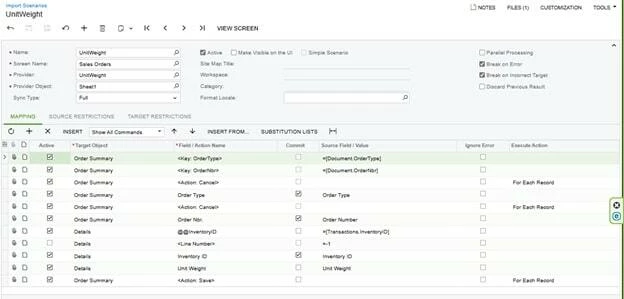
I have also received a requirement from a customer to update the unit weight in the SO line, and the import scenario I used is as follows,


However, in my case there were couple of scenarios which did not update the field required

1. When the line is complete leading the line to be non-editable
2. When the line is open, yet the item is partially delivered which led the unit weight field to be non-editable
3. When the same order contains the same item multiple times which lead the import scenario to change only the line which appears first (of that same SKU)

Hope this helps!

16 replies

lauraj46
Captain II
Forum|alt.badge.img+8
  • Captain II
  • July 24, 2024

Hi @timKallman ,

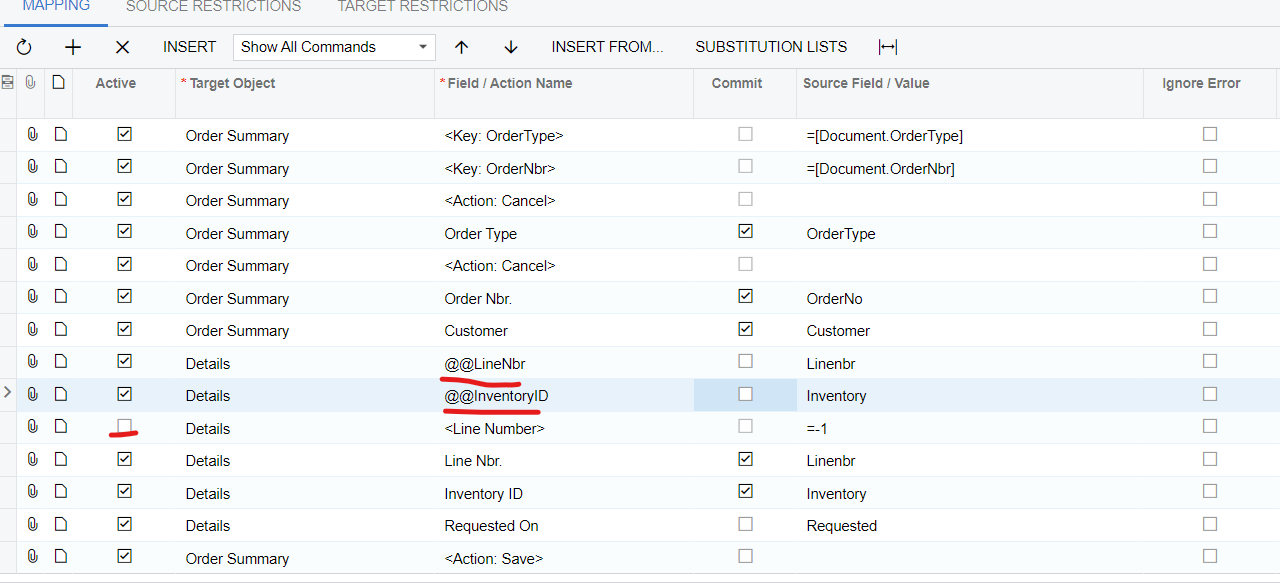
To start you will want to uncheck the line that sets <Line Number> to -1.  The -1 value tells Acumatica to insert a row.  Alternatively, leave this row active and replace -1 with the formula below.

Lookup the existing row either by <Line Number> or by the using the Inventory ID as a custom key.  Both lookups are not needed.  Use @@InventoryID in the Field/Action Name for the inventory id lookup.  However, if the same inventory id may appear multiple times on a Sales Order, then the Line Number is a better option.  Through trial and error I’ve found that the formula CInt([Line Order]) - 1 returns the correct row.


Hope this helps!


MichaelShirk
Captain II
Forum|alt.badge.img+5

@timKallman Hey! I’ve experienced bugs in import scenarios before, so that can’t be ruled out if it was working previously.

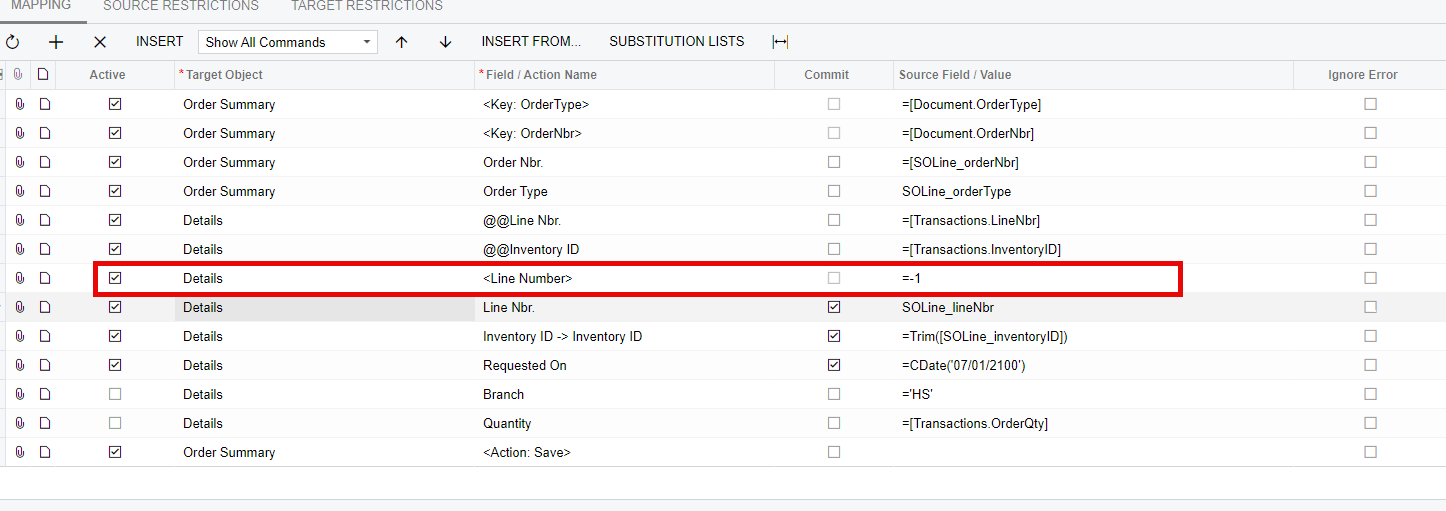
However, I do see that you have the “Line Nbr. =-1” line set to active.
The line number should not be active for Import Scenarios that update existing lines. The mapping in your screenshot is correctly adding a new line based on the LineNbr. row being active.


  • Author
  • Freshman I
  • July 24, 2024

Thanks for the suggestion, but unfortunately I’ve already tried unchecking the line with various combinations of the ‘commit’ checkbox with the other fields and it didn’t change the outcome. 

@timKallman Hey! I’ve experienced bugs in import scenarios before, so that can’t be ruled out if it was working previously.

However, I do see that you have the “Line Nbr. =-1” line set to active.
The line number should not be active for Import Scenarios that update existing lines. The mapping in your screenshot is correctly adding a new line based on the LineNbr. row being active.


Hi @timKallman ,

To start you will want to uncheck the line that sets <Line Number> to -1.  The -1 value tells Acumatica to insert a row.  Alternatively, leave this row active and replace -1 with the formula below.

Lookup the existing row either by <Line Number> or by the using the Inventory ID as a custom key.  Both lookups are not needed.  Use @@InventoryID in the Field/Action Name for the inventory id lookup.  However, if the same inventory id may appear multiple times on a Sales Order, then the Line Number is a better option.  Through trial and error I’ve found that the formula CInt([Line Order]) - 1 returns the correct row.


Hope this helps!


MichaelShirk
Captain II
Forum|alt.badge.img+5

Could you provide a copy of your import scenario?


dcomerford
Captain II
Forum|alt.badge.img+15
  • Captain II
  • July 24, 2024

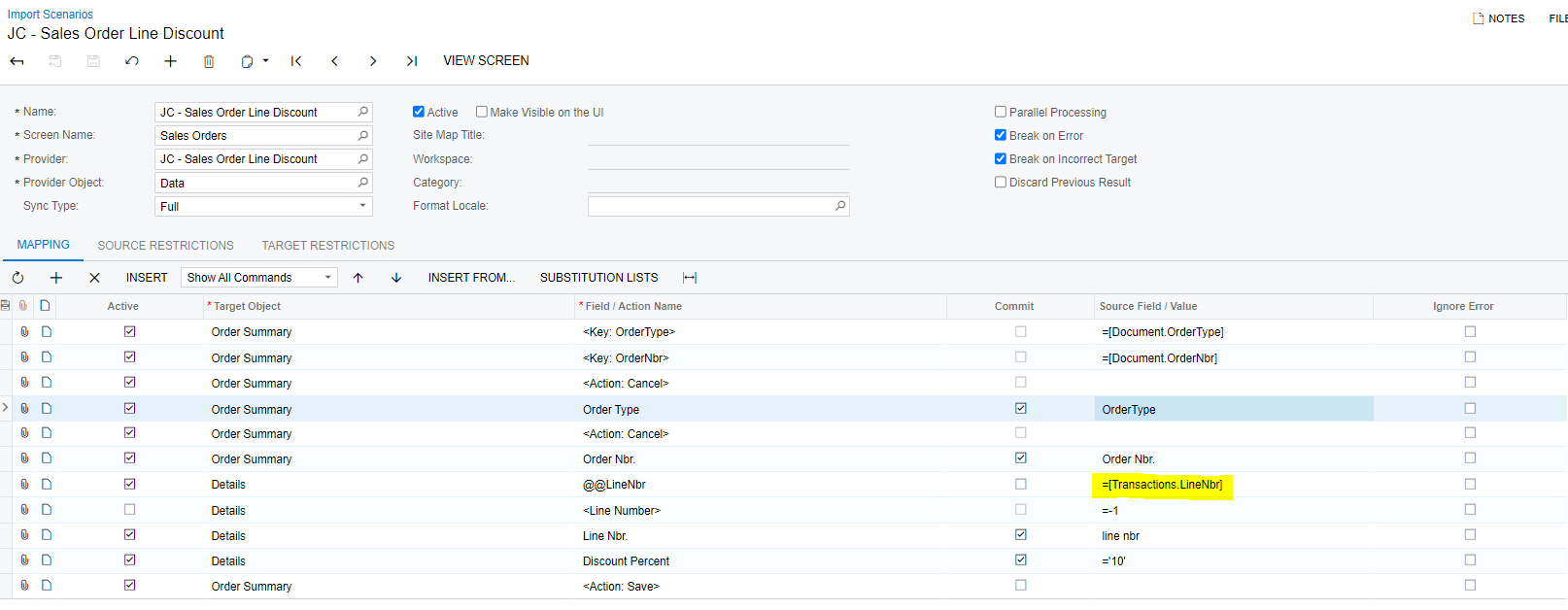
Your Order Summary is not correct you must lay it out as follows. Also remove the Inventory bits on the Details as you dont need it Linenbr will do. Also ensure the Line Number = -1 is not active. The one below updates discount (not mine but i have borrowed and used it for other feilds)


  • Author
  • Freshman I
  • July 25, 2024

Could you provide a copy of your import scenario?


  • Author
  • Freshman I
  • July 25, 2024

Your Order Summary is not correct you must lay it out as follows. Also remove the Inventory bits on the Details as you dont need it Linenbr will do. Also ensure the Line Number = -1 is not active. The one below updates discount (not mine but i have borrowed and used it for other feilds)


unfortunately this also doesn’t work, using this I get ‘unit conversion is missing’ as an error, I think because it thinks I’m still entering a new line into the order


Chris Hackett
Community Manager
Forum|alt.badge.img
  • Acumatica Community Manager
  • August 22, 2024

Hi @timKallman were you able to find a solution? Thank you!


  • Author
  • Freshman I
  • August 22, 2024

Hi @timKallman were you able to find a solution? Thank you!

Hi @Chris Hackett, not yet unfortunately


Forum|alt.badge.img

@timKallman please try this


  • Author
  • Freshman I
  • August 26, 2024

@johnythevara48 

I get ‘unit conversion is missing’ with that setup


Naveen Boga
Captain II
Forum|alt.badge.img+19
  • Captain II
  • August 26, 2024

@timKallman  Can you please share your updated import scenario?


  • Author
  • Freshman I
  • August 26, 2024

@timKallman  Can you please share your updated import scenario?

@Naveen Boga 


Naveen Boga
Captain II
Forum|alt.badge.img+19
  • Captain II
  • August 26, 2024

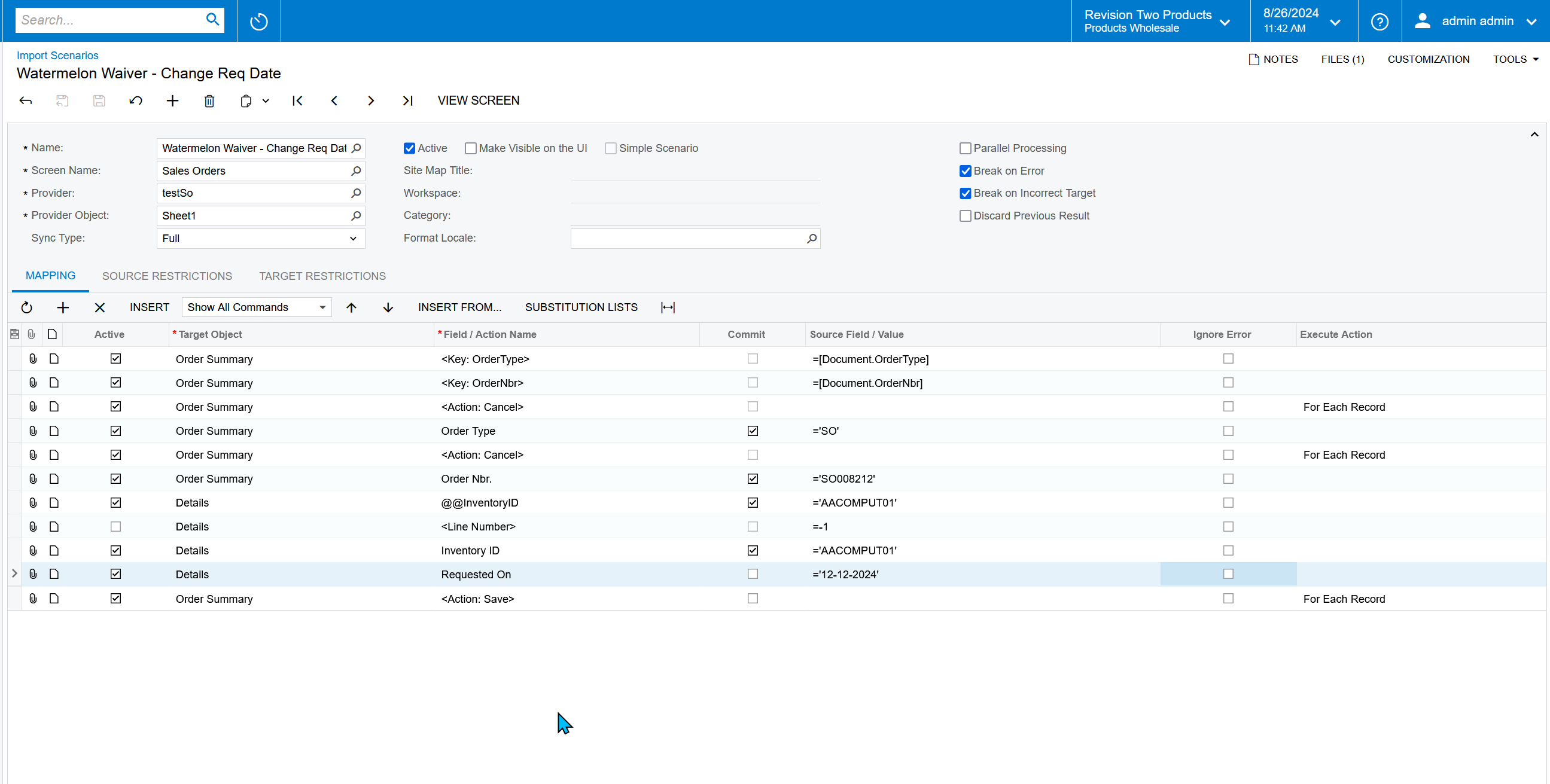
Hi @timKallman  I just tried with the below import scenario and it is working as expected.


Forum|alt.badge.img
  • Freshman I
  • August 29, 2024

@timKallman did this work for you?
@Naveen Boga Followed this thread because I’ve been trying to do a similar action to update a field on an existing line item, and followed your steps here but I still get the same error mentioned about unit conversion. Is stopping us through all variations of the attempt above. Any other help on this would be greatly appreciated!


Forum|alt.badge.img

Hi ​@timKallman 

I have also received a requirement from a customer to update the unit weight in the SO line, and the import scenario I used is as follows,


However, in my case there were couple of scenarios which did not update the field required

1. When the line is complete leading the line to be non-editable
2. When the line is open, yet the item is partially delivered which led the unit weight field to be non-editable
3. When the same order contains the same item multiple times which lead the import scenario to change only the line which appears first (of that same SKU)

Hope this helps!