Answer

Unable to Update Shipping Rule for Each SOLine Using Import Scenario or Mass Update

  • October 13, 2025
  • 6 replies
  • 68 views

DipakNilkanth
Pro III
Forum|alt.badge.img+13

Hi everyone,

I’m trying to update the Shipping Rule field (ShipComplete) for each Sales Order line (SOLine) in Acumatica.

Here’s what I’ve tried so far:

  • Mass Update through Generic Inquiry: I created a GI including the ShipComplete field and enabled Mass Update. However, the update doesn’t seem to apply to the records.

  • Import Scenario: I created an import scenario mapped to the Sales Orders (SO301000) screen.

    • When I use LineNbr = -1 (Deactivated), it only updates the first line of the sales order.

    • If I activate LineNbr, It is giving error as Unit Conversion is missing.

My goal is to update the Shipping Rule for each SOLine (e.g., set “Back Order Allowed”) without manually editing each order.

Has anyone successfully updated line-level fields in SOLine via Import Scenario or found a working approach?
Do I need to use a different matching field or configuration to get each line updated correctly?

Any guidance or examples would be greatly appreciated!

Thanks,

 

Best answer by bwhite49

Hi ​@Manikanta Dhulipudi,

I reviewed your import scenario and noticed that the Sales Order Nbr is hardcoded, and the Excel file does not contain the OrderNbr field to pass dynamically.

In my case, I exported all sales orders using the Export button from the Sales Orders screen, so my Excel file does not include all line details.

Do I need to include each SOLine (sales order line) in the Excel file to update the Shipping Rule for each line, or is there another approach to update all lines for multiple orders through an import scenario?

Thanks in advance for your help!

Yeah, you will need to have SOLine LineNbr exported out to loop through each line.

You can replace the @@LineNbr with @@InventoryID (or any field for that matter) and map to transactions.inventoryID, but you will only update the first item that matches that inventory ID on the SO line. If the inventory item exists 2 or 3 times on the sales order, it will only update the first record. Not all matches.

This is why it is best to use SOLine.LineNbr, because it’s a unique value to each line. You are basically turning LineNbr into a key field to update that specific line. 


6 replies

bwhite49
Captain II
Forum|alt.badge.img+10
  • Captain II
  • October 13, 2025

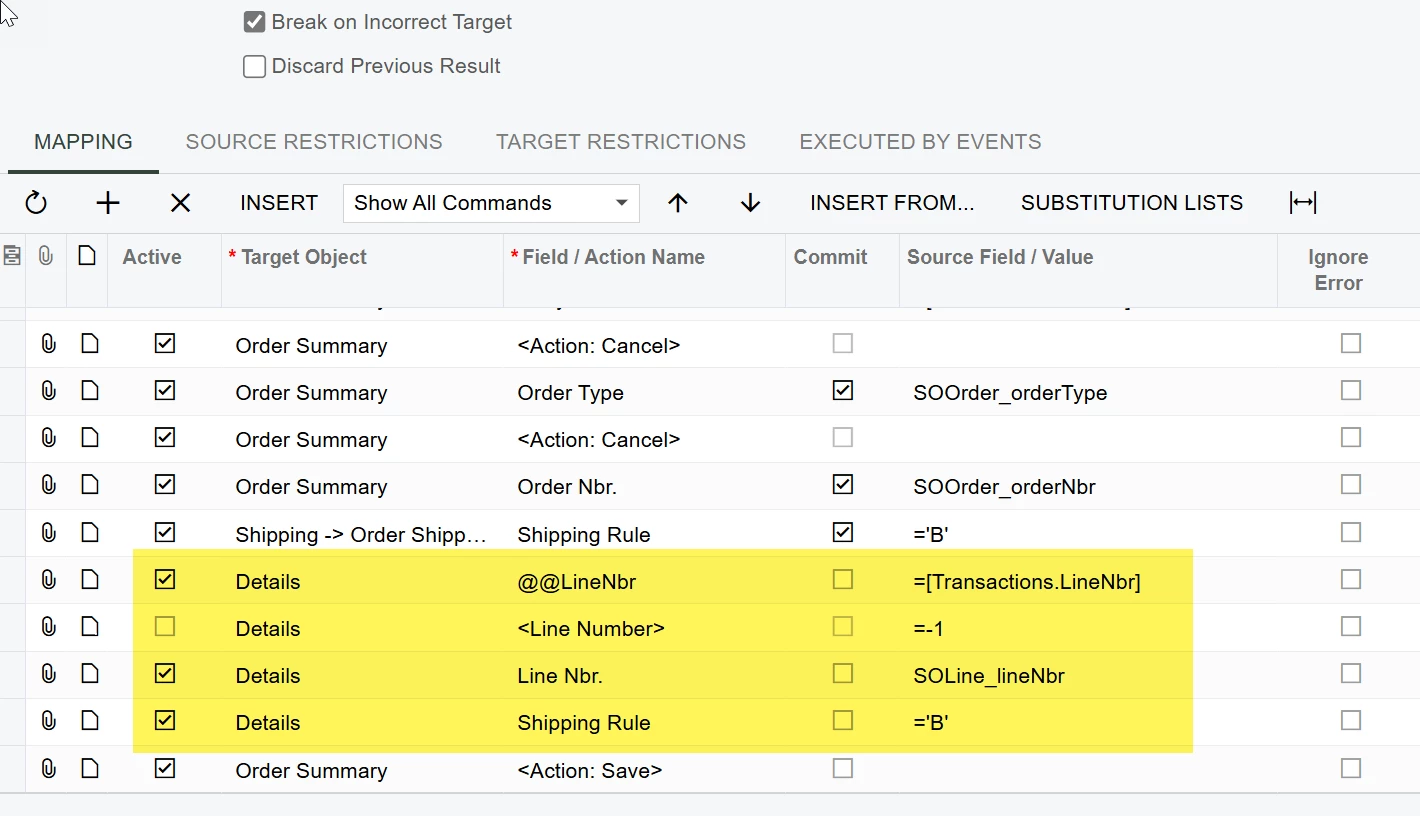
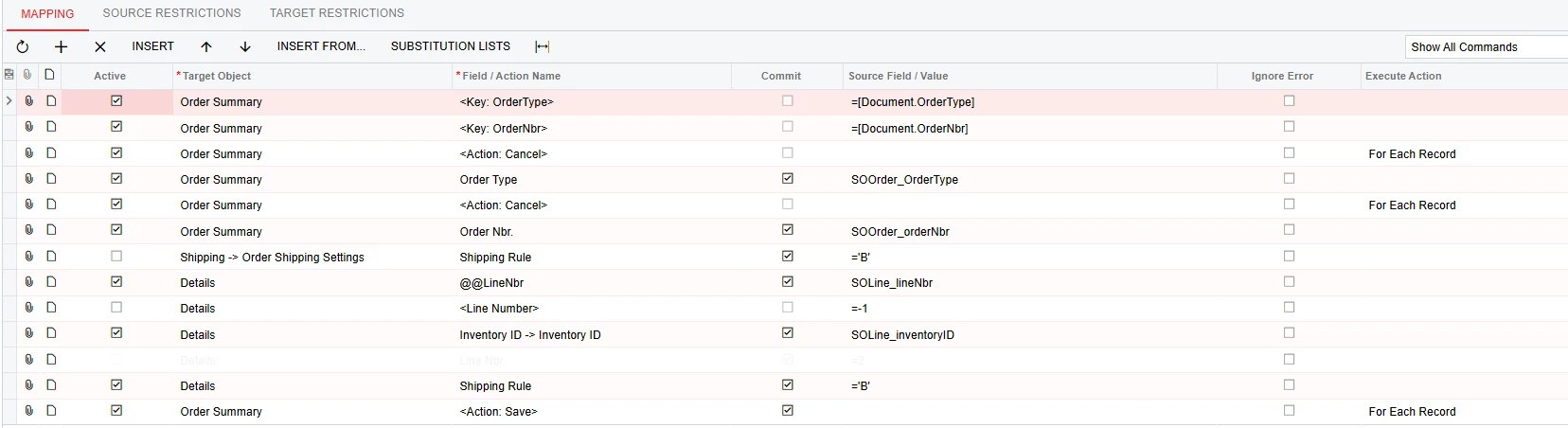
Your import scenario should look like this...


DipakNilkanth
Pro III
Forum|alt.badge.img+13
  • Author
  • Pro III
  • October 14, 2025

Hi ​@bwhite49,

Thanks for your response on this.
I tried the same configuration as shown in your screenshot, but unfortunately, it still updates the Shipping Rule only for the first line of the sales order detail line and not for the other lines.

Is there anything else I might be missing in the import scenario setup to make it loop through and update each SOLine properly?

Appreciate your help and time!

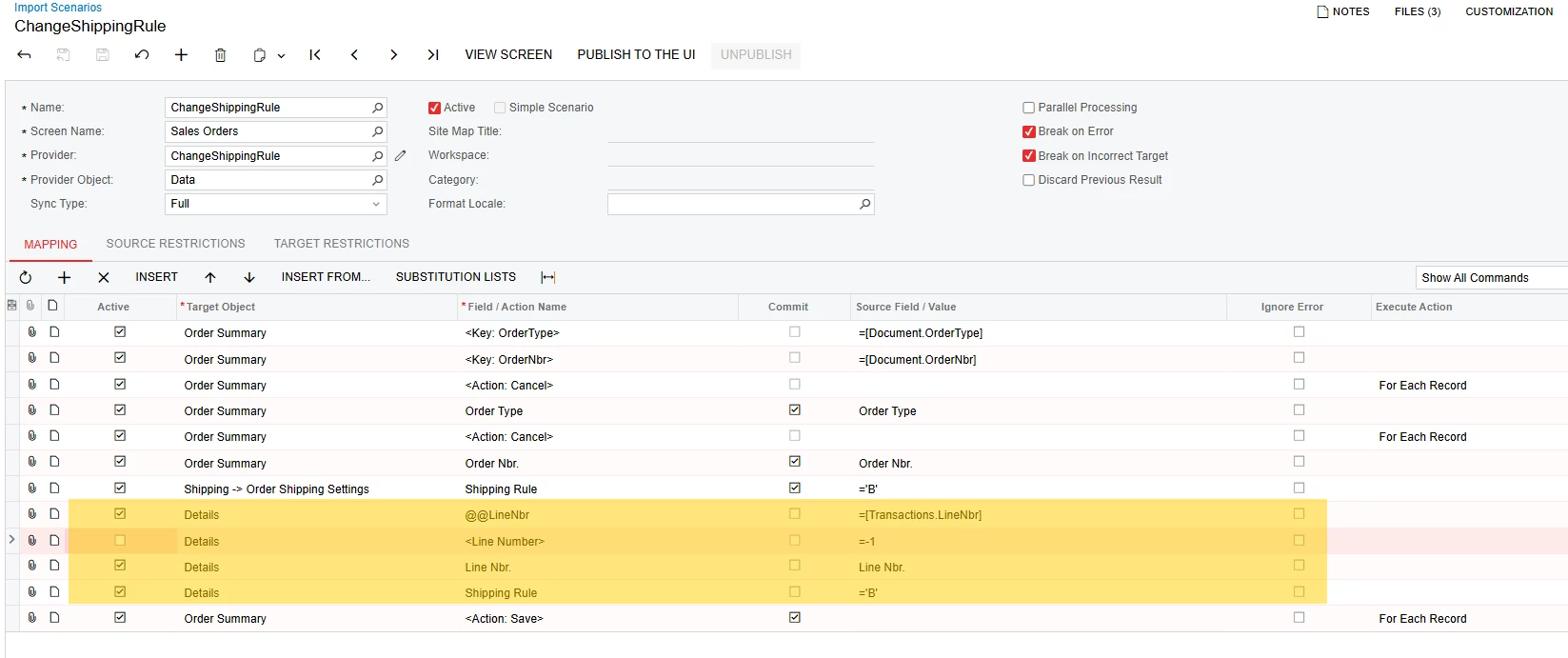
Import Scenario :

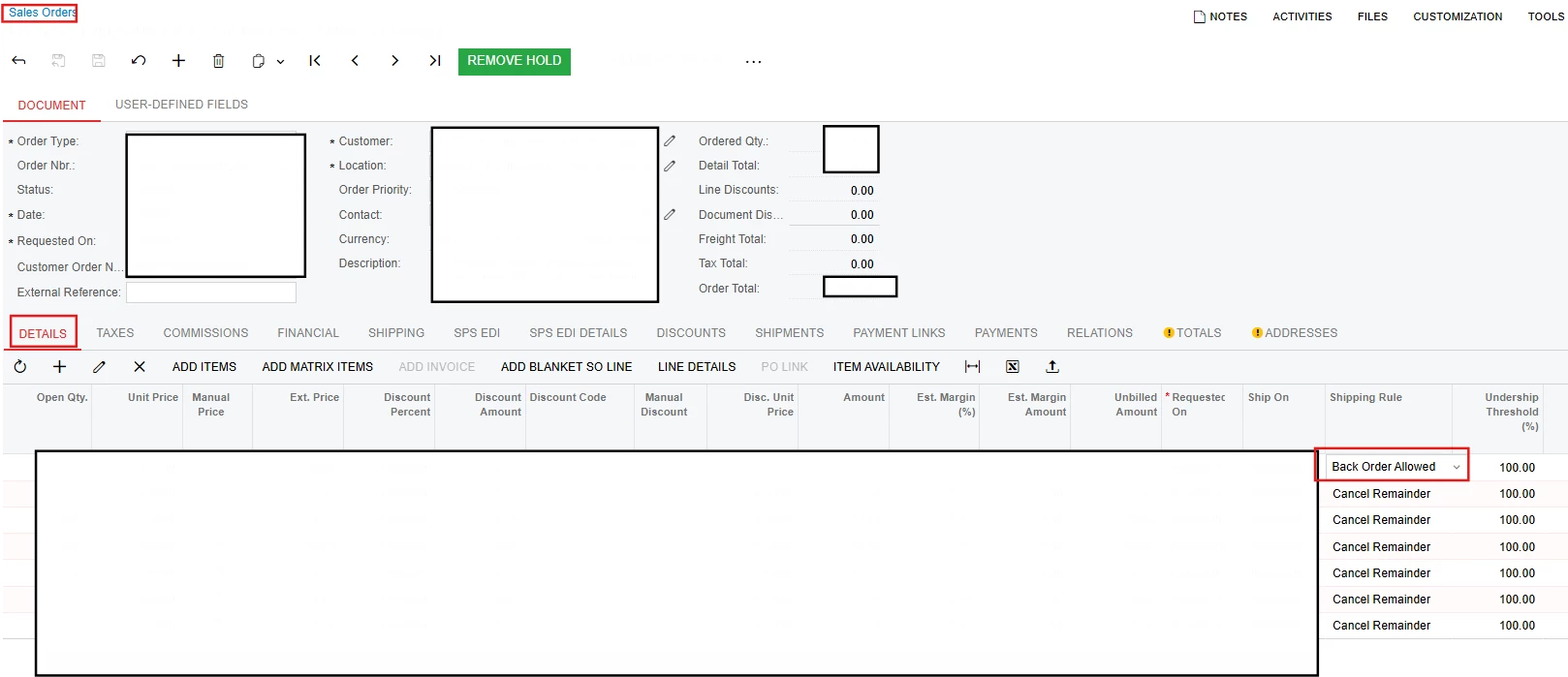
hers is the result.


Manikanta Dhulipudi
Captain II
Forum|alt.badge.img+15

@DipakNilkanth 

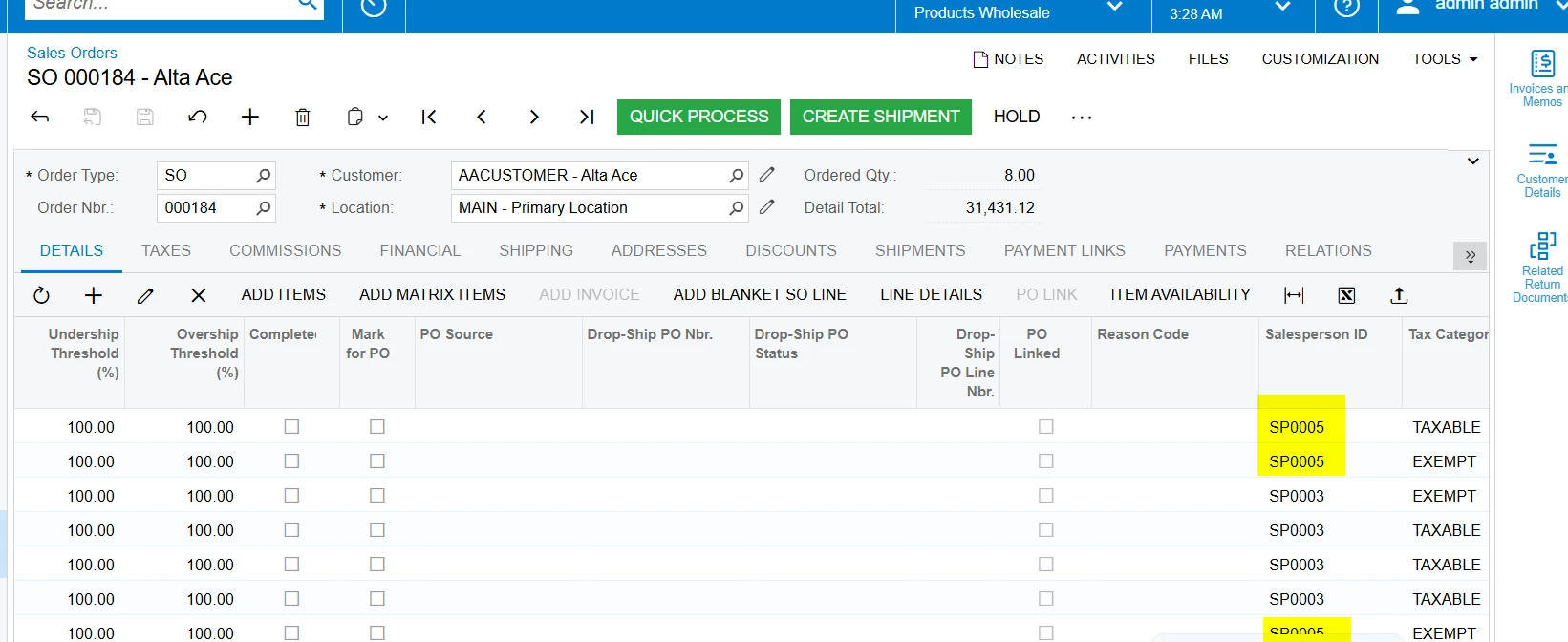
Using the import scenario below, I am able to import salesperson information at the line level.

Attached is a sample file which originally contains the salesperson “SP0003”. After running the import, I am able to successfully update it to SP0005.

Please review and let me know if you have any questions.


DipakNilkanth
Pro III
Forum|alt.badge.img+13
  • Author
  • Pro III
  • October 14, 2025

Hi ​@Manikanta Dhulipudi,

I reviewed your import scenario and noticed that the Sales Order Nbr is hardcoded, and the Excel file does not contain the OrderNbr field to pass dynamically.

In my case, I exported all sales orders using the Export button from the Sales Orders screen, so my Excel file does not include all line details.

Do I need to include each SOLine (sales order line) in the Excel file to update the Shipping Rule for each line, or is there another approach to update all lines for multiple orders through an import scenario?

Thanks in advance for your help!


bwhite49
Captain II
Forum|alt.badge.img+10
  • Captain II
  • Answer
  • October 14, 2025

Hi ​@Manikanta Dhulipudi,

I reviewed your import scenario and noticed that the Sales Order Nbr is hardcoded, and the Excel file does not contain the OrderNbr field to pass dynamically.

In my case, I exported all sales orders using the Export button from the Sales Orders screen, so my Excel file does not include all line details.

Do I need to include each SOLine (sales order line) in the Excel file to update the Shipping Rule for each line, or is there another approach to update all lines for multiple orders through an import scenario?

Thanks in advance for your help!

Yeah, you will need to have SOLine LineNbr exported out to loop through each line.

You can replace the @@LineNbr with @@InventoryID (or any field for that matter) and map to transactions.inventoryID, but you will only update the first item that matches that inventory ID on the SO line. If the inventory item exists 2 or 3 times on the sales order, it will only update the first record. Not all matches.

This is why it is best to use SOLine.LineNbr, because it’s a unique value to each line. You are basically turning LineNbr into a key field to update that specific line. 


DipakNilkanth
Pro III
Forum|alt.badge.img+13
  • Author
  • Pro III
  • October 14, 2025

Hi ​@bwhite49 , ​@Manikanta Dhulipudi  Thank you for your help — I really appreciate your time on this.

To resolve this, I created a new Generic Inquiry that includes the detail lines (with LineNbr) and added this GI as the Data Provider source in the import scenario. Then, I used the following mappings to successfully update the records.