Question

Time Card - Import Scenario - Submit after Save error

  • March 21, 2026
  • 4 replies
  • 33 views

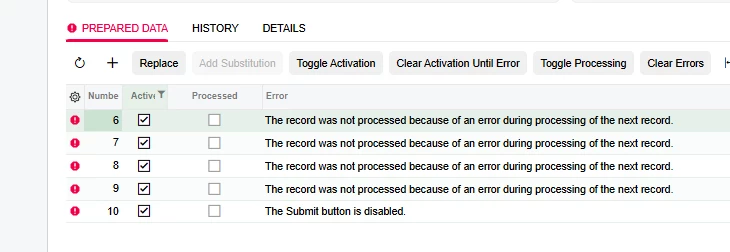
I cannot seem to resolve the error ‘The Submit button is disabled’.

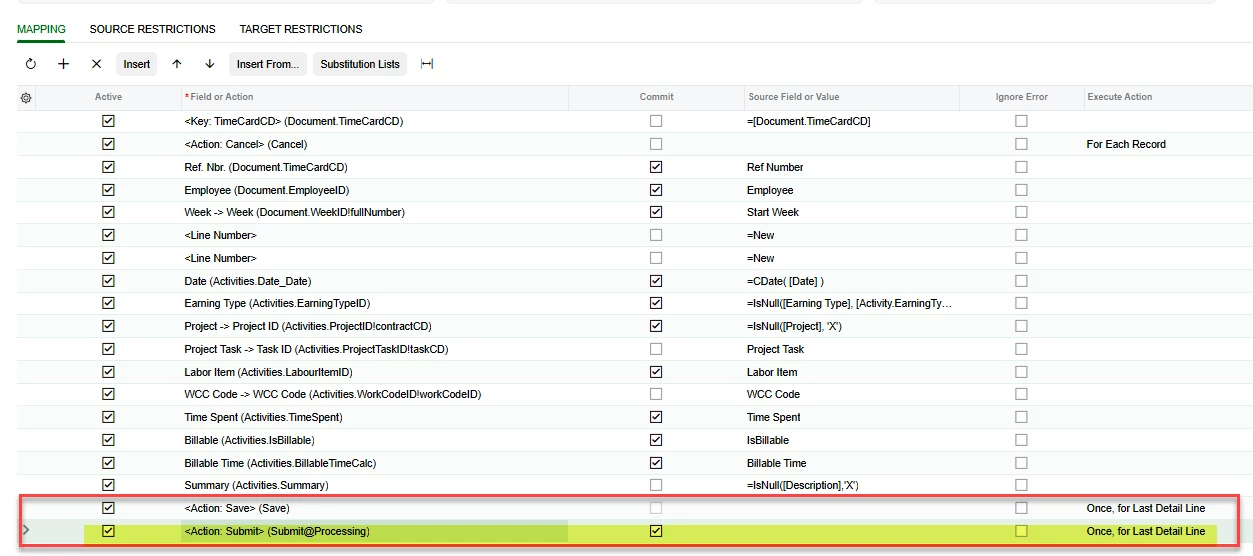
If the Submit action is removed, the time card Save creates and saves the time card as expected.

I have tried many options in the scenario to continue to Submit without any luck (different flags, different Submit action, etc.). Any suggestions on how to resolve? Attaching the XML also.
 

4 replies

mohammadnawaz51
Jr Varsity II
Forum|alt.badge.img+6

@lcurl Did you try only submitting option?


  • Author
  • March 22, 2026

Yes. Removing Save and using Submit only does not resolve.


KrunalDoshi
Varsity I
Forum|alt.badge.img
  • Varsity I
  • March 25, 2026

Hi ​@lcurl,

Thanks for uploading the Import Scenario XML. That has helped me to analyze the issue. I have tried few things at my end to run Save and Submit in Import Scenario. However, I do not think it will work. You will have to Save the Time Card first scenario and create another scenario or processing screen to Submit timecards. Hope that helps.

Here is what I have tried. I have added <Action: Cancel> after save and tried to select the same Time Card with Ref Number.


  • Author
  • March 25, 2026

@KrunalDoshi  - Thank you for trying. I also tried what you tried without luck. I did end up creating a separate process to submit the time cards - so we both reached the same conclusion. Thanks again.