Answer

Set stock items as inactive once quantity hits zero

  • November 21, 2024
  • 9 replies
  • 154 views

Forum|alt.badge.img

Hi Everyone,

I am working on a requirement to automatically change the status of a stock item to inactive once its quantity reaches zero across all warehouses. I successfully created a business event that triggers when this occurs, and I added an email notification as a subscriber, which is working fine. However, I am facing an issue with the import scenario that should automatically update the item's status. Does anyone have any suggestions on how to achieve this?

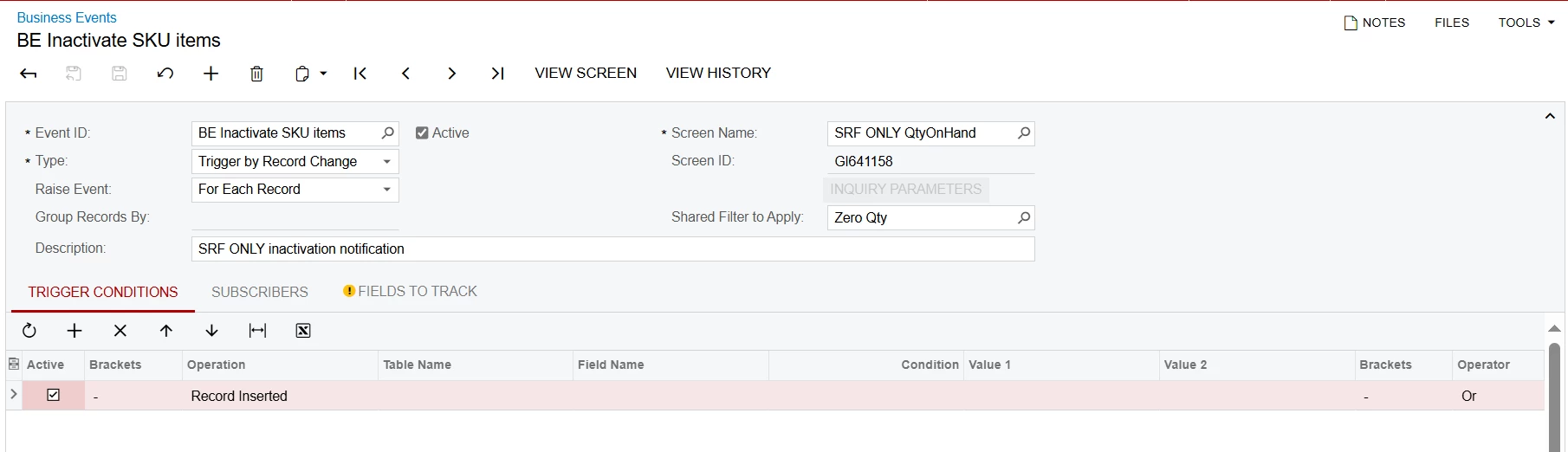
This is how the BE is set up
 

Best answer by DipakNilkanth

Hi ​@lorach,

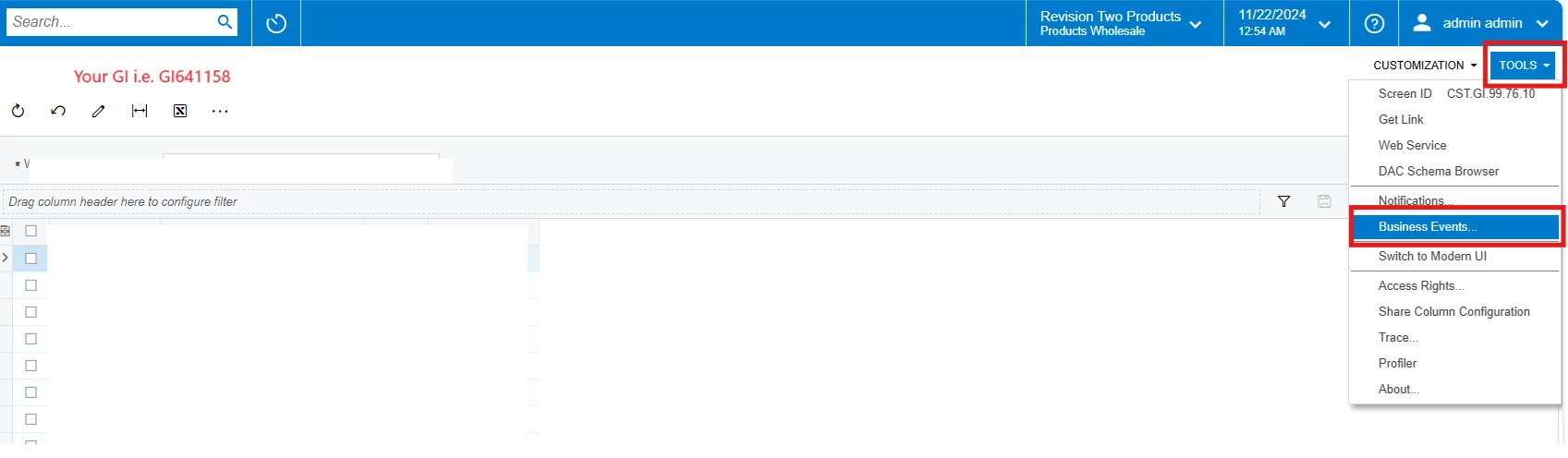
  1. You need to create a business Event from that specific GI using Tools→ Business events as below.
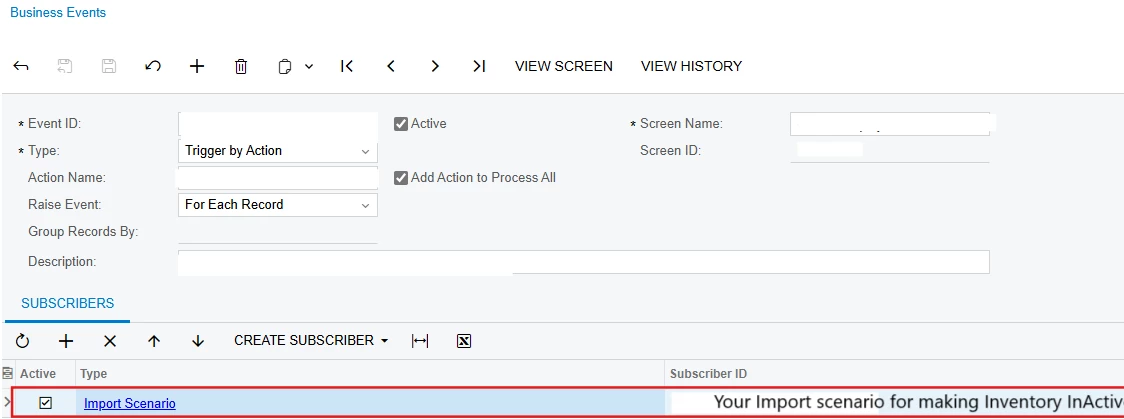
  2. Create business event with following settings.

           1. Trigger Conditions tab : Add trigger conditions like Operation = New field value and selects Quantity field in Field column which equals to 0.


           2. Create Subscriber Tab: Use Create Subscriber Action to create import scenario as subscriber and do the mappings as previous , it will take our GI as a Data Provider, So do not need to create Provider again.


I have attached test files, check and make changes as per your requirement.


Hope, it helps!

9 replies

DipakNilkanth
Pro III
Forum|alt.badge.img+13

Hi ​@lorach,

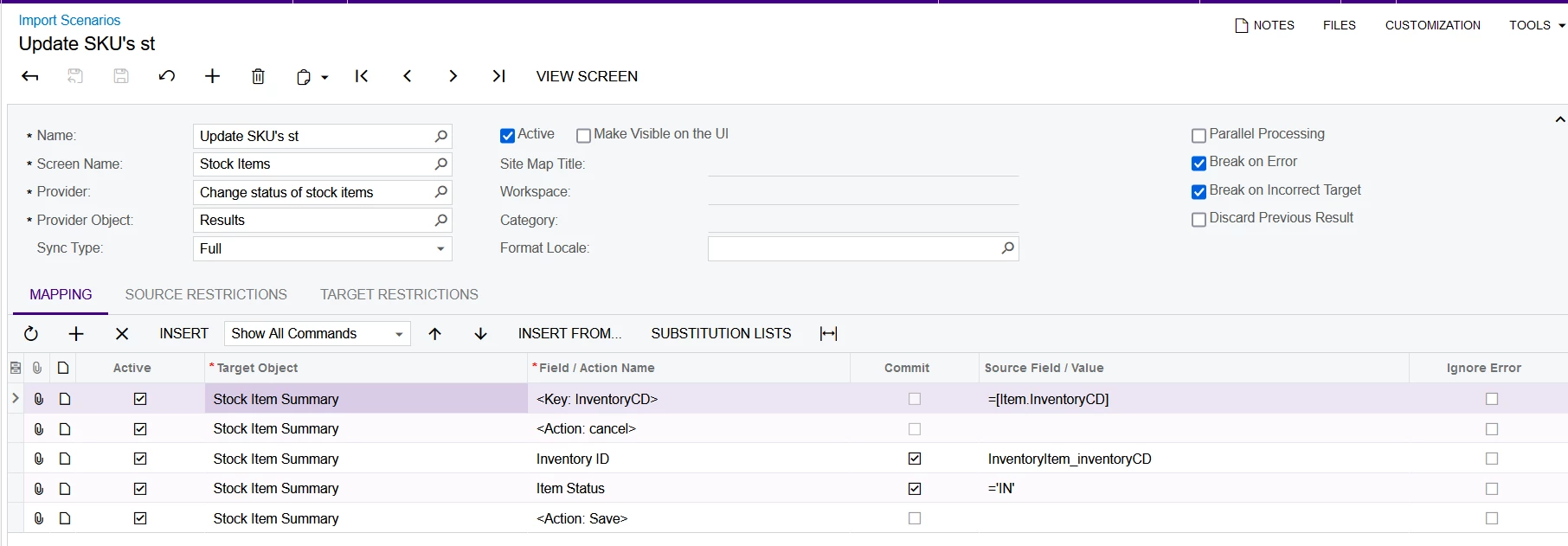
To update the status of an inventory item to Inactive, you need to create an Import Scenario for Stock Items that updates the status field accordingly.

This Import Scenario will be attached as a Subscriber to a Business Event, ensuring that the Import Scenario is triggered whenever the Business Event is executed.


Hope, it helps!


Forum|alt.badge.img
  • Author
  • Jr Varsity II
  • November 21, 2024

Hi ​@Dipak Nilkanth 

The issue I am experiencing is how to correctly set up the import scenario. I have set one up, but it isn’t being triggered. Perhaps you could guide where I went wrong.


DipakNilkanth
Pro III
Forum|alt.badge.img+13

@lorach , Could you please attach your import scenario here?


DipakNilkanth
Pro III
Forum|alt.badge.img+13

Hi ​@lorach,

Kindly find the attached import scenario to InActive the Stock items. I have tested and looks fine to me.

Make sure to add this import scenario as an Subscriber to the Business event, so it will triggered when BE is triggered.
 

Hope, it helps!


Forum|alt.badge.img
  • Author
  • Jr Varsity II
  • November 22, 2024

Hi ​@Dipak Nilkanth 

Thank you for the quick response. I have attached the import scenario I had configured before. However, I noticed that I cannot add the import scenario you provided on the backend I am using. It seems to only allow scenarios that have a data provider classified as a "Business Process Provider." Is that correct?


Forum|alt.badge.img
  • Author
  • Jr Varsity II
  • November 22, 2024

Hi ​@Dipak Nilkanth 

I have also attached the BE below where I have added the import scenario I have shared above, though it seems to only be triggered once I manually change the status


DipakNilkanth
Pro III
Forum|alt.badge.img+13
  • Pro III
  • Answer
  • November 22, 2024

Hi ​@lorach,

  1. You need to create a business Event from that specific GI using Tools→ Business events as below.
  2. Create business event with following settings.

           1. Trigger Conditions tab : Add trigger conditions like Operation = New field value and selects Quantity field in Field column which equals to 0.


           2. Create Subscriber Tab: Use Create Subscriber Action to create import scenario as subscriber and do the mappings as previous , it will take our GI as a Data Provider, So do not need to create Provider again.


I have attached test files, check and make changes as per your requirement.


Hope, it helps!


Forum|alt.badge.img
  • Author
  • Jr Varsity II
  • November 27, 2024

Hi ​@Dipak Nilkanth 

Thank you so much for your help! It finally worked. For the past few days, I have been testing it without any luck. I realized that the GI I was using had a grouping, which was causing issues with the BE not working as expected. Once I removed the grouping, everything went smoothly. I appreciate your time! 🤝


DipakNilkanth
Pro III
Forum|alt.badge.img+13

@lorach, Thank you for sharing your solution with Acumatica community.
Happy to hear that you have resolved your issue.