Answer

Service Order Import Scenario Generated By a Business Event Issue

  • May 9, 2024
  • 4 replies
  • 114 views

jaymarzian
Varsity I
Forum|alt.badge.img

Hey Folks,Hoping someone has tried to do this before.  I have everything working except that I can’t get the import scenario to work because of “Branch Location”.  When you run an Import by Scenario manually, Branch Location gets populated based on the one selected in your profile, but because the import scenario gets run by the triggered business event, it does not pick up any Branch Location.   I can’t even tell what Branch the system chooses to post the service order from.  

So, this is what I need:
1, Some way to select a Branch Location from the Import Scenario.  Something that can maybe search the field, and return the first value.

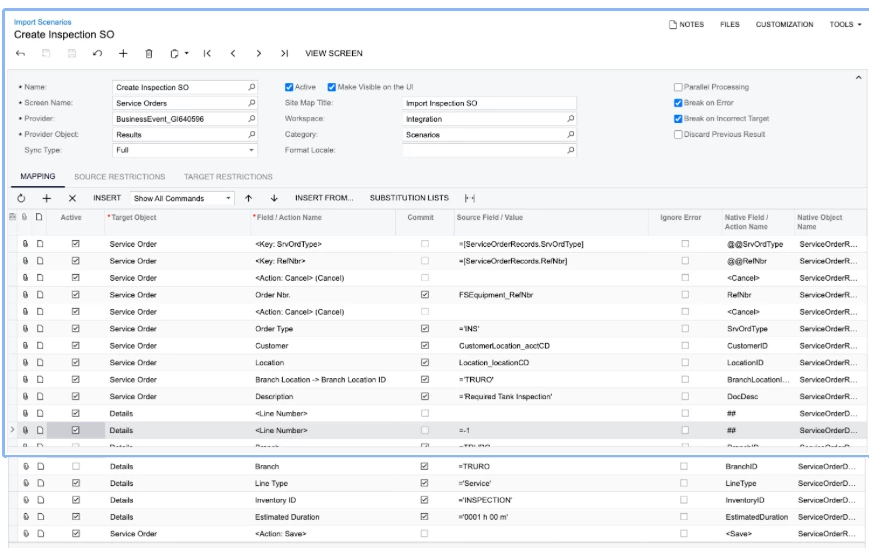
Here is my import scenario, I tried manually selecting my default BL, but to no avail:


Best answer by jaymarzian

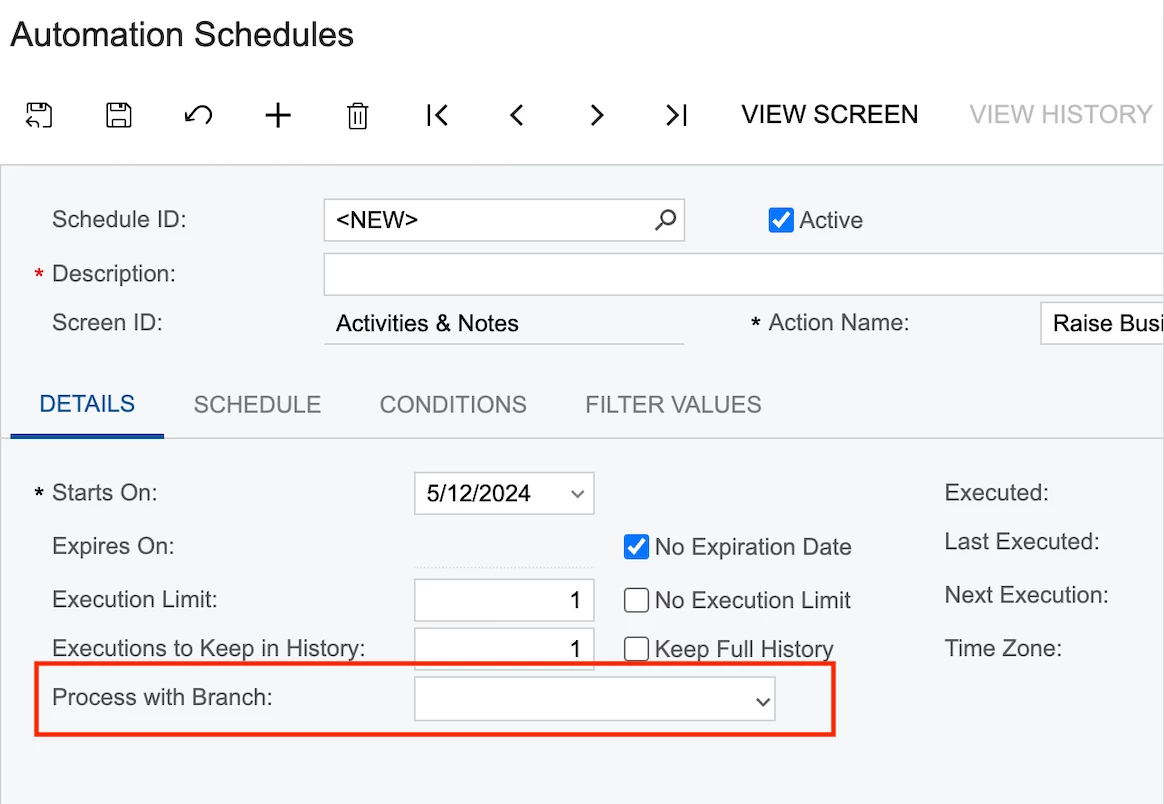
Okay, well.  Looks like I figured it out.   Within the business event, where you configure the schedule, you can specify the “Branch” that you want to run the import scenario under. This resolved my issue:


4 replies

craig2
Pro I
Forum|alt.badge.img+3
  • Pro I
  • May 9, 2024

Hi @jaymarzian ,

I don’t use that module but just something to try, have you thrown in the converted BranchID instead of the description?  I always have to do a quick ad hoc GI to figure it out, but if you CStr([WhateverTableYouHave.BranchID]), it will throw back the actual integer value rather than TRURO (e.g. ‘18’).  Then try using that.  I’ve run into a similar situation in other areas.


jaymarzian
Varsity I
Forum|alt.badge.img
  • Author
  • Varsity I
  • May 9, 2024

Hi @jaymarzian ,

I don’t use that module but just something to try, have you thrown in the converted BranchID instead of the description?  I always have to do a quick ad hoc GI to figure it out, but if you CStr([WhateverTableYouHave.BranchID]), it will throw back the actual integer value rather than TRURO (e.g. ‘18’).  Then try using that.  I’ve run into a similar situation in other areas.

Hey Craig!  No I have not.  I can try that….


jaymarzian
Varsity I
Forum|alt.badge.img
  • Author
  • Varsity I
  • Answer
  • May 12, 2024

Okay, well.  Looks like I figured it out.   Within the business event, where you configure the schedule, you can specify the “Branch” that you want to run the import scenario under. This resolved my issue:


Chris Hackett
Community Manager
Forum|alt.badge.img
  • Acumatica Community Manager
  • May 13, 2024

Thank you for sharing your solution with the community @jaymarzian!