Answer

Remove Warehouses with import scenario

  • September 3, 2024
  • 5 replies
  • 193 views

Hello.

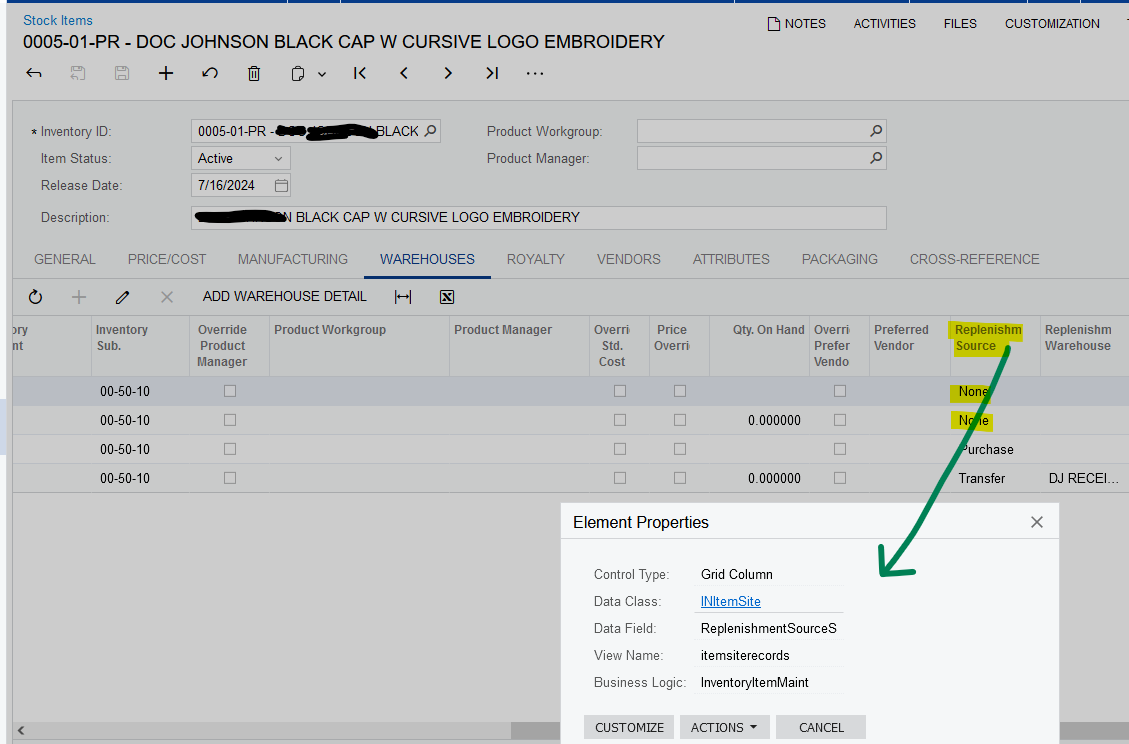
Is there any way to eliminate by import scenario the warehouses whose source is none?
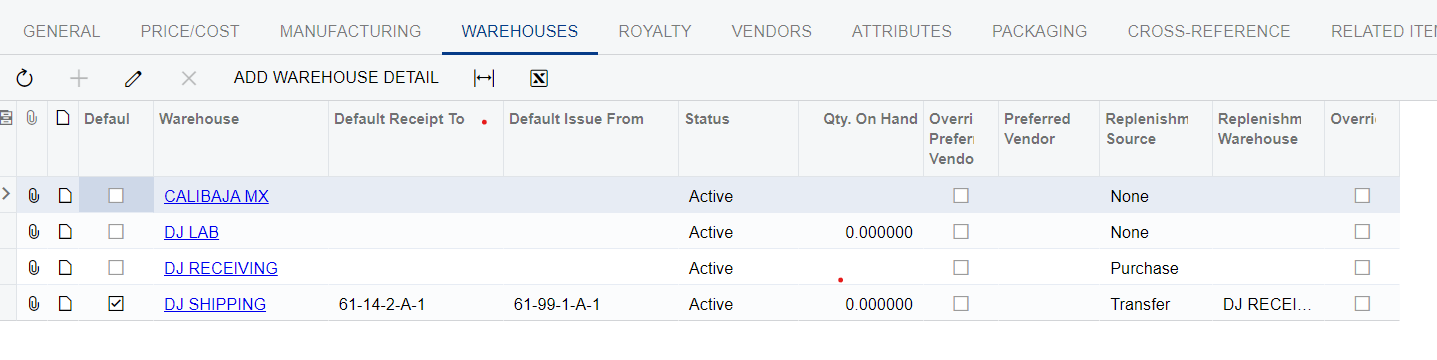
I'm not familiar yet with how to delete things.

Regards.

Best answer by BenjaminCrisman

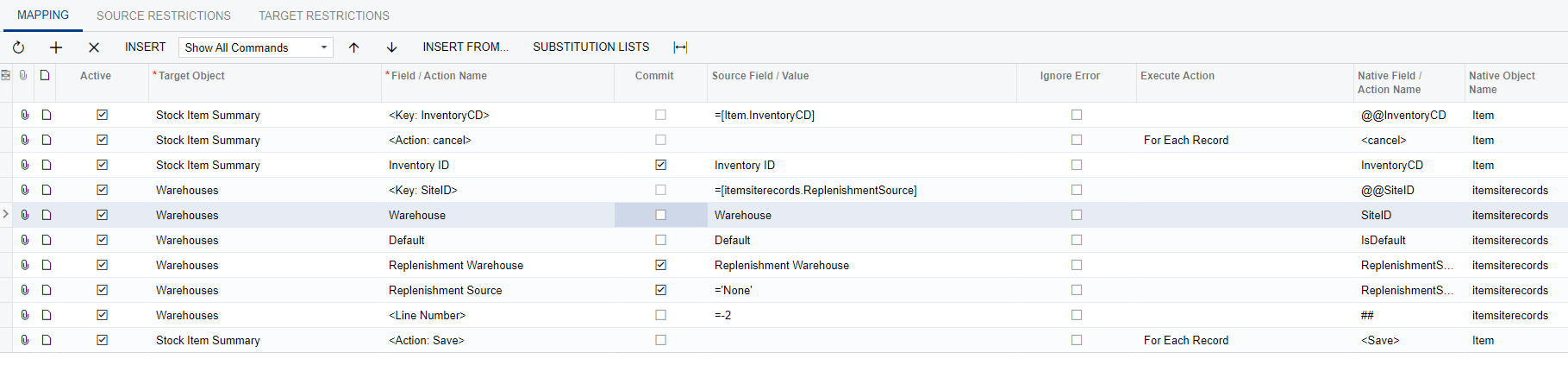
@JavierGtz I think you need to move the ( <Line Number> =-2 ) line up to below the line for <Key: SiteID>. Typically I always see the line number reference just below this and it works. Otherwise, if you are struggling with how to put together a data provider or configure the import on a base level then I would recommend the training and then have another crack at it.

5 replies

Laura03
Captain II
Forum|alt.badge.img+19
  • Captain II
  • September 3, 2024

Hello Javier,

Import Scenarios can be used to delete records. It seems like you are asking to delete lines from the Warehouses tab of Stock Items screen where Replenishment Source = None. The field you want to use in your condition is [INItemSite.ReplenishmentSourceS].

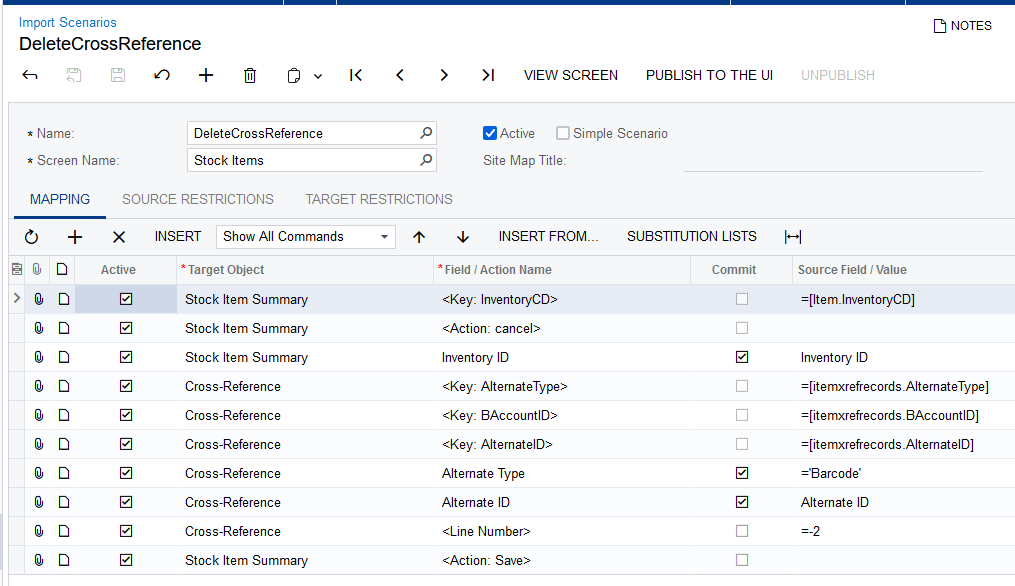
Here is an example Import Scenario that deletes from the Cross-Reference tab of Stock Items screen:

I looked at the Restrictions tabs of the above Import and I do not see where INItemSite.ReplenishmentSourceS is a candidate for use in the restrictions.

(Other community members will add to this post with additional suggestions for you.)


I recommend practicing Import - Delete action in your Test tenant. When it’s working correctly, the Import Scenario can be exported from the Test tenant and imported to the Live tenant.


Laura


Laura03
Captain II
Forum|alt.badge.img+19
  • Captain II
  • September 3, 2024

Hello @JavierGtz ,

I found an example on Acumatica Community for using  @@ in an Import Scenario to search by Fieldname and then delete the lines.  The example is deleting salesperson from a customer based on a certain customer location and salesperson ID:

I think the same idea can be used to remove replenishment lines where the Source = None.


Laura


  • Author
  • Freshman I
  • September 3, 2024

Hello Javier,

Import Scenarios can be used to delete records. It seems like you are asking to delete lines from the Warehouses tab of Stock Items screen where Replenishment Source = None. The field you want to use in your condition is [INItemSite.ReplenishmentSourceS].

Here is an example Import Scenario that deletes from the Cross-Reference tab of Stock Items screen:

I looked at the Restrictions tabs of the above Import and I do not see where INItemSite.ReplenishmentSourceS is a candidate for use in the restrictions.

(Other community members will add to this post with additional suggestions for you.)


I recommend practicing Import - Delete action in your Test tenant. When it’s working correctly, the Import Scenario can be exported from the Test tenant and imported to the Live tenant.


Laura


Hi Laura.

I'm not sure if I should upload a file or not, or what information that file (provider) should have. I tried this scenario, I run it and it says completed successfully but it doesn't actually delete anything.


Laura03
Captain II
Forum|alt.badge.img+19
  • Captain II
  • September 4, 2024

Hello Javier,

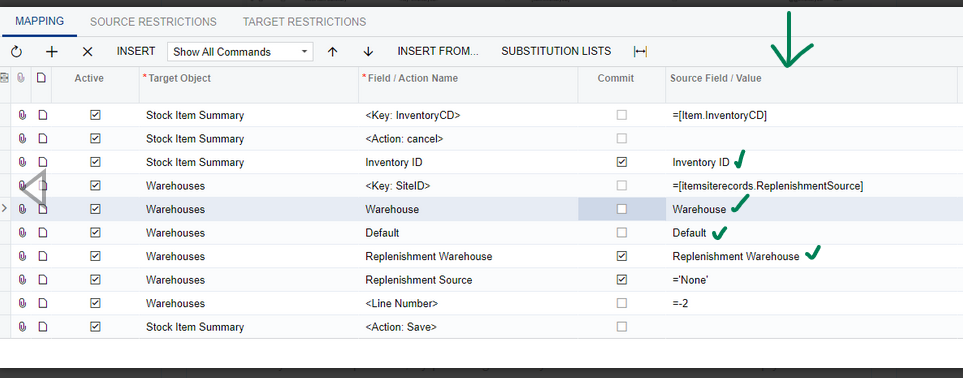
Based on your screenshot shown above, your Provider/Excel file will contain the Inventory ID, Warehouse, Default, and Replenishment Warehouse columns.


To help you get started learning Import Scenarios, I recommend Acumatica Open University. Use the Search tool to search Open University for Import Scenarios training.

Laura


BenjaminCrisman
Acumatica Employee
Forum|alt.badge.img+4
  • Acumatica Support Team
  • Answer
  • September 9, 2024

@JavierGtz I think you need to move the ( <Line Number> =-2 ) line up to below the line for <Key: SiteID>. Typically I always see the line number reference just below this and it works. Otherwise, if you are struggling with how to put together a data provider or configure the import on a base level then I would recommend the training and then have another crack at it.