Question

join

  • August 16, 2025
  • 20 replies
  • 220 views

Forum|alt.badge.img

Hi Acumatica Community,

I have been struggling with a very simple import of a newly created attribute that has been assigned to all of my customer classes.

I consistently get this error:

Error: The class does not have the INFLUENCE attribute. Make sure the attribute name is correct or consider adding the attribute to the class.


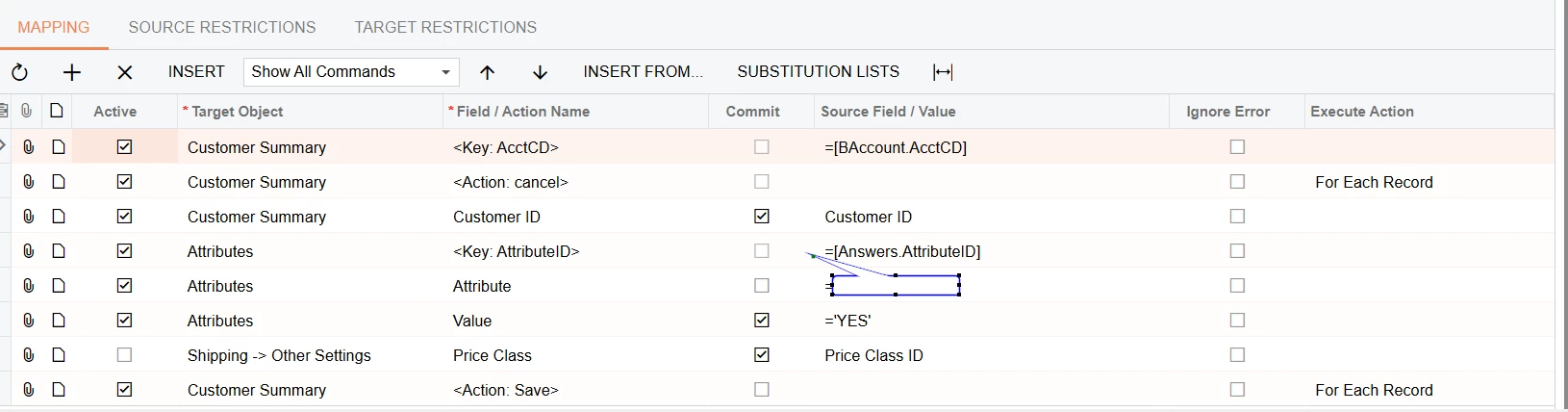
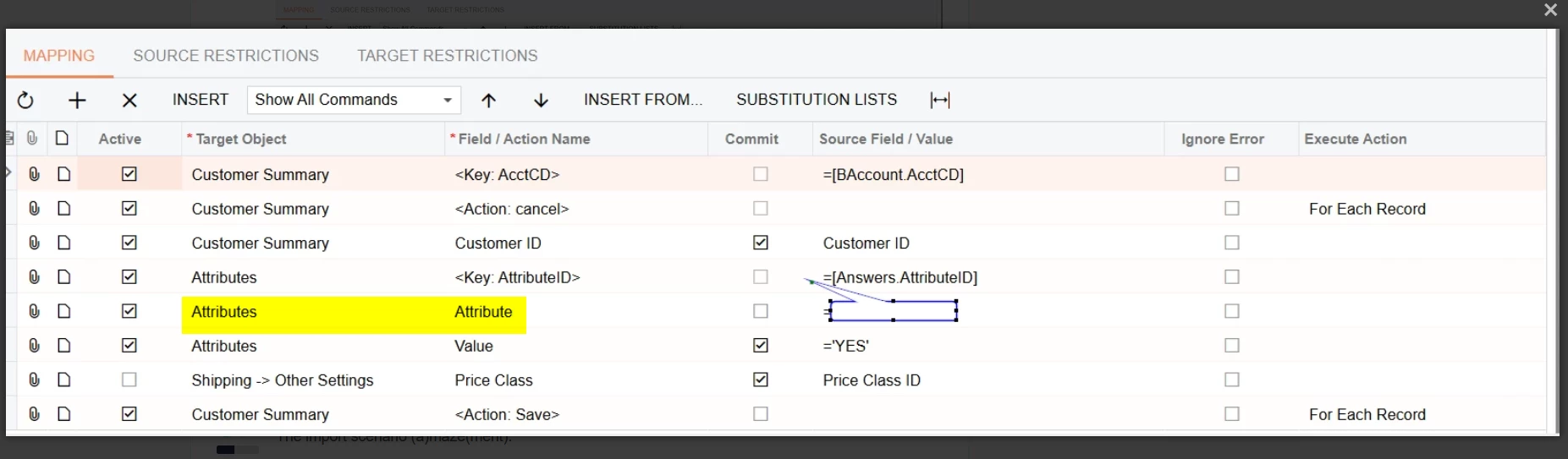
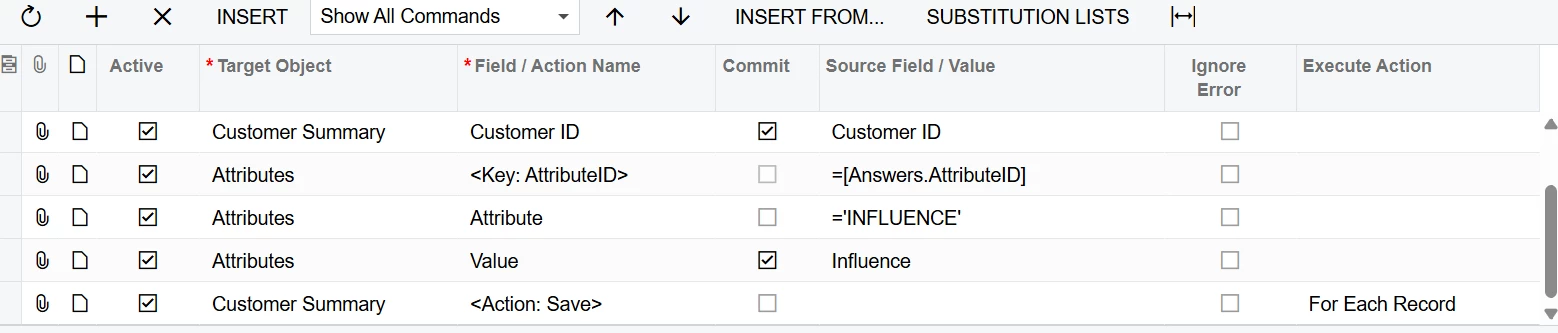
This is my import scenario mapping:
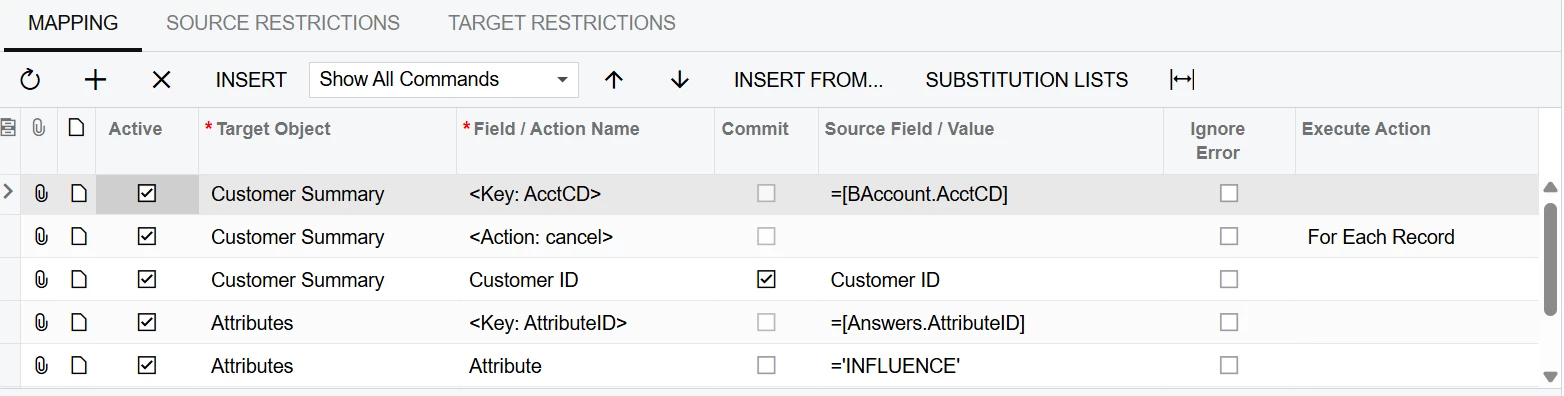
 

Image continued:


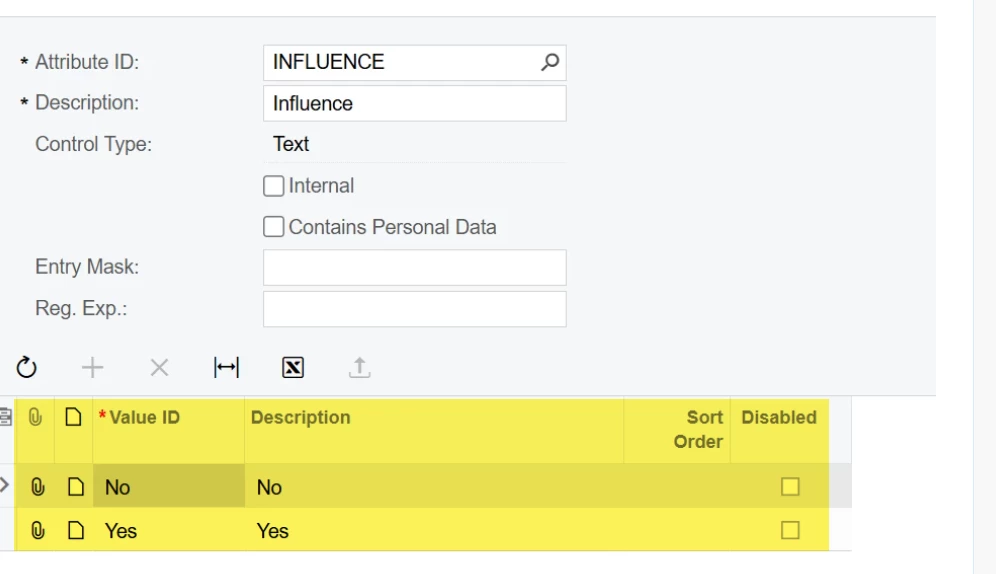
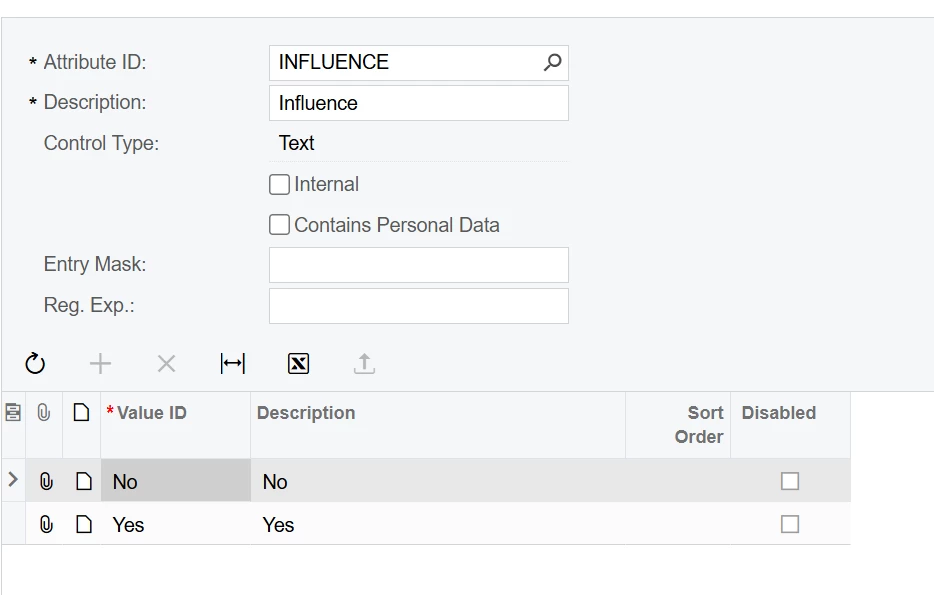
This is my new attribute:
 

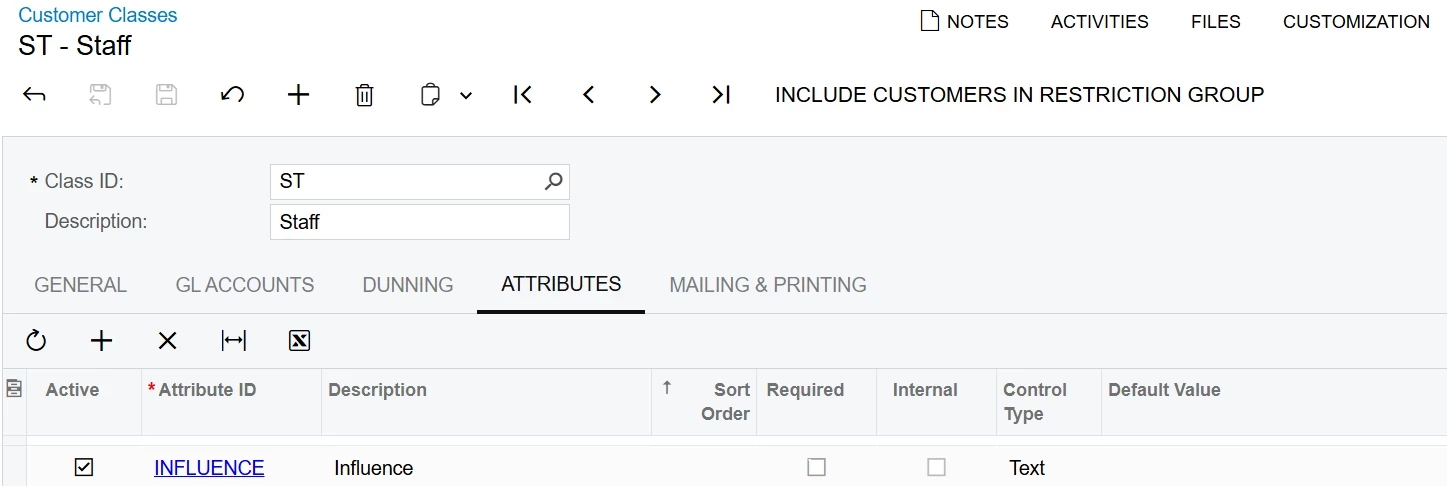
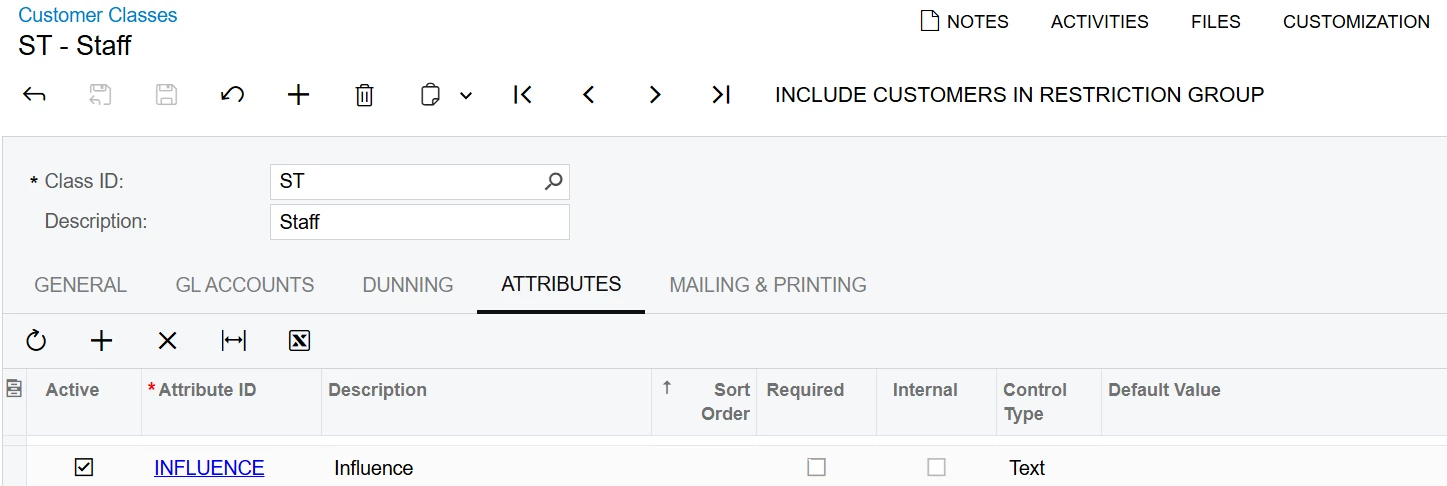
Here is my attribute assigned to my customer class:


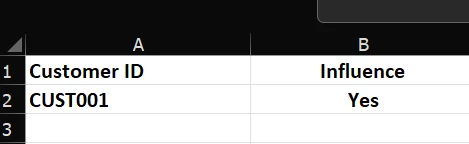
Lastly, here is my data provider excel with a dummy customer:
 

I have watched all the webinars on this and copied them exactly. I even have a similar import scenario that works for a different attribute so I am really hoping the community can help.


Thank you

 

20 replies

JSpikowski
Jr Varsity II
Forum|alt.badge.img
  • Jr Varsity II
  • August 16, 2025

Does the new attribute show up when doing a REST $adHocSchema call?


Forum|alt.badge.img
  • Author
  • Freshman I
  • August 17, 2025

Hi JSpikowski,


I have attached the response from the adHocSchema call as a text file. I dont see any of my custom attributes in the response. I used the call as specified in one of your other posts:


I am not sure whether this is the expected behavior or not.

Thank you


JSpikowski
Jr Varsity II
Forum|alt.badge.img
  • Jr Varsity II
  • August 17, 2025

That doesn't look good.

I don't use import scenarios, only REST.

Hopefully someone else will chime in with an answer for you.


JSpikowski
Jr Varsity II
Forum|alt.badge.img
  • Jr Varsity II
  • August 17, 2025

Hope this helps.

Yes, you can add a custom field called "Traumatic" within an Acumatica import scenario to map and update data in your system. However, the process involves two main parts:

  1. Creating the custom field in Acumatica: This is the first step before you can use the custom field in an import scenario. You'll need to use the Customization Manager to add the "Traumatic" field (likely a checkbox) to the relevant screen or data access class (DAC) where you want to store this information. You'll define the field's properties, such as the display name ("Traumatic") and data type (e.g., Boolean for a checkbox). You might choose to use User-Defined Fields (UDFs) for simplicity, or DAC extensions for more complex scenarios, according to the Acumatica Community. Remember to save and publish your customization project to make the new field available in the system.
  2. Mapping the custom field in the import scenario: Once the "Traumatic" field is created, you can then:
    • Open your existing import scenario (or create a new one): You'll need to specify the screen name where the records will be directed.
    • Map the field: In the import scenario's mapping section, you'll see a list of target objects and fields. You'll add a row for your new "Traumatic" field. In the "Field / Action Name" column, you should be able to select your custom field (likely named using the "Usr" prefix, for example, UsrTraumatic).
    • Specify the source: In the "File or Value" column, indicate the column from your spreadsheet (or other data provider) that contains the "Traumatic" data you want to import. 

Important Considerations:

  • Data Type Matching: Ensure the data type of the "Traumatic" column in your source file (e.g., "True" or "False", or "1" or "0" for a Boolean) is compatible with the data type you defined for the custom field in Acumatica.
  • Location of the Custom Field: Be aware of where you added the custom field in Acumatica (e.g., on a specific screen or within a particular tab) as this influences where you'll find it when mapping in the import scenario.
  • Troubleshooting: If you encounter issues (e.g., the data isn't importing correctly), refer to the Acumatica community forums for troubleshooting tips. 

By following these steps, you can successfully add a "Traumatic" custom field and use an import scenario to populate this field with data in your Acumatica system. 


Forum|alt.badge.img
  • Author
  • Freshman I
  • August 17, 2025

Thanks JSpikowski,

I appreciate the assistance and the information. I am still quite confused as this isn’t a custom field, but rather an attribute defined within Acumatica’s attributes screen. I wouldn’t have thought that adding them to import scenarios would be so complicated or require “Customization”.

Am I perhaps misunderstanding?


JSpikowski
Jr Varsity II
Forum|alt.badge.img
  • Jr Varsity II
  • August 17, 2025

Attributes are  a 'field' in your data structure. Notice the other attribute fields in your schema you posted.


JSpikowski
Jr Varsity II
Forum|alt.badge.img
  • Jr Varsity II
  • August 18, 2025

Have thought about using a custom field that already exists in the schema to hold your attribute like field?


Manikanta Dhulipudi
Captain II
Forum|alt.badge.img+15

@KyranW 

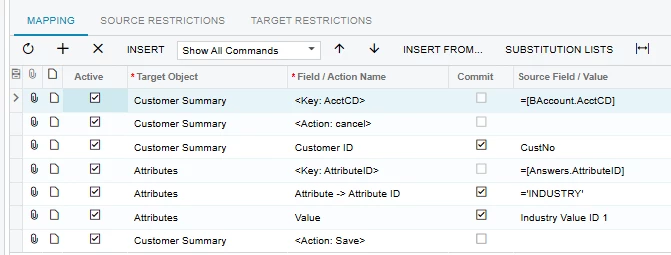
Please find the Import scenario


JSpikowski
Jr Varsity II
Forum|alt.badge.img
  • Jr Varsity II
  • August 18, 2025

The import scenario (a)maze(ment).

Too manual of a method for me.


Forum|alt.badge.img
  • Author
  • Freshman I
  • August 18, 2025

Thanks ​@Manikanta Dhulipudi,


Unfortunately that still isn’t solving the error on my side. Does the addition of the Price Class ID change the behavior of the import?


Error:

Field: Value, Value: Yes, Error: The class does not have the INFLUENCE attribute. Make sure the attribute name is correct or consider adding the attribute to the class.


Forum|alt.badge.img
  • Jr Varsity III
  • August 18, 2025

It looks like the attribute needs to be added to your customer class.  Go into the customer class, Attributes tab and add in INFLUENCE.  


Forum|alt.badge.img
  • Author
  • Freshman I
  • August 19, 2025

Thanks ​@kmuczynski54,

It already is added to my customer class attributes. Its in my first message but I have included it here again. 

This is the main reason for reaching out to the community, because this error message doesn’t make sense with regards to my setup.


mohammadnawaz51
Jr Varsity I
Forum|alt.badge.img+4

@KyranW Are you able to Update manually?


Forum|alt.badge.img
  • Author
  • Freshman I
  • August 19, 2025

@mohammadnawaz51 yes I can update the attribute manually.


Forum|alt.badge.img
  • Jr Varsity III
  • August 19, 2025

Apologies for not understanding fully.  Here is what mine looks like.

The difference in mine is the Field/Action Name for the Attribute ID.  This difference may be due to version, though.  But, something to consider.


mohammadnawaz51
Jr Varsity I
Forum|alt.badge.img+4

@kmuczynski54 


Did you try ​@Manikanta Dhulipudi.old  suggestion.


Forum|alt.badge.img
  • Author
  • Freshman I
  • August 20, 2025

Thanks ​@mohammadnawaz51 and ​@kmuczynski54,


I have tried both of these but neither seem to work. I am on Acumatica 2024 R2 build 24.209.0013 and I am beginning to suspect that this problem may be more complex than just my mapping.


bwhite49
Captain II
Forum|alt.badge.img+10
  • Captain II
  • August 20, 2025

I think you may have broke the attribute. 

You should not have any data in the CSAttributeDetails table with a text attribute. Looks like you may have changed the control type at one point and that may be causing issues.

I would recreate the attribute with the control type of “Combo” vs “Text” and then add the same values in the lower grid. Apply this new attribute to the item class and then try the import again with this new combo attribute.

You could also try and edit the existing attribute by removing from the customer class, and then changing the control type back to combo. The control type becomes editable again when unassigned.


Forum|alt.badge.img
  • Author
  • Freshman I
  • August 21, 2025

Thank you all for the suggestions, 

I have removed the attribute, recreated it and rebuilt the data provider and import scenario, however I still get the same error.

I will reach out to our Acumatica partners for the answer to this strange problem.


Chris Hackett
Community Manager
Forum|alt.badge.img
  • Acumatica Community Manager
  • September 25, 2025

Hi ​@KyranW were you able to find a solution? Thank you!