

Solved

Is there a specific format or configuration required to import multiple values into a multi-select attribute?

  • August 18, 2026
  • 2 replies
  • 51 views

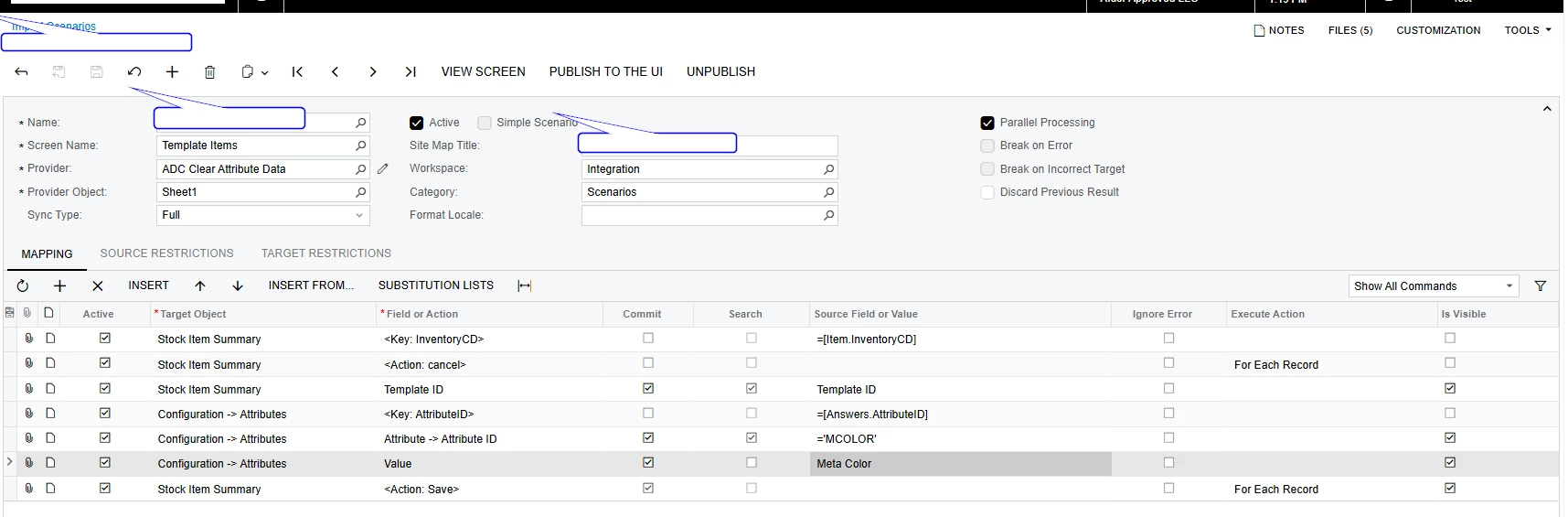
I am working on a simple Import Scenario that was previously functioning as expected. However, I am currently unable to update a multi-select attribute through the Import Scenario.

I can update and select multiple attribute values manually without any issues, but the same values are not being updated when processed through the Import Scenario. I have tested using both the Value ID and Description, but neither approach is updating the multiple selections.

Could you please advise if there is a specific format or configuration required to import multiple values into a multi-select attribute?


Best answer by Manikanta Dhulipudi

@Adcirruserp 

Please review the below examples.

https://community.acumatica.com/import-and-export-scenarios-221/webinar-common-examples-of-import-scenarios-206?tid=206&fid=221

2 replies

smilner3
Varsity III
Forum|alt.badge.img+1
  • Varsity III
  • August 18, 2026

Yes — there's a specific format.

For a Multi Select Combo attribute, all of the values go into a single source cell, separated by commas with no spaces after the commas, and they must be the Value IDs from the Attributes (CS205000) form — not the descriptions shown on the Attributes tab. You map that one column to the attribute's Value field and the system parses the list for you; you do not create one source row per selected value.

So the cell should look like RED,BLUE,GREEN — not RED, BLUE, GREEN and not Rudy Red,Baby Blue.

That's how it's stored internally too: the entire selection lives in one field as a comma-delimited list of value IDs, which is why the descriptions never take.

A few things to check on your scenario specifically:

  1. Commit must be selected on the attribute Value row — without it the attribute value isn't saved. It looks selected in your screenshot, so that's probably fine.
  2. Confirm the control type of MCOLOR on CS205000. If it's Combo rather than Multi Select Combo, only one value can ever be stored. Worth noting on Template Items specifically: attributes in the Variant category are required to use the Combo control type, so if MCOLOR is a Variant attribute, what you're selecting in the UI isn't a Multi Select Combo value list and won't import the same way.
  3. Do a round-trip test. Set the multiple values manually on one item and save, then look at what's actually stored in that Value field (a quick GI, or an export scenario on the same screen). Feed that exact string back in as your source value — if the round-trip imports cleanly, the problem is in how your source file is formatting the list.
  4. Check your key row. In the screenshot, <Key: AttributeID> is mapped to =[Answers.AttributeID] while Attribute -> Attribute ID is the constant ='MCOLOR'. If the source column doesn't also contain MCOLOR, you'd be positioning on one attribute row and then setting a different attribute ID. Is that intentional?
  5. Check the source cell for stray whitespace, and that value ID casing matches CS205000 exactly.

Manikanta Dhulipudi
Captain II
Forum|alt.badge.img+16

