Question

Importing into Customer Payment Methods (MaxQ)

  • October 3, 2025
  • 7 replies
  • 77 views

Client has businesses that change ownership, and when this happens, they generally have batches of customer payment methods that need to be entered into the system. This is tedious with all of the manual entry. They would like an import to get this done, I have gone through numerous revisions, and I am not making much progress.

Errors that I have received include

  1. Saying it processed but nothing added/updated
  2. Error message that a data field must contain information. (The import has the data for that field)
  3. Only updating the header information, not updating the details with the account information

I know this screen is notoriously a pain to import into, and I have done some updates before to the screen but nothing to this extent. Any assistance would be greatly appreciated as I just seem to be spinning my wheels.


Thank you in advance.

7 replies

Manikanta Dhulipudi
Captain II
Forum|alt.badge.img+15

@shooper10 Please check for import scenario mapping


  • Author
  • Freshman I
  • October 13, 2025

@shooper10 Please check for import scenario mapping


Thanks, but this doesn’t include of the details needed for ACH like banking information. Can you do so via the Customer screen?


Chris Hackett
Community Manager
Forum|alt.badge.img
  • Acumatica Community Manager
  • November 6, 2025

Hi ​@shooper10 were you able to find a solution? Thank you!


PaulMainard55
Captain I
Forum|alt.badge.img+2

@shooper10

It sounds like you’re trying to import to the Customer Payment Methods screen and not the Cusomer master screen, correct? 

This is indeed a tricky screen to import records into.  I’ve had some success importing credit card payment methods in the past, but have not tried Customer ACH data (presumably for direct debiting their bank accounts?).  Identifiying the appropriate schema can be challenging.  

Given that you’re importing this data into Acumatica, are you trying to restore existing tokens, or trying to create new tokens? 

If you’re creating new tokens, it could well be that the screen you’re trying to import to, is an applet pop-up screen of the payment processor and not necessarily a native Acumatica maintenance screen. It’s often a piece of middleware necessary to meet PCI compliance.  If this is the case, you might need to reach out to the payment processor to see if there’s a way to load this data into their vault to first generate the tokens, and then have them provide the token data to restore into Acumatica?

Have you reached-out to the guys at MaxQ?  I know ​that the guys there in their support can be quite helpful.  

I may have gotten this all wrong.  ​@Fran Parker (if I have the right guy), do you have any thoughts or insights on this?


  • Author
  • Freshman I
  • November 6, 2025

@shooper10

It sounds like you’re trying to import to the Customer Payment Methods screen and not the Cusomer master screen, correct? 

This is indeed a tricky screen to import records into.  I’ve had some success importing credit card payment methods in the past, but have not tried Customer ACH data (presumably for direct debiting their bank accounts?).  Identifiying the appropriate schema can be challenging.  

Given that you’re importing this data into Acumatica, are you trying to restore existing tokens, or trying to create new tokens? 

If you’re creating new tokens, it could well be that the screen you’re trying to import to, is an applet pop-up screen of the payment processor and not necessarily a native Acumatica maintenance screen. It’s often a piece of middleware necessary to meet PCI compliance.  If this is the case, you might need to reach out to the payment processor to see if there’s a way to load this data into their vault to first generate the tokens, and then have them provide the token data to restore into Acumatica?

Have you reached-out to the guys at MaxQ?  I know ​that the guys there in their support can be quite helpful.  

I may have gotten this all wrong.  ​@Fran Parker (if I have the right guy), do you have any thoughts or insights on this?

Thanks for the response. Yes, I am primarily using the Customer Payment Methods Screen first. After a recommendation from someone I went to the customer screen then after striking out there I went back to the customer payment method screen. Generally, I will either get the default error message that doesn’t tell you anything, a validation error (even though everything matches field validation, I turned that off to test it and it would process through but not update anything), or it would just say it processed properly but not do anything. 

This is creating new records and doesn’t involve any pop ups. Just filling in the required information for the ACH details (Bank information). 


I did reach out to MaxQ. They said they didn’t have anything but gave some pointers. I attempted those directions and they didn’t work. I responded to them with that, but there hasn’t been a reply to that. There definitely has been a lot of hair pulling and resetting information back to previous version


PaulMainard55
Captain I
Forum|alt.badge.img+2

@shooper10 - thanks for the response.  Sounds frustrating.  

If this screen was customized by MaxQ, I would definitely work with them on the import.  There should be someone there familiar with the logic who can help with the automation.  

What I always find helpful when I’m stuck on an import is to manually enter one or two records to confirm that the workflow is aligned with the behavior of the screen and the order of operations.  Once you’ve entered those, be sure to disable them from your import data.  

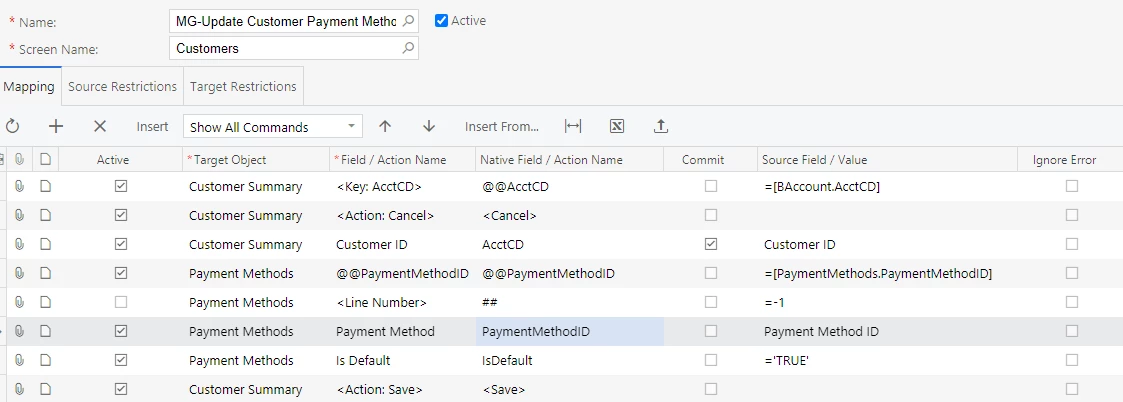
Can you post a screenshot of your import mapping so we can see?  Also, please provide a screenshot of the Customer Payment Methods screen that is displaying a similar record type (with sensitive data blurrend or redacted) so we can see the schema.

A couple things to look at…

Check the settings of the payment method you’re importing to confirm you have the schema correct.  Double check the AR settings.  Maybe share a screenshot of your payment method’s AR Settings to make sure we’re clear on required schema.  

If the payment method is tied to processing center, confirm that it is configured correctly and that everything is connected properly.

Not sure what else to offer, but seeing what you’re trying to do will be a big help.  

One last suggestion - have the client reach-out to the processor for assistance.  

Good luck!


  • Author
  • Freshman I
  • November 11, 2025

@shooper10 - thanks for the response.  Sounds frustrating.  

If this screen was customized by MaxQ, I would definitely work with them on the import.  There should be someone there familiar with the logic who can help with the automation.  

What I always find helpful when I’m stuck on an import is to manually enter one or two records to confirm that the workflow is aligned with the behavior of the screen and the order of operations.  Once you’ve entered those, be sure to disable them from your import data.  

Can you post a screenshot of your import mapping so we can see?  Also, please provide a screenshot of the Customer Payment Methods screen that is displaying a similar record type (with sensitive data blurrend or redacted) so we can see the schema.

A couple things to look at…

Check the settings of the payment method you’re importing to confirm you have the schema correct.  Double check the AR settings.  Maybe share a screenshot of your payment method’s AR Settings to make sure we’re clear on required schema.  

If the payment method is tied to processing center, confirm that it is configured correctly and that everything is connected properly.

Not sure what else to offer, but seeing what you’re trying to do will be a big help.  

One last suggestion - have the client reach-out to the processor for assistance.  

Good luck!


Thank you for the assistance on this, I kept hitting some walls and I decided to give it a fresh approach. They client is on 24R1 and I decided let's test this out on 25R2. After some updating to manage 25R2 field changes, I was able to get it to import. This might just be an issue in older versions; I will be doing a final version update for the client. If that doesn't work. Then we might just table it until their next upgrade.