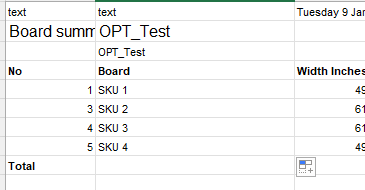
We have a BOM export that comes in this format - which we are looking to import:
As you can see, the column header information starts on row 4. Can we design the data provider/import scenario to read the fourth row as the header information?
Also, will the total row break the import?
Best answer by LeanneM
I would try make a fake csv file with headers that you have in row 4 and upload that as data provider. Then when you import the real file, as a csv type but headers in row 4, see if its still able to grab the data. Can only but test to see, but otherwise the user will have to modify it in excel and save as csv first to remove the first 4 lines
When u create your import scenario use the conditions to only use data where column 1 is greater than 0, and that should eliminate that noise in your data provider.
But headers must be in the first row for it to read and no way for that to know the headers are in row 4
When u create your import scenario use the conditions to only use data where column 1 is greater than 0, and that should eliminate that noise in your data provider.
But headers must be in the first row for it to read and no way for that to know the headers are in row 4
Are there any data providers in Acumatica that you would be able to specify which row to read as the column headers?
I would try make a fake csv file with headers that you have in row 4 and upload that as data provider. Then when you import the real file, as a csv type but headers in row 4, see if its still able to grab the data. Can only but test to see, but otherwise the user will have to modify it in excel and save as csv first to remove the first 4 lines