

Answer

Import Scenario to Sync Aborted Sales Orders

  • January 3, 2025
  • 3 replies
  • 70 views

Forum|alt.badge.img

Hello, 

We have Shopify connected to Acumatica. I have the Sales order entity attempt 100 syncs for sales orders before the status changes to Aborted. Sometimes our stores get really busy and the inventory can be off, so a sale takes place when the inventory doesn’t show up in Acumatica, thus the order fails to sync. The staff don’t make the adjustments for a few days, so it fails 100 times. When they finally correct it in the system, I have to manually sync the order from the Sync History screen to get the order to go through. I want to automate this process using an import scenario, but it doesn’t appear to be working. Any help is appreciated!


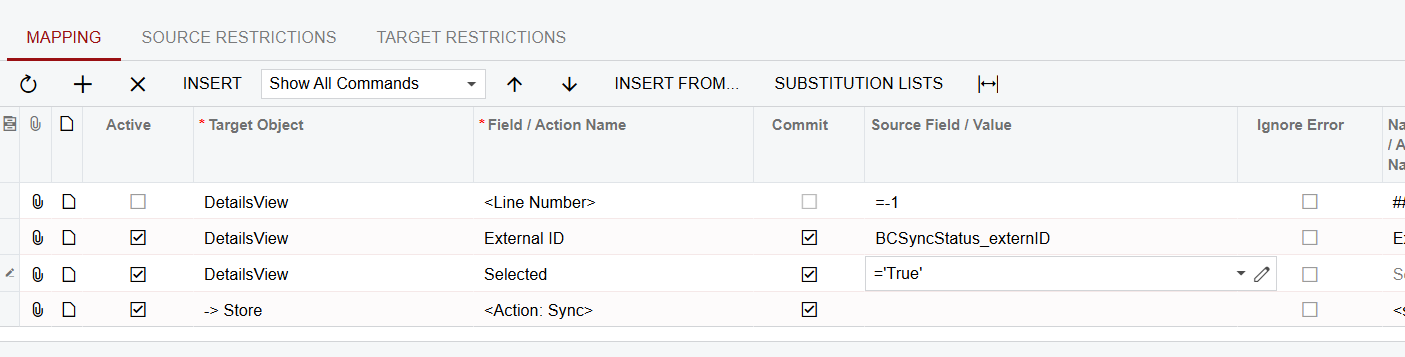
I have the data provider set up to look for orders on the Sync history screen that are in the Aborted Status. Then I take the External ID from Shopify, select it, and try to sync. The import scenario says it runs successfully with no errors, yet nothing happens.
 

Best answer by bclark

Update: 
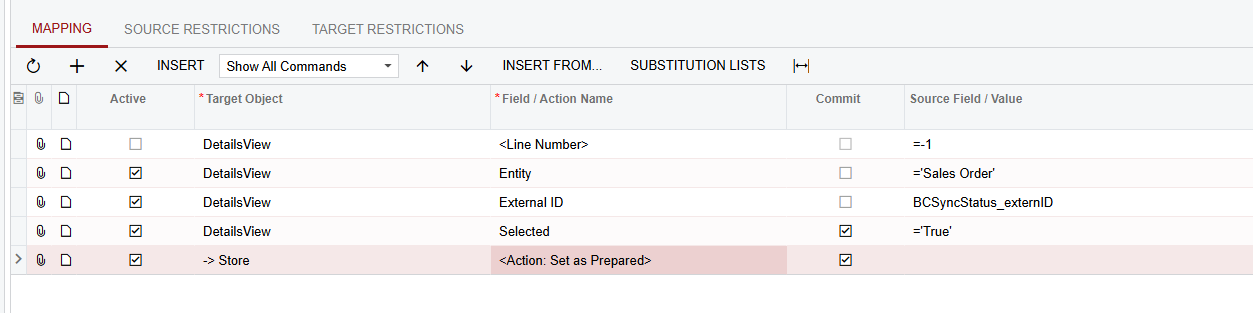
I wasn’t able to get the import scenario to Sync any aborted orders, but I was able to just set the aborted orders as “Prepared” which then allows the regular schedule to prepare and process run. 

I have my Entity set up to try and sync orders 100 times, so this import scenario can basically reset an aborted order to try another 100 times. 


3 replies

Manikanta Dhulipudi
Captain II
Forum|alt.badge.img+15

@bclark Can you try Business events? 

Generally I have implemented business events to send an email for aborted orders. We will fix and doing manually sync.

I am little unsure about bring the aborted status order to ready to process using a Import scenario, this is something you need to explore options.


Forum|alt.badge.img
  • Author
  • Varsity I
  • January 3, 2025

@Manikanta Dhulipudi  

I already track the aborted orders with a widget on my dashboard. I would just like a way to automatically try resyncing all orders with an aborted status. 

I haven’t tried anything with changing it to Ready to Process, though. I can try that next. Thanks!


Forum|alt.badge.img
  • Author
  • Varsity I
  • Answer
  • January 6, 2025

Update: 
I wasn’t able to get the import scenario to Sync any aborted orders, but I was able to just set the aborted orders as “Prepared” which then allows the regular schedule to prepare and process run. 

I have my Entity set up to try and sync orders 100 times, so this import scenario can basically reset an aborted order to try another 100 times.

