Answer

Import scenario to skip existing customer record while doing insert operation

  • January 12, 2022
  • 9 replies
  • 1211 views

I want to import the unique customer records using import scenario.

I  want to skip the existing records & insert only non existing records.

The record skip logic should be execute on “CustomerID”.

Best answer by mikeschmitt81

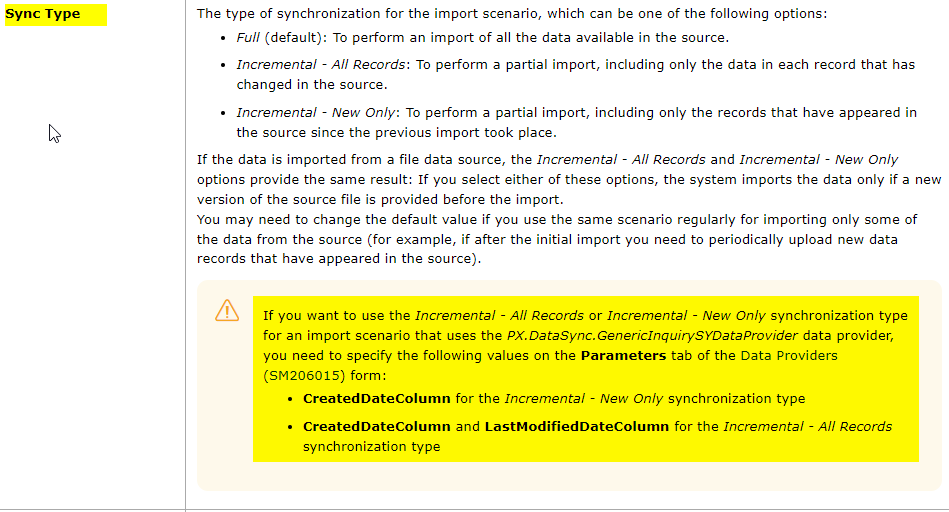
@sysuser113  Review the Incremental sync type option - in the help text 
 

9 replies

Naveen Boga
Captain II
Forum|alt.badge.img+19
  • Captain II
  • January 12, 2022

@sysuser113  By default Acumatica, will look into the Keys (In this case it is Customer ID), if this value already existed in the system, process run and update the record if not exist Customer record will be created in the system. 


  • Author
  • Freshman I
  • January 12, 2022

@Naveen B  Thanks for the reply.

Yes, Acumatica check the Key and if the record exist then it updates the record.

I don’t want to update the record instead of update it should skip the record.


mikeschmitt81
Jr Varsity I
Forum|alt.badge.img
  • Jr Varsity I
  • Answer
  • January 12, 2022

@sysuser113  Review the Incremental sync type option - in the help text 


Forum|alt.badge.img
  • Jr Varsity II
  • January 18, 2022

@mikeschmitt81    Have you been able to get this to work?  I just did some testing w a file that imports Stock Items.  I had ItemID 35802 in my source file. I imported it successfully.  I then opened my source file, left Item 35802 in there, and added a new line for item 35803. This is the scenario referenced in help “if after the initial import you need to periodically upload new data records that have appeared in the source.”  I saved the file and “upload new version” in the IS.  I ran the import scenario.  It gave an error on item 35802 that “An attempt was made to add a duplicate entry” on the Purchase Unit field -- this indicates it tried to import the previously-imported record and didn’t skip that one, as the help screen says it should have “for importing only some of the data from the source”. I tried sync type of Incremental - All Records as well as Incremental - New Only, and they both acted the same way, gave the same error on the existing item and imported the second, new item 35803.  If you’ve gotten this to work, I would love to understand your steps to a successful partial import.  Thank you!


jdobish
Pro III
Forum|alt.badge.img+2
  • Pro III
  • January 18, 2022

On your stock item import, remove the checkbox for <ACTION: CANCEL> and see if it works, as well as the <LINE NUMBER> checkbox for the -1 value. 


Forum|alt.badge.img
  • Jr Varsity II
  • January 18, 2022

@jeremyd45    I tried unchecking “<Action: cancel>” line; no luck, same error message about adding a duplicate entry.  There is no line for <LINE NUMBER> = -1 to uncheck in this type of IS (we’re creating a master record, not a detail line on an order), and even if there were, then no record would be inserted, which is what we’re trying to do -- only import/create new records, leave existing records alone.


jdobish
Pro III
Forum|alt.badge.img+2
  • Pro III
  • January 18, 2022

Can you share your import scenario? That might help people troubleshoot. Thanks!


Forum|alt.badge.img
  • Jr Varsity III
  • March 2, 2022

Is there a resolution to this?   I am trying to do something similar with Project Tasks.  I have tried to use target restrictions, but I have not figured out a way to not update existing records.


OK, I figured out something that works for me.  I set up a target restriction.  In my case I looked at the status of project task and told the system to only process records with a certain status.

I am wondering if for this topic if you set a target restriction to CustomerID is Empty which should only allow you to add new records. 


Forum|alt.badge.img
  • Jr Varsity II
  • November 7, 2022

This worked for skipping existing stock items by setting the Inventory ID Field Name Condition to ‘Is Empty’ on the Target Restrictions tab of the import scenario.