Solved

Import Scenario to populate an existing Email draft

  • April 17, 2025
  • 9 replies
  • 102 views

plambert
Semi-Pro I
Forum|alt.badge.img+2

Is there a way to load a specific email draft from an import scenario (24r2)? I thought that, since the NoteID is the Key for Email, that I could load one in the same manner as an inventory item.
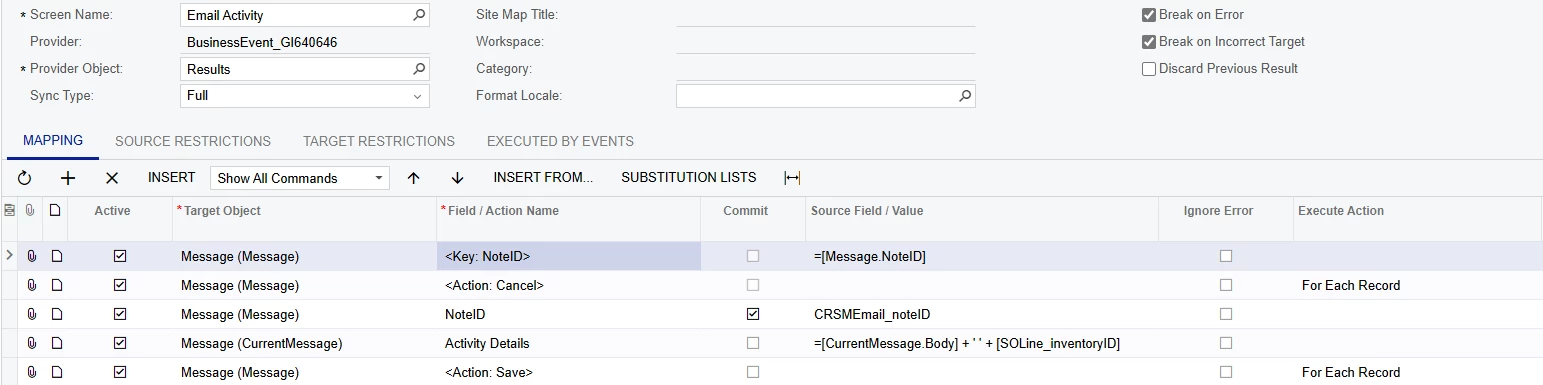
Yet this creates a new email even when the provided noteID exists.


Perhaps I’m going about this the wrong way. The goal is to send customers and salespeople an email listing order lines which we had to cancel due to inventory items becoming discontinued - where we never will receive more stock to fulfill their order. This happens often enough that we provide a weekly email of any changes which occurred.

My plan is currently to have one Business Event monitoring a GI for when items meet the conditions for cancelation. That event triggers one scenario to cancel the line and another scenario (this) to add the SO information to an email; We would like to cancel SO lines ASAP but not send out more than one email a week.At the end of the week a scheduled event will add some templated text and send any drafts that have been building up during the week.

Yet if there’s no way to modify an existing email then I’ll have to come up with an alternate approach to create that email all at once at the end of the week. Perhaps with a report as an attachment…. I digress.


Has anyone encountered a situation like this? Thank you for any insight you can provide,

 

Best answer by lbarker

 see here is an example how you find an existing record to update with import


9 replies

lbarker
Semi-Pro II
Forum|alt.badge.img+3
  • Semi-Pro II
  • April 23, 2025

Under the Field Action name try put @@NoteID to dind it

but I think its a field called MessageID if I remember right so add that to your GI and then try @@MessageID instead


lbarker
Semi-Pro II
Forum|alt.badge.img+3
  • Semi-Pro II
  • Answer
  • April 23, 2025

 see here is an example how you find an existing record to update with import


plambert
Semi-Pro I
Forum|alt.badge.img+2
  • Author
  • Semi-Pro I
  • April 23, 2025

Thank you for the link! It made me realize the mistake I was making that caused so much frustration: I wasn’t committing the @@NoteID line. I did also confirm that MessageID (and another field just called ID) also work for lookups for email. 

I’m going to stay with NoteID since the DAC indicates that it is the key field for Email records, but I appreciate the help figuring out my error!


Forum|alt.badge.img+1
  • Semi-Pro II
  • April 23, 2025

Thanks ​@lbarker 


@plambert I have a similar idea, I am trying to edit an email and add a CC email depending on the items in the email. 


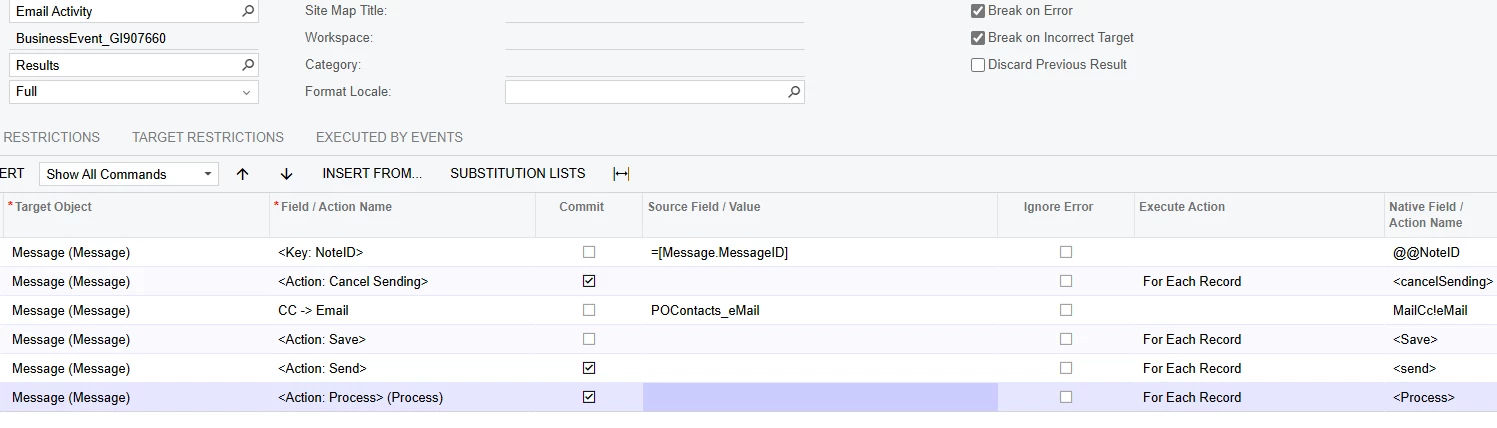
Now I don’t have a lot of experience with Import Scenarios, but this is what I have so far, 


-The Key: NoteID will match up the [Message.MessageID] with the message ID from my GI. 

-Then it will cancel sending before it is processed

-Then add to the CC Email, the POContacts_Email that I want, (will this add to current CCs? or Replace?)

-Then Save, 

-Send,

-And Process.


Or am I not understanding this correctly?


plambert
Semi-Pro I
Forum|alt.badge.img+2
  • Author
  • Semi-Pro I
  • April 23, 2025

Hello ​@bodiec , it’s nice to hear that I’m not the only one fiddling with existing emails.

There are a couple of issues with your current import scenario that’ll keep it from doing what you’re looking to do.

Email Lookup

As I just realized, you have to commit lookups (shown with the @@ notation in the Native Field / Action Name column) for email. This is different from, say, a Stock Item because on the Stock Item screen there is a field that you can enter a value to perform the lookup; not the case with email.

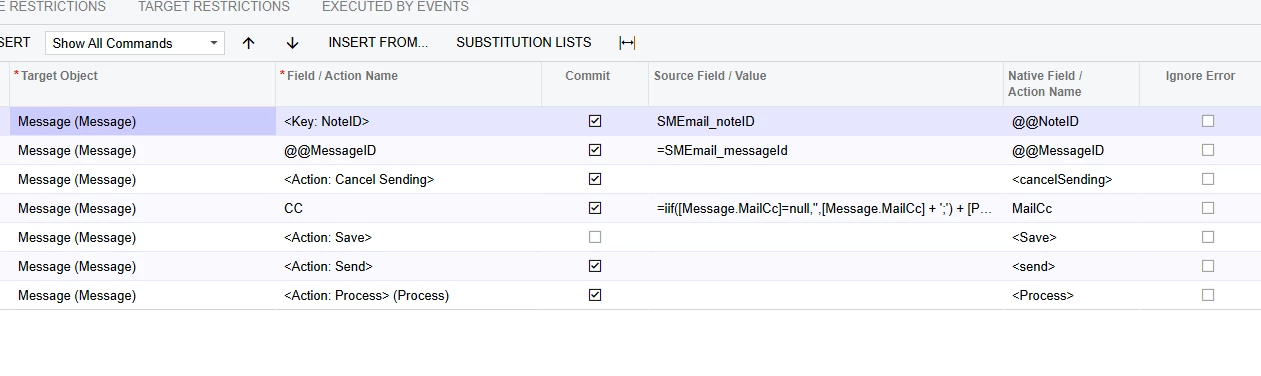
Also, if you’re using the MessageID then be sure to use the @@MessageID action. I recommend swapping to the NoteID in your GI since that is the key field. You only need to pick one of the below lookup lines.

CC field

The arrow notation is actually another form of lookup, best detailed by Tip #8 of this handy article. Instead, just use the CC field. Assigning a value to a field does overwrite any existing data. If you want to preserve any existing CC information instead of overwriting it, concat the [Message.MailCC] field to your POContacts_eMail. My formula might be overkill, but it shows the idea.


Forum|alt.badge.img+1
  • Semi-Pro II
  • April 23, 2025

Thank you very much for your help with this ​@plambert 


I have updated my Scenario to resemble your example. And I am a sucker for IIF expressions so I did copy yours. 


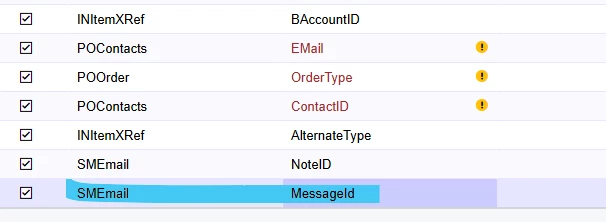
The only thing that I am worried about is, I am using SMEmail in my GI and when I look in the source field, I don’t have message ID for some reason. I entered it in as an equation, and it took it. However I am worried that it will not work correctly. 


I do have SMEmail.MessageID on my GI as seen in this screenshot, I don’t know why it doesn’t show as an option in this Source Field.


Do you think this will still work?


plambert
Semi-Pro I
Forum|alt.badge.img+2
  • Author
  • Semi-Pro I
  • April 23, 2025

To reiterate, you don’t need both lookups. I don’t think it will hurt anything to have them, but it’s a bit redundant to lookup records that match the NoteID and also the MessageID, since they’re unique identifiers.

I believe you’ve encountered the other frustration I ran into during this process: the Import Scenario doesn’t seem to update the Source fields when working from a Business Event when the GI changes. The only way around this I found was to create a new Import Scenario subscriber to the Event, copy my existing Import Scenario into the new one, and then that new scenario had access to the updated GI results. It may be a bug? I haven’t looked for more information on that topic, though. Relatively painless to do with the ability to copy/paste scenarios

To answer your question directly: no. I found that entering in a source value I knew to be in the GI but wasn’t showing up in the scenario editor did not work. I may have spent several minutes saying “but it’s right there!” to my monitors before I rebuilt the scenario and it was fixed.


Forum|alt.badge.img+1
  • Semi-Pro II
  • April 23, 2025

😂   I have completely felt that frustration and also told the screen “it’s right there!” 
 

Thank you ​@plambert


Forum|alt.badge.img+1
  • Semi-Pro II
  • April 24, 2025

Hey ​@plambert 

I was finally able to test my business event today, 

However it seemed my import scenario did not work accurately.


Instead of adding a CC email, to the pending email, it immediately sent a separate Blank email with just the CC email on it. 


So the part of adding the CC did work, but do you think I am missing something which is making it create a new email, instead of editing the same email. I’m thinking maybe having the noteID and MessageID could maybe be effecting it, and maybe I only pick one?


Do you have any thoughts on this?

Were you able to get your import scenario to work?