

Answer

Import scenario to add order to shipments 2024 R2

  • March 5, 2025
  • 9 replies
  • 166 views

bwhite49
Captain II
Forum|alt.badge.img+10

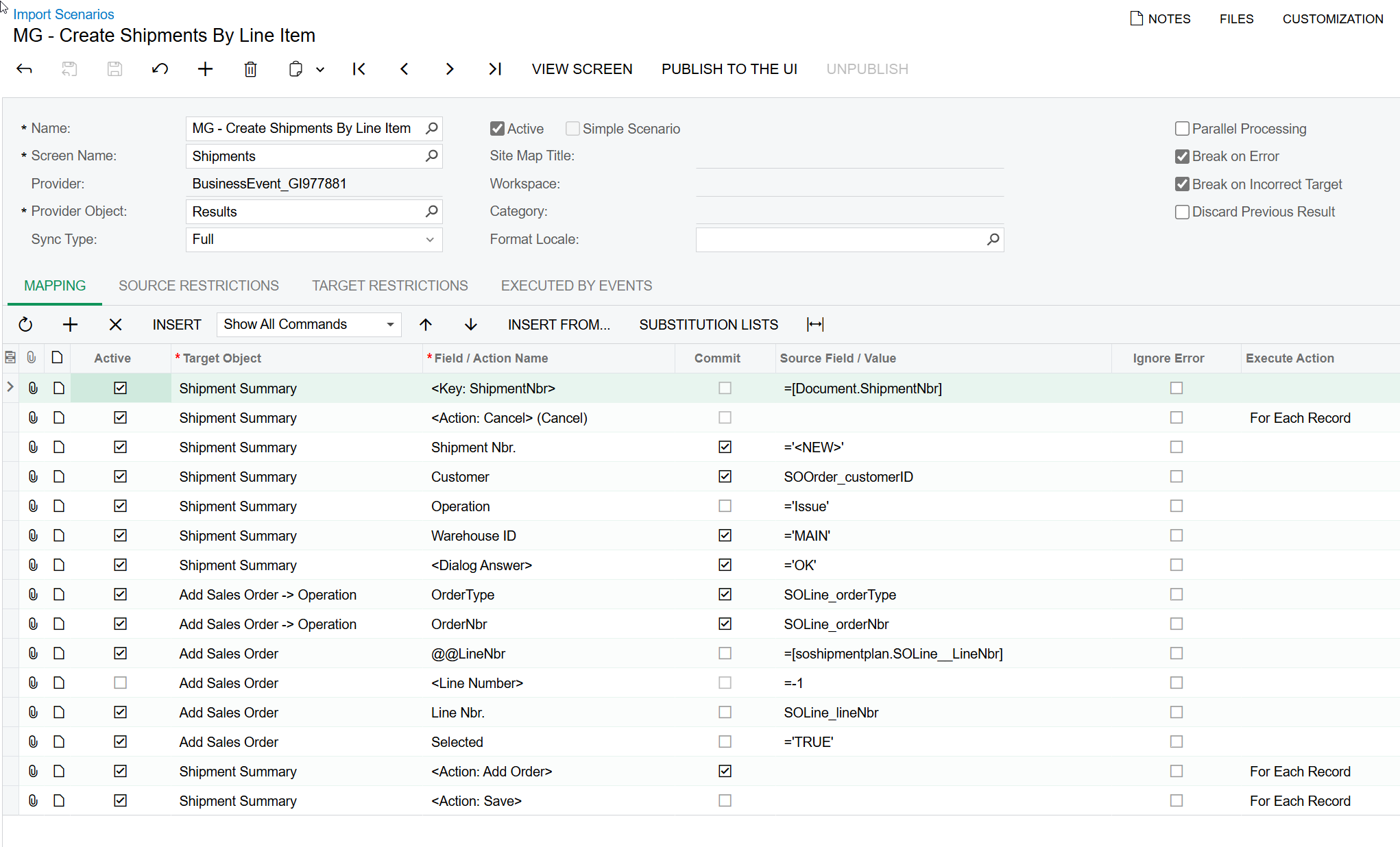
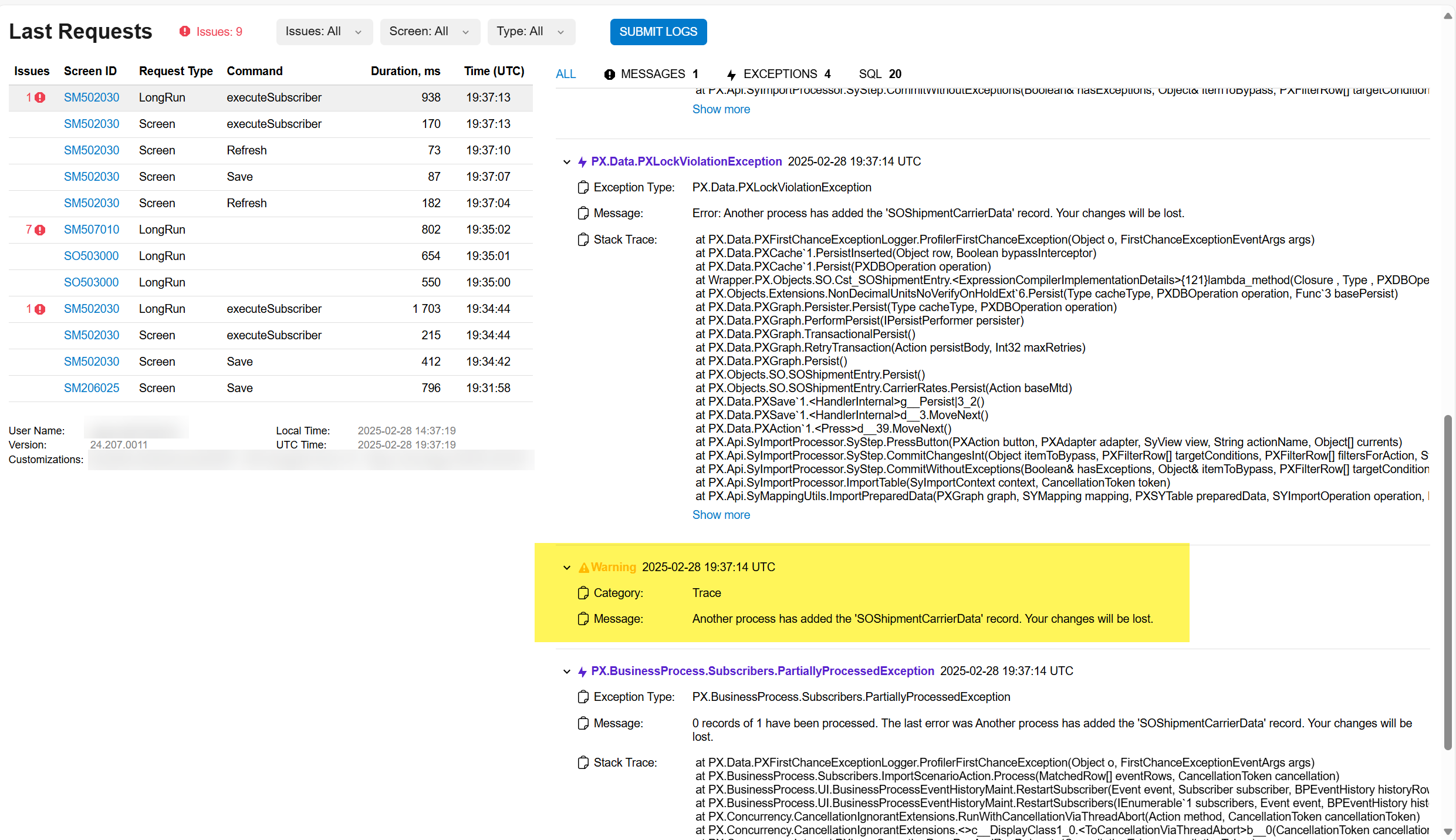
I have an import scenario that worked prior to 2024 R2, but it no longer works in 2024 R2. I now get the following error message. I believe it’s a bug, but would like to know if others are having the same issue and if there is a work-around.


Best answer by plambert

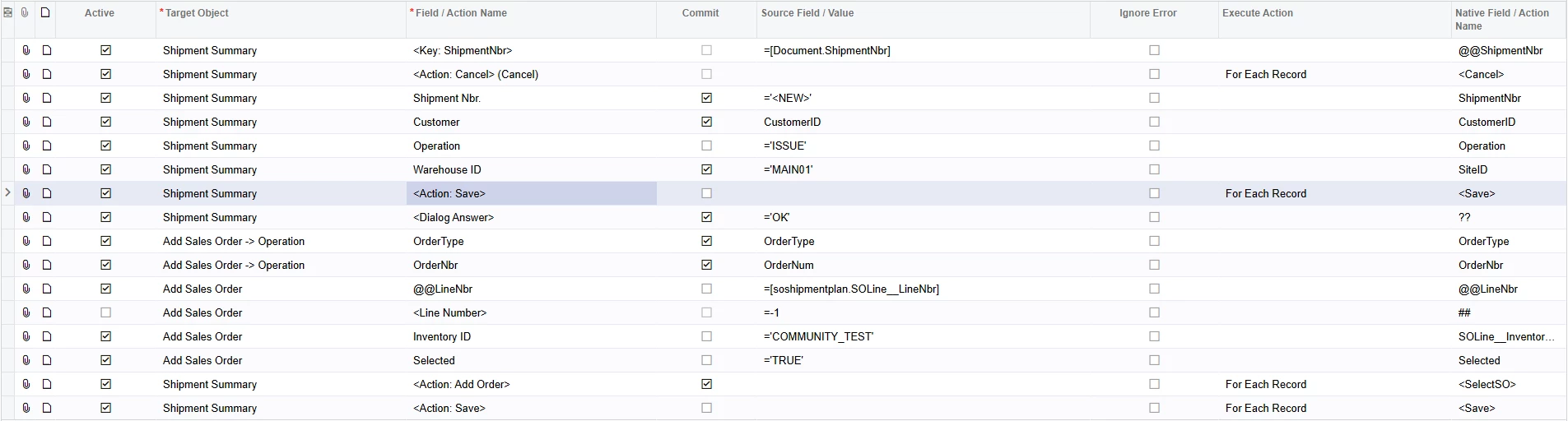
While I never got your process to work using the line number (I used the Inventory ID to get something to populate), I was able to find a work-around for the error. Adding an extra save to let Acumatica finish doing all the shipment setup before adding the SO has worked for my testing.
 

My best guess as to why the error occurs is that a new shipment is checking default settings for if it needs the PaceJet carrier extension - SOShipmentCarrierData. Then when you link to an SO, that record has its own shipping information to overwrite the defaults. An import scenario must just go a little too quickly with trying to bring in the SO info before the shipment is ready to ready to receive it.

9 replies

Forum|alt.badge.img+12
  • Acumatica Support Team
  • March 6, 2025

Hi ​@bwhite49 

Can you try create the shipment for same order / customer information from Shipment entry screen. Check if you can save the record. This will ensure there is no issue with the data being imported/ or data validation error.  

If there are able to save the record from Shipment entry screen, one more thing you can try is creating a new import scenario with same mapping setting. I have noticed this work in few instances when a good import scenario stops working post update.

Let us know the result.

Regards,


Forum|alt.badge.img
  • Semi-Pro II
  • May 31, 2025

@bwhite49 have you had any success with this yet? Looking to do the same.


bwhite49
Captain II
Forum|alt.badge.img+10
  • Author
  • Captain II
  • June 2, 2025

@bwhite49 have you had any success with this yet? Looking to do the same.

No, this is still a bug in 2024 R2


plambert
Semi-Pro I
Forum|alt.badge.img+2
  • Semi-Pro I
  • Answer
  • June 10, 2025

While I never got your process to work using the line number (I used the Inventory ID to get something to populate), I was able to find a work-around for the error. Adding an extra save to let Acumatica finish doing all the shipment setup before adding the SO has worked for my testing.


My best guess as to why the error occurs is that a new shipment is checking default settings for if it needs the PaceJet carrier extension - SOShipmentCarrierData. Then when you link to an SO, that record has its own shipping information to overwrite the defaults. An import scenario must just go a little too quickly with trying to bring in the SO info before the shipment is ready to ready to receive it.


bwhite49
Captain II
Forum|alt.badge.img+10
  • Author
  • Captain II
  • June 10, 2025

@plambert 

Thank you for taking a look. I will try with the extra save and inventoryID work-around. The original import scenario was working prior to 2024 R2 on a few sites and then something changed. Your explanation makes sense.

I appreciate it.


Forum|alt.badge.img
  • Semi-Pro II
  • June 10, 2025

@plambert do you know if it’s possible to create a shipment of lines from multiple sales orders using this method? (e.g. Create a shipment consisting of line 3 from SO#0001, line 7 from SO#0002, and line 1 from SO#0003?)


bwhite49
Captain II
Forum|alt.badge.img+10
  • Author
  • Captain II
  • June 10, 2025

@plambert do you know if it’s possible to create a shipment of lines from multiple sales orders using this method? (e.g. Create a shipment consisting of line 3 from SO#0001, line 7 from SO#0002, and line 1 from SO#0003?)

As long as orders are all linked to the same customer location, then this import scenario can add multiple orders onto the same shipment. They just need to be searchable from the shipment. 


plambert
Semi-Pro I
Forum|alt.badge.img+2
  • Semi-Pro I
  • June 10, 2025

@michaelho Yes, I believe so. If you want all of the records to be put on one new shipment, then change the ‘Execute Action’ setting on first Cancel and first Save actions from “For Each Record” to “Once, for First Line Detail”. That should only run through the header once to set up the Shipment and the iteratively add all the records.


Forum|alt.badge.img
  • Semi-Pro II
  • June 11, 2025

Thank you, ​@bwhite49 and ​@plambert! I was able to get this to work on lines from multiple orders.



