Answer

Import Scenario - Purchase Receipts - ADD PO LINE button not adding PO Line 2

  • September 22, 2023
  • 24 replies
  • 839 views

I’m creating an Import Scenario for the Purchase Request screen (PO.30.20.00).

I’m having difficulty adding an individual PO line (other than the first PO line) using the ADD PO LINE button (found under the DETAILS tab).



It seems like the 2nd line never gets properly selected thus, by default, the first line remains selected.

How do I add a PO line other than the first one?

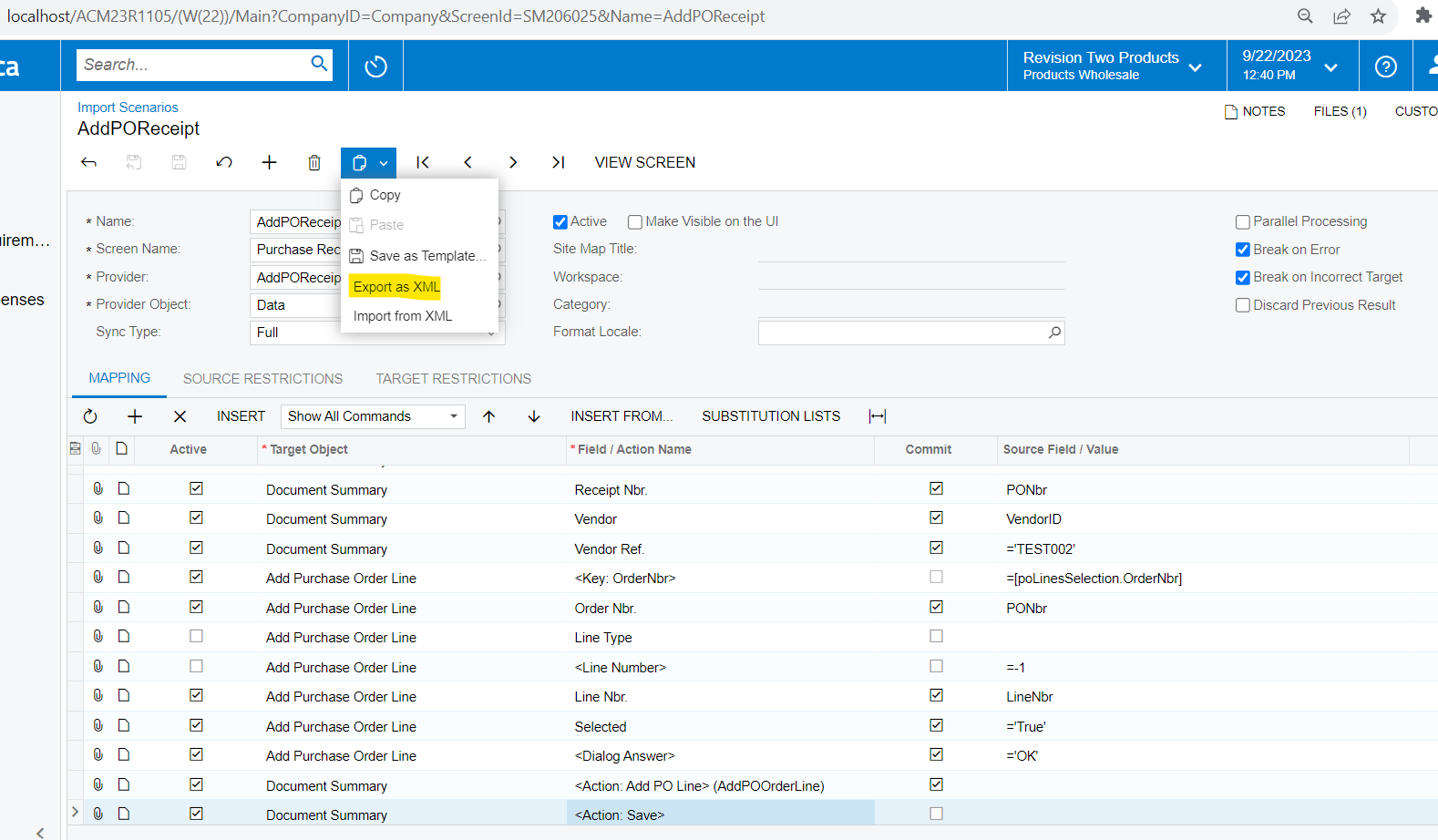
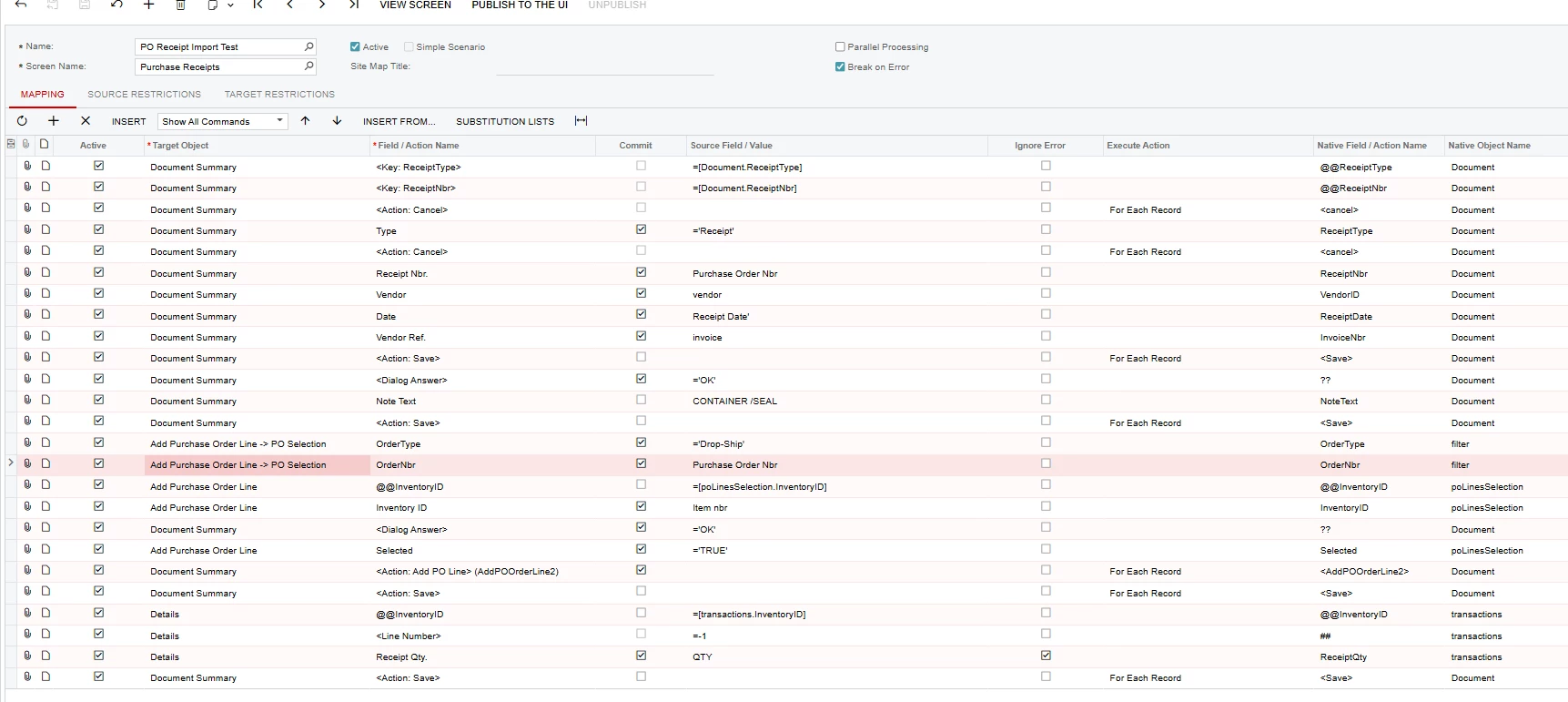
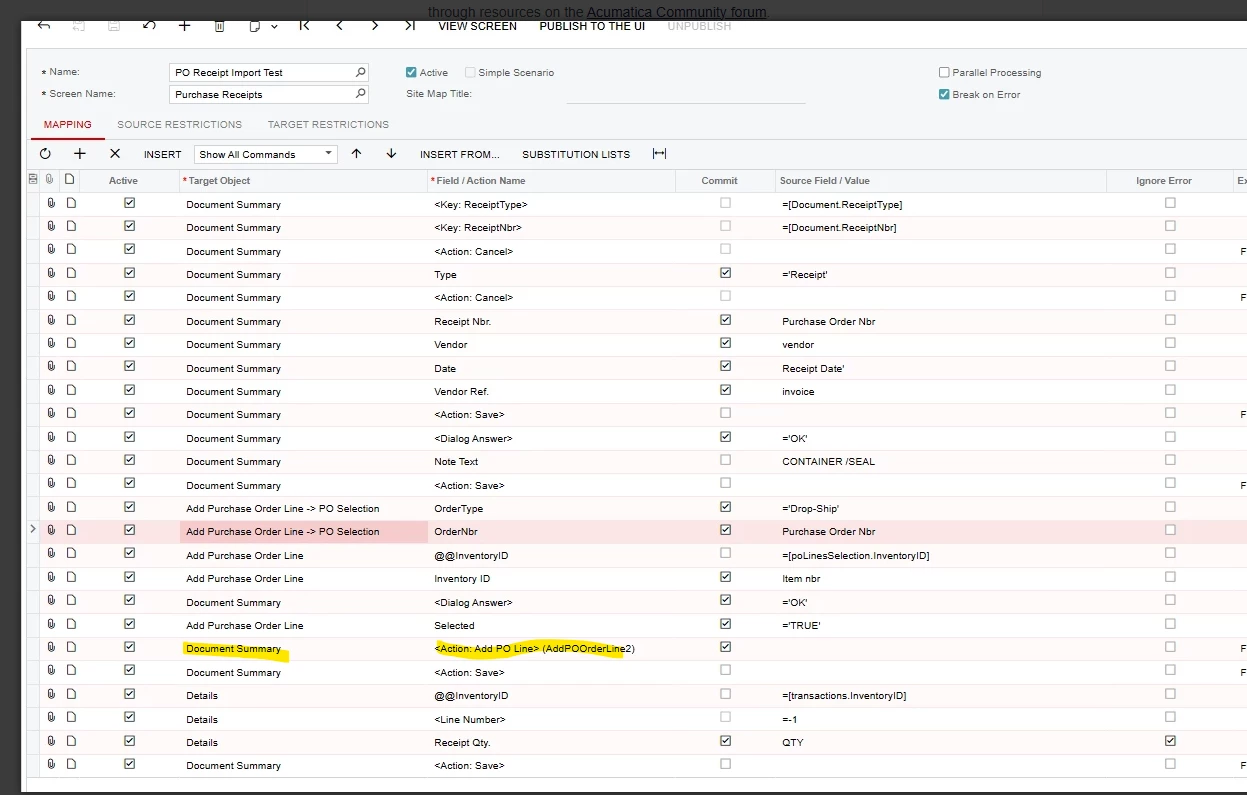
Here is are my steps (in two screenshots):
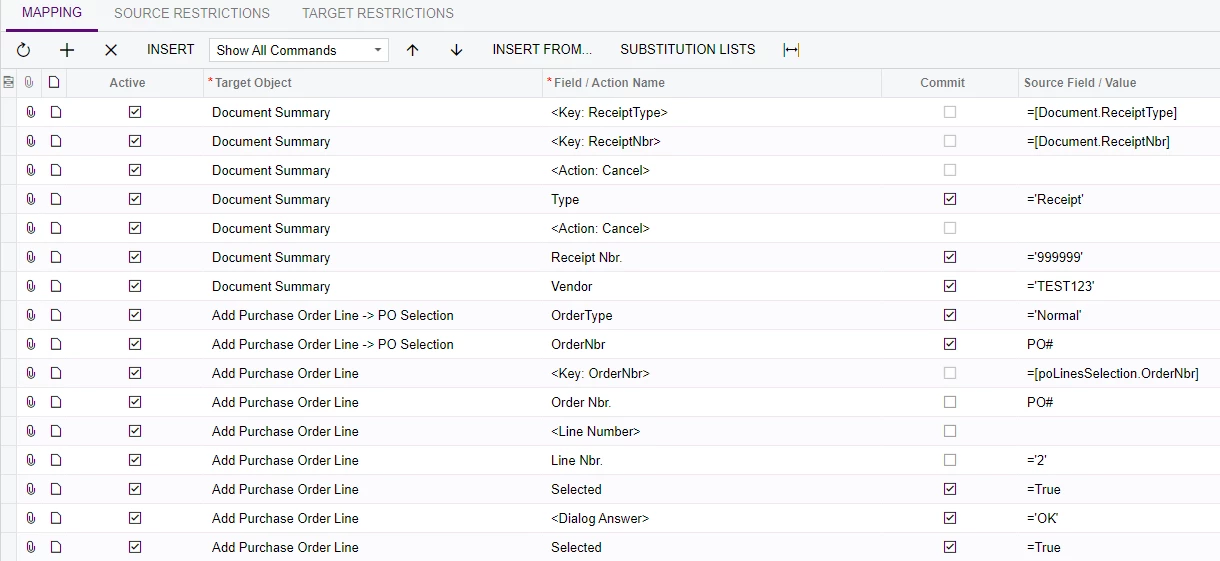


Best answer by ChandraM

hi @dmillette Here is the solution to answer your question - How do I add a PO line other than the first one?
Please find the attached import scenario to import the PO Receipt with the PO lines other than the first line.

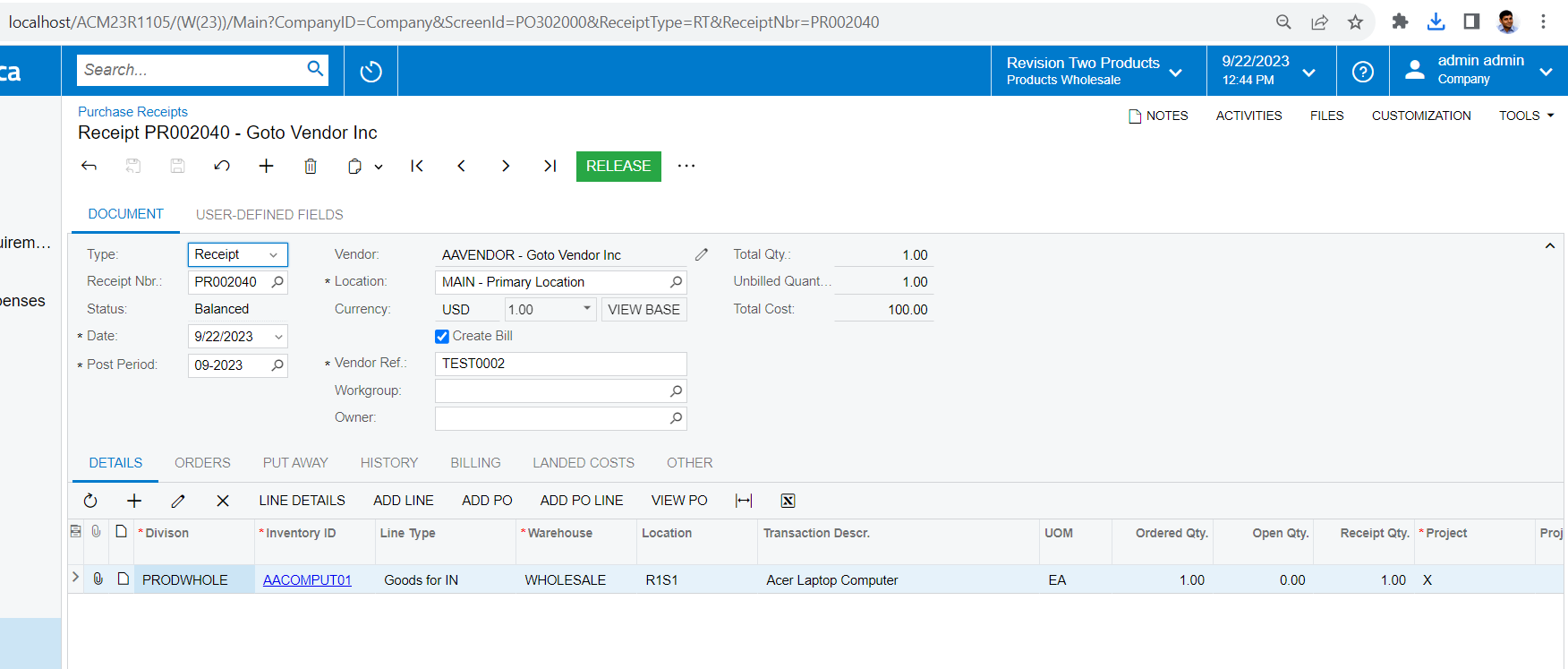
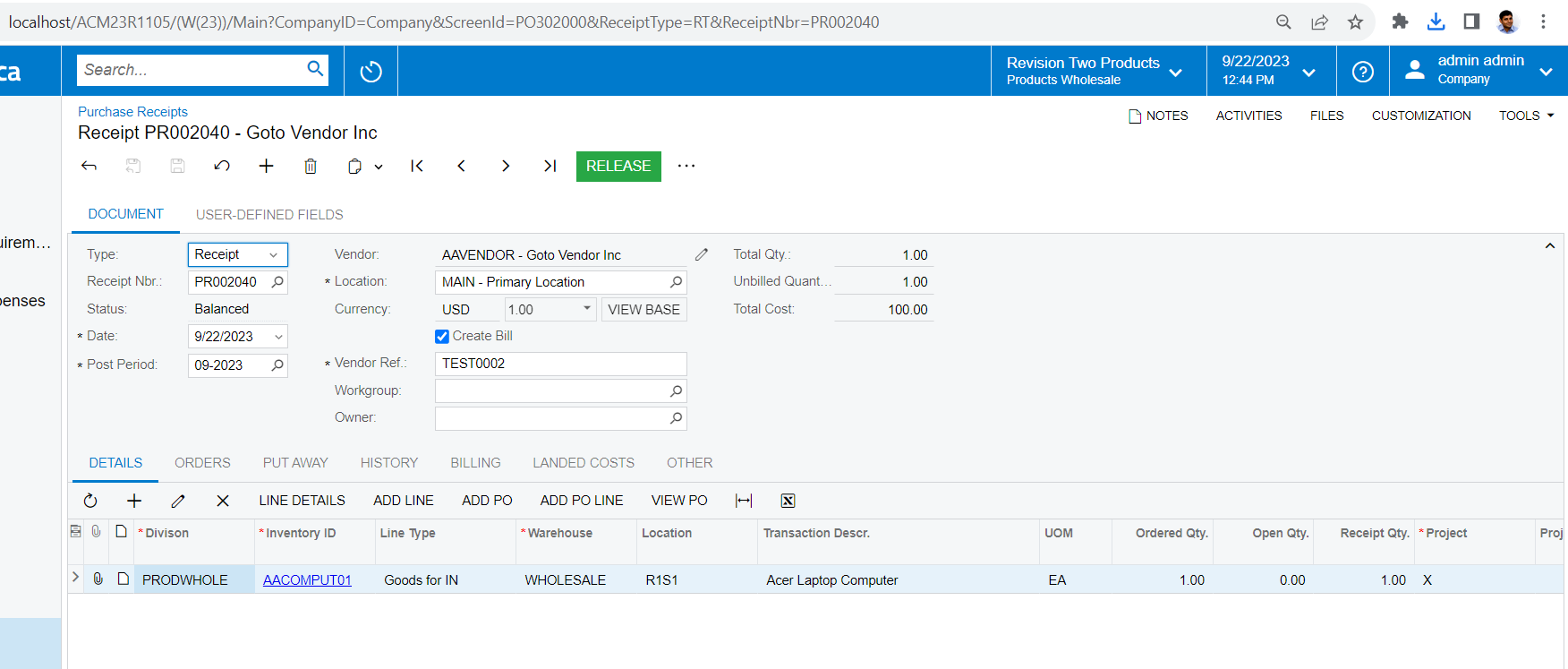
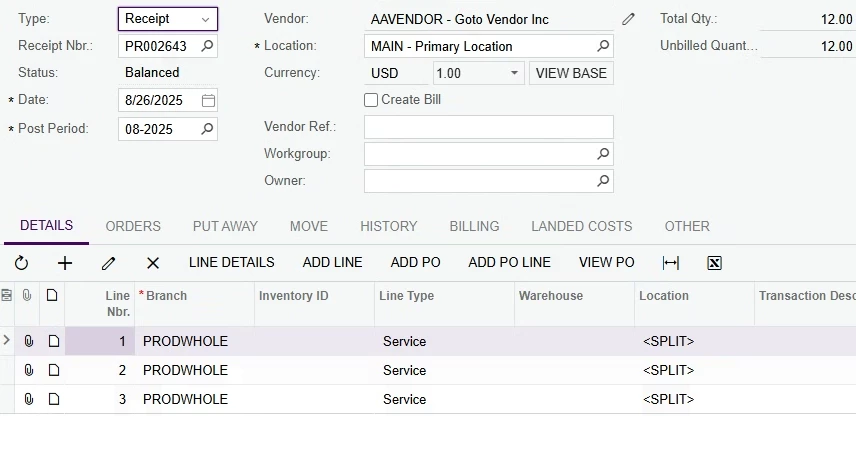
Here is the screenshot showing the result:


24 replies

Forum|alt.badge.img+8
  • Semi-Pro I
  • September 22, 2023

Hi @dmillette Please upload the import scenario you have created, so that we can take a look.


Forum|alt.badge.img+8
  • Semi-Pro I
  • September 22, 2023

Hi @dmillette Please also let us know the Acumatica Version being used.


  • Author
  • Freshman I
  • September 22, 2023

How do I export an import scenario in order to upload it here?


Forum|alt.badge.img+8
  • Semi-Pro I
  • September 22, 2023

Hi @dmillette Please use the below option to export as XML. After that you will find the XML in the “Downloads” folder on your PC/Laptop.

Chandra


Forum|alt.badge.img+8
  • Semi-Pro I
  • September 22, 2023

Hi @dmillette Just an update. I created a new Import Scenario and was able to replicate the issue that you mentioned.

Just attaching the import Scenario here.


Forum|alt.badge.img+8
  • Semi-Pro I
  • Answer
  • September 22, 2023

hi @dmillette Here is the solution to answer your question - How do I add a PO line other than the first one?
Please find the attached import scenario to import the PO Receipt with the PO lines other than the first line.

Here is the screenshot showing the result:


Forum|alt.badge.img+8
  • Semi-Pro I
  • September 22, 2023

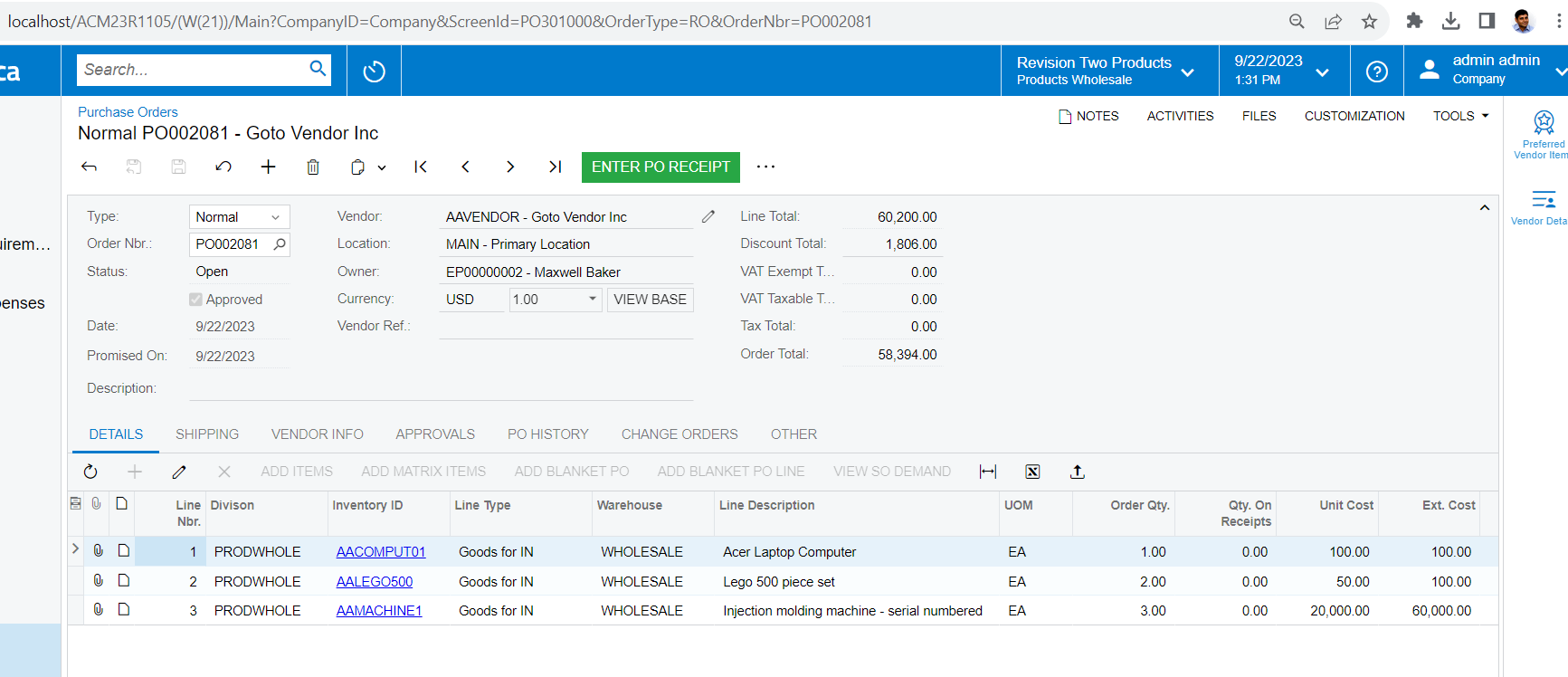
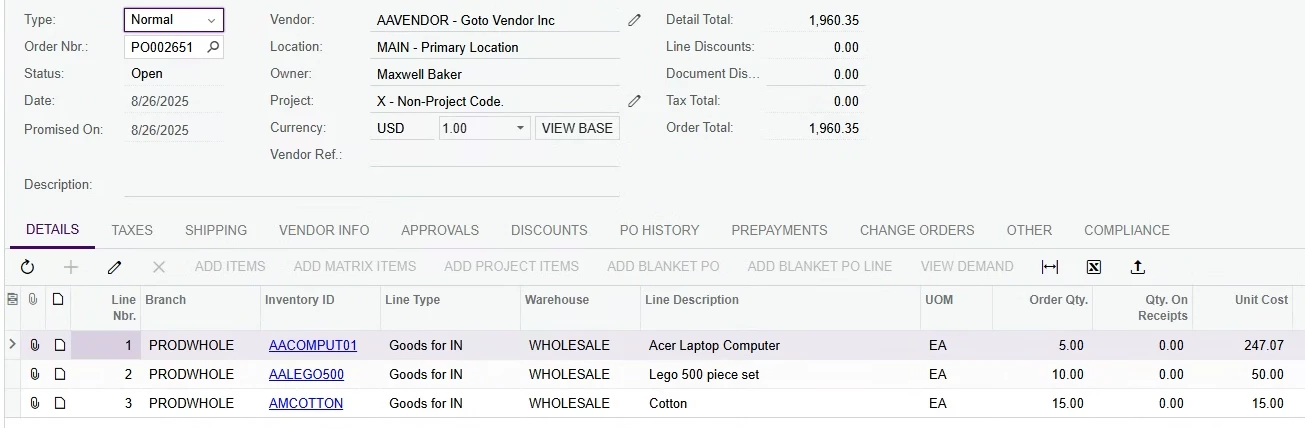
Hi @dmillette Just an additional information on my testing. Please find the screenshot of the sample PO used for my testing and the excel data file used for my testing.

Screenshot of the PO used for my testing:


The imported PO receipt - Imported the lines other than the first line (solution for your original Question - How do I add a PO line other than the first one?)


  • Freshman I
  • November 6, 2024

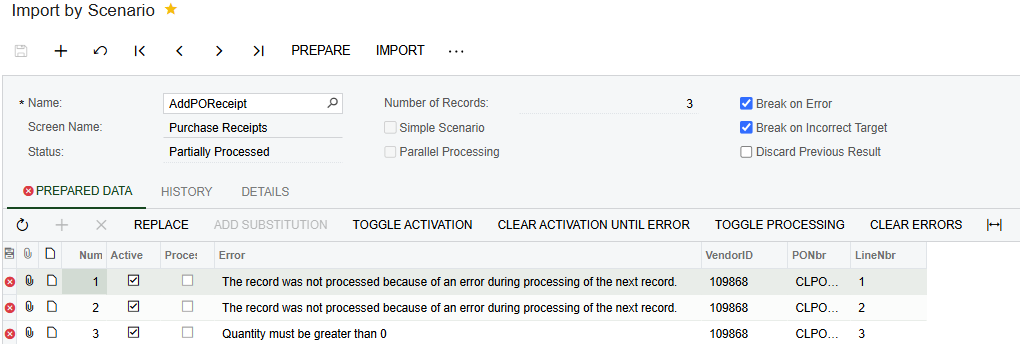
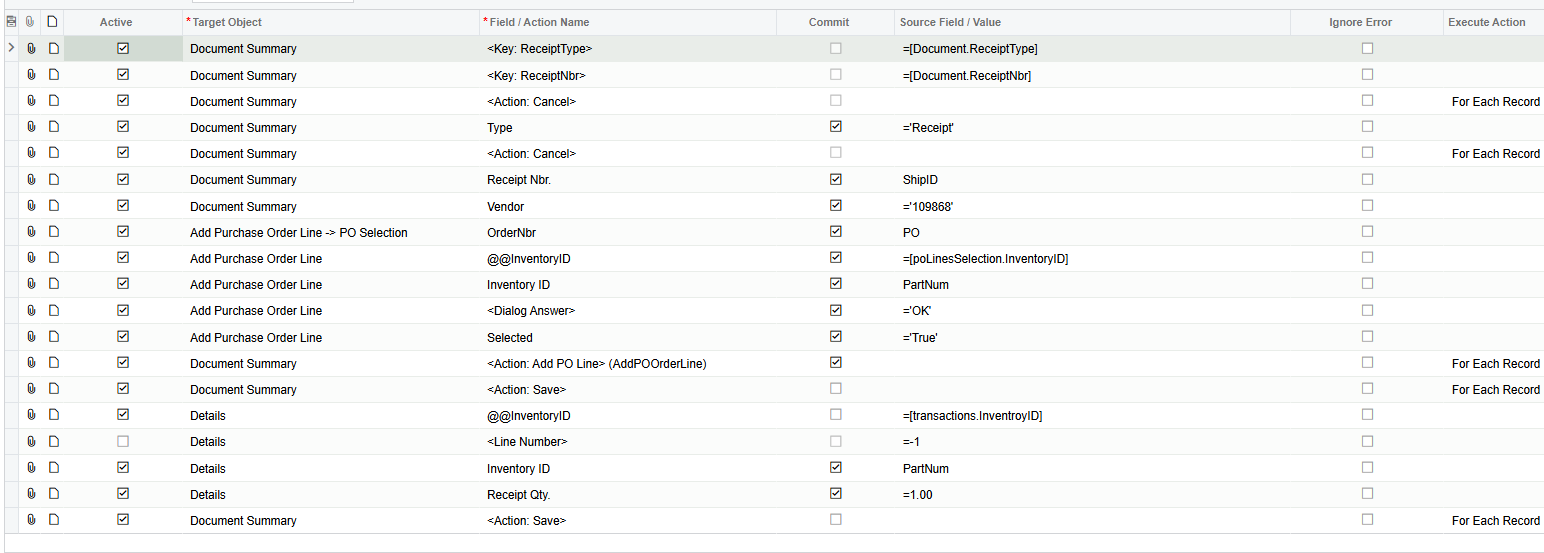
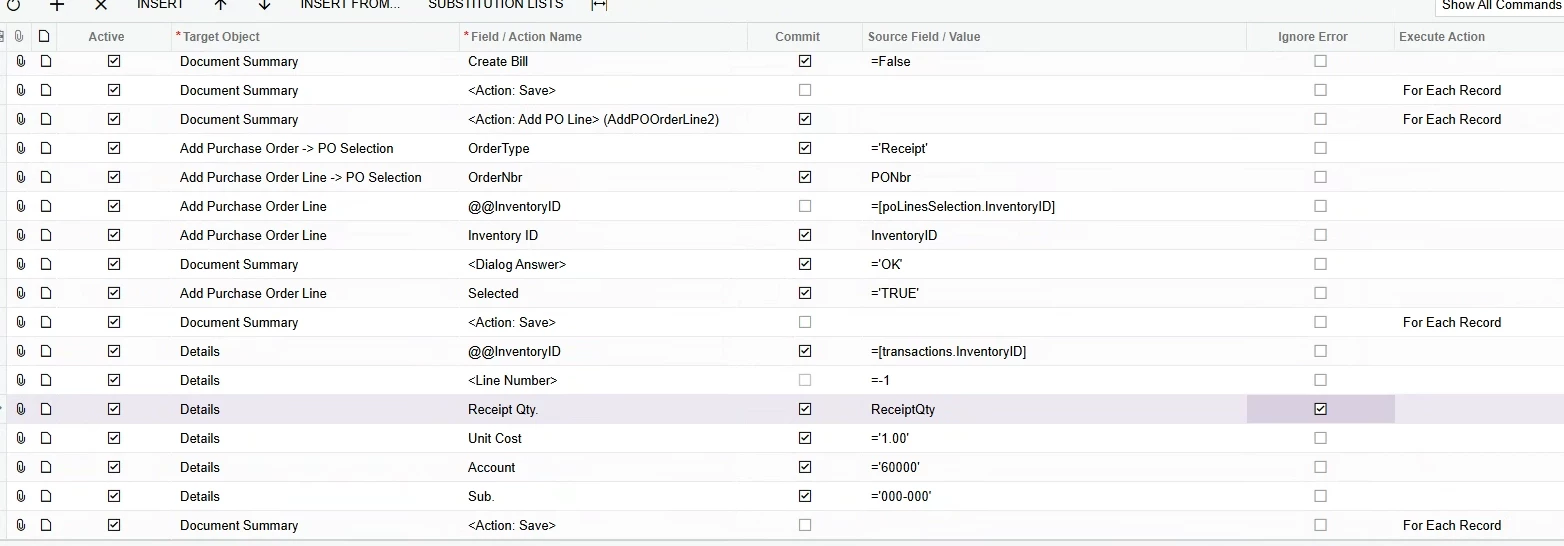
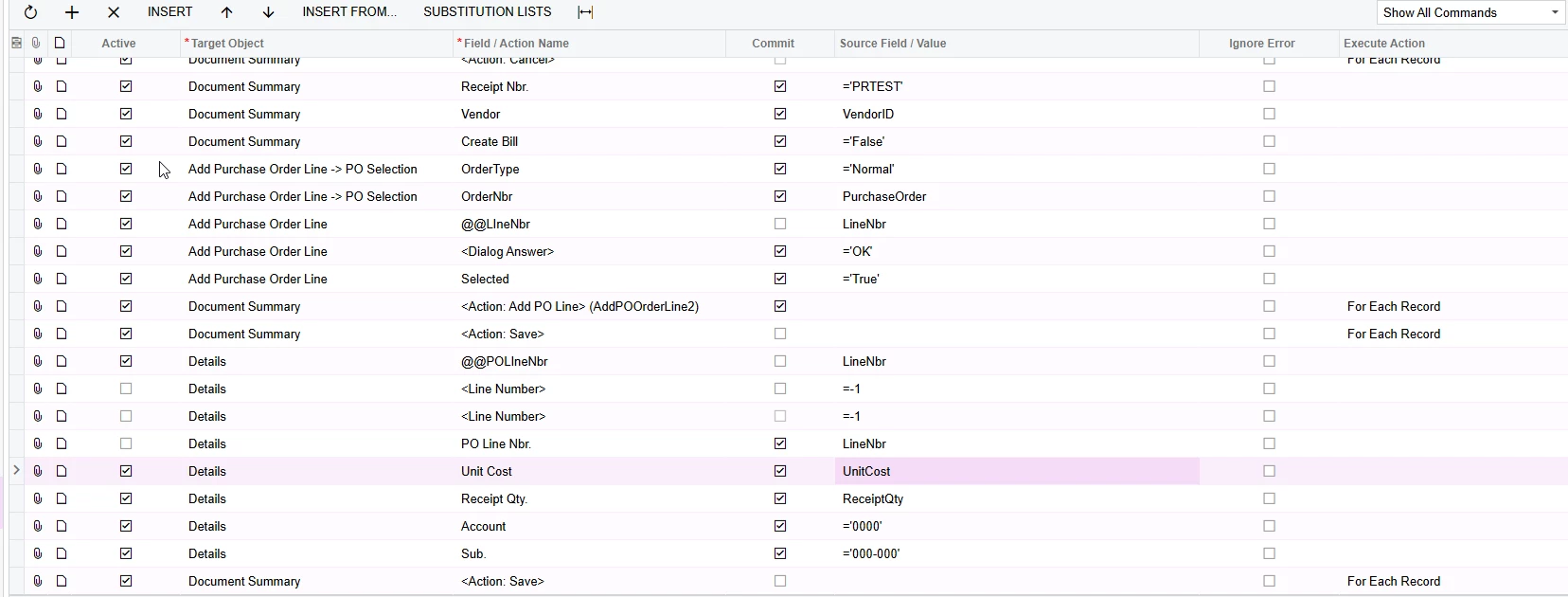
Hi.  I tried the attached solution for this issue, and I am getting the same error as the PR import scenario I created.  Quantity must be greater than zero.  When I pull in a PO line into the receipt, the quantity received defaults to zero. This happens when entering a receipt manually and must be changed also.   I’m trying to change the quantity received in my import with no luck.  Any ideas?  If I need to open a new post on this just let me know.  Attached is the error for the original import solution attached to this thread, and also a screenshot of my import scenario.

Thanks,


Forum|alt.badge.img+8
  • Semi-Pro I
  • November 7, 2024

Hi @MFlint Please try changing the receipt Qty formula as below with a single quote.

 =’1.00’


  • Freshman I
  • November 7, 2024

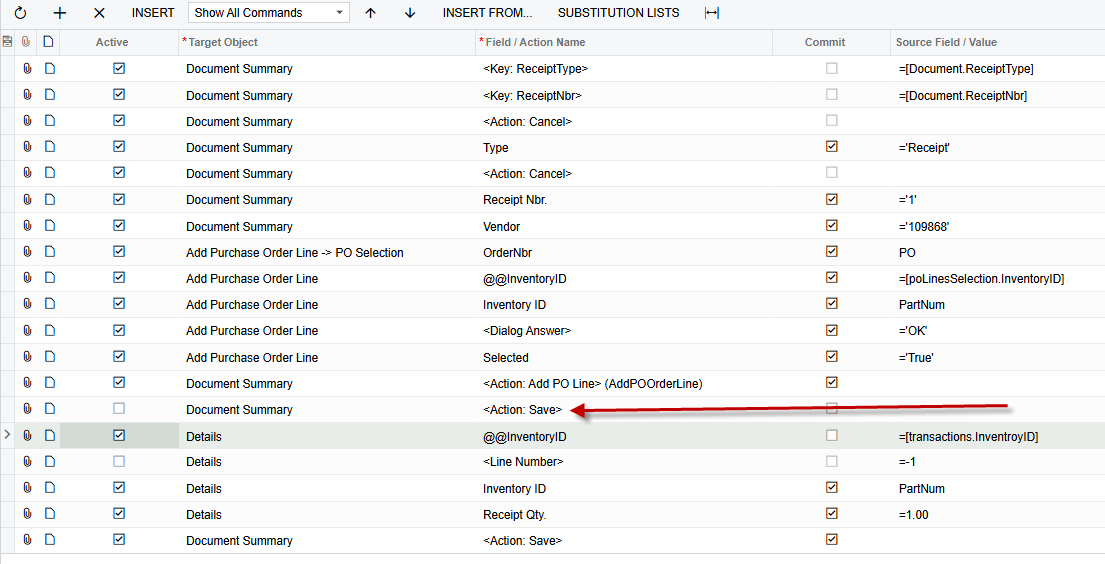
Hi ChandraM.  Thank you for the reply.  I’ve actually just made some progress on the PR import. The issue with the ‘Receipt Qty must be greater than 0’ was happening because of the save action in the document summary happening before the line changing the Receipt Qty to = 1.00.  Deactivating the save is now allowing me to import a 2 line PR.  I did have 3 items, but one of the items was creating an Document error.  I’ll have to investigate why that is, but this is a good start.


Forum|alt.badge.img+8
  • Semi-Pro I
  • November 7, 2024

Hi @MFlint Thanks for the update!


Forum|alt.badge.img
  • Jr Varsity II
  • August 14, 2025

I am using this Purchase Receipt Import successfully, however I want to add a Note Text and I cannot get it to work. Any suggestions would be appreciated


  • Freshman I
  • August 24, 2025

Hi, looking at this solution I’ve tested the import from ChandraM and it works to bring in lines 2 and 3 and but I can’t get line 1 and I need all of them. How can I get all the receipt lines to get created? 


JSpikowski
Jr Varsity II
Forum|alt.badge.img
  • Jr Varsity II
  • August 24, 2025

An alternative to doing an import scenario.

Acumatica has REST API endpoints for Purchase Receipts, with common endpoints found under /entity/Default/Version/PurchaseReceipt and for actions like AddPOOrder within specific endpoints such as /entity/vendorpolineitems/Version//purchasereceipt/AddPOOrder, allowing for the creation and management of purchase receipts. To find the exact endpoints and their specific parameters for your Acumatica instance, you can navigate to the "Web Service Endpoints" form directly within your Acumatica system. 

How to find the specific endpoint for your instance: 

  1. Log in: to your Acumatica instance.
  2. Navigate: to the "Web Service Endpoints" form.
  3. Locate: the PurchaseReceipt entity to view available endpoints, entities, fields, and actions specific to your Acumatica version.

Common examples of endpoints and actions:

Important Considerations:

  • Version Specificity: 

    The exact version number in the endpoint URL will vary depending on your specific Acumatica deployment (e.g., 18.200.001). 

  • Contract-Based API: 

    Acumatica uses a contract-based REST API, which means you can find detailed information about the available endpoints and fields within your live instance. 

  • Developer Resources: 

    You can also find examples and guidance in the Acumatica Integration Development Guide and through resources on the Acumatica Community forum


Forum|alt.badge.img
  • Jr Varsity II
  • August 25, 2025

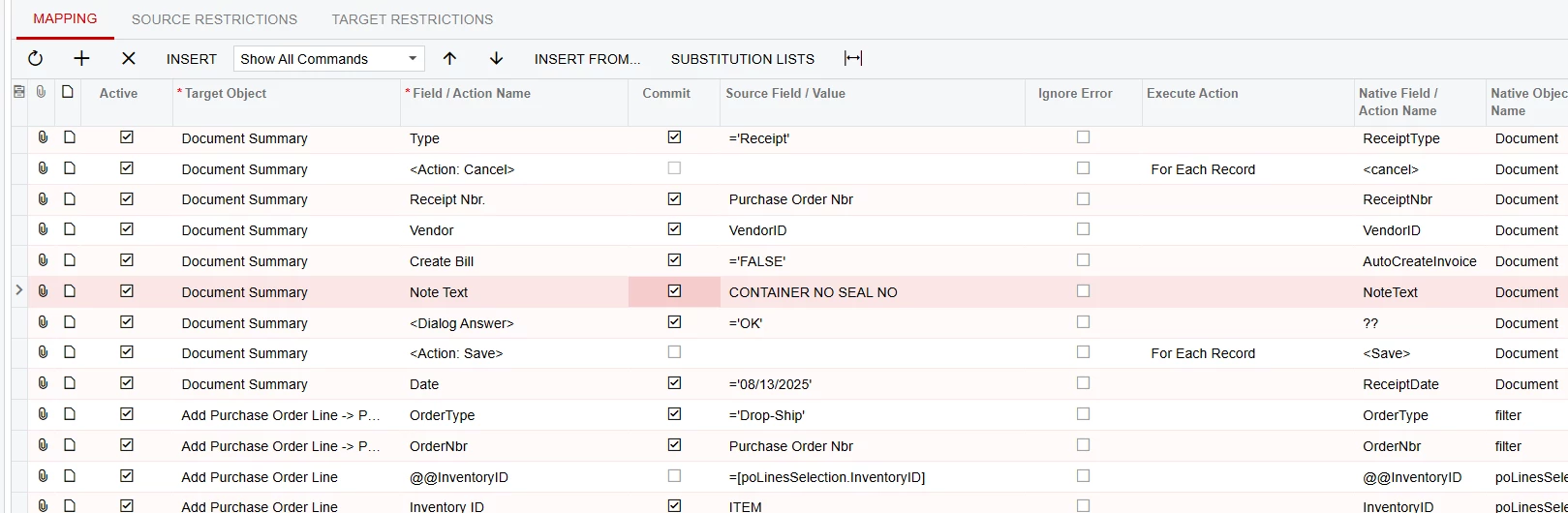
With the help of Acumatica Support, my Import for PO Receipts is now working successfully.  Here it is for anyone interested.


  • Freshman I
  • August 25, 2025

Thanks for the input. The above import brings all lines from a PO? 


Forum|alt.badge.img
  • Jr Varsity II
  • August 25, 2025

Yes this brings in all the lines and adds a note to the header of the document. It will also create the vendor bill.


  • Freshman I
  • August 25, 2025

Thanks for the input. I will take a look and confirm. 


  • Freshman I
  • August 26, 2025

Hi TShoaff, 


I ran the import displayed above and I keep getting a receipt with missing inventoryIDs: 

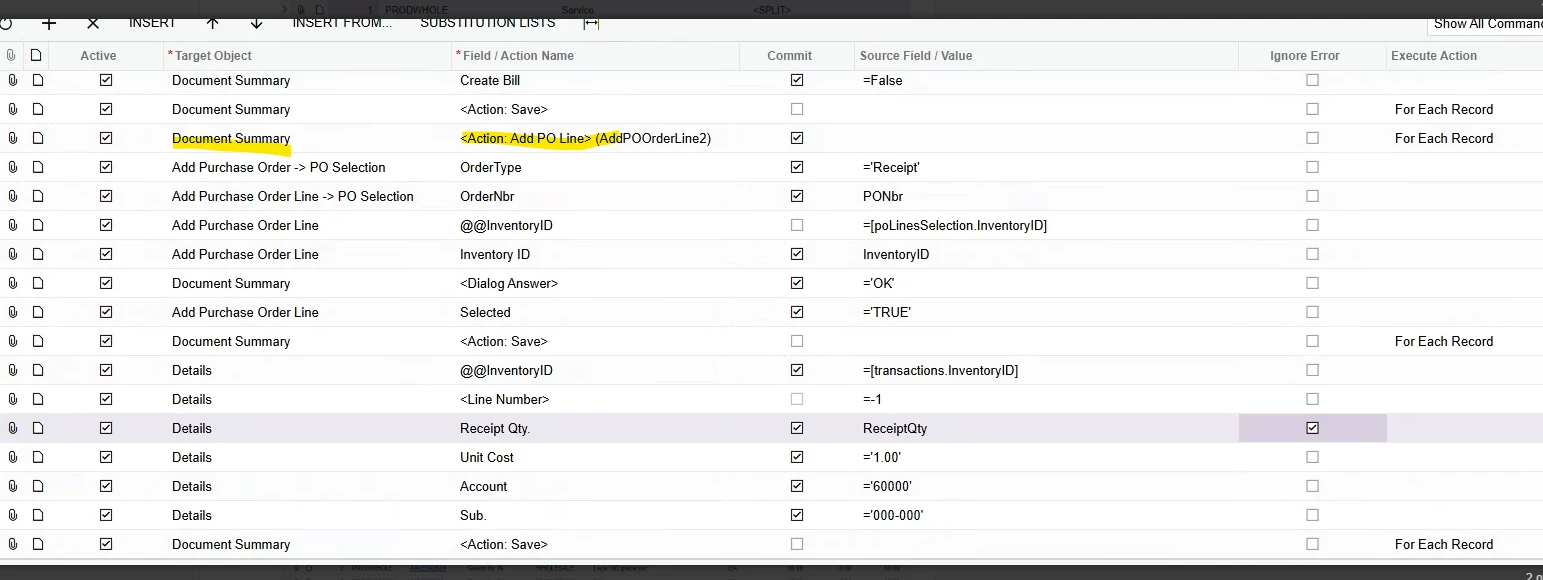
What could cause this? This is what I have in the import: 

And the PO: 

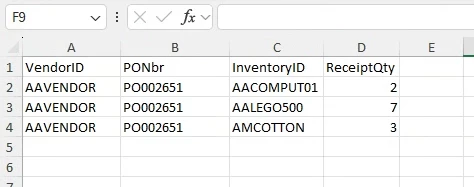
And the file: 


Let me know what could be the cause of the missing inventory ids when running this import. Thanks. 


Forum|alt.badge.img
  • Jr Varsity II
  • August 26, 2025

Remove this highlighted line above

and Add highlighted line below


  • Freshman I
  • August 26, 2025

Thanks, made the changes got a little closer. It looks like it can’t find the purchase order number which is open: 


  • Freshman I
  • August 27, 2025

Hi, Thanks for all the input. I got a little further. I was able to bring in accurate lines to each corresponding PO number line but now my issue is that when I introduce a 2nd PO for the same vendor the import doesn’t read that new line see below: 

Import: 


Spreadsheet: 

Result: 

One possibility would be to break them up into separate receipts per purchase order. Any thoughts on how to do this or maybe try to fix? 


  • Freshman I
  • September 17, 2025

Thanks for the replies, the suggestions worked and we were able to import our data. 


Hi ​@rquiroz84, I’m running into the same issue with multiple POs. Can you please share how you resolved it?