Solved

Import Scenario - New to add a blank field

  • February 7, 2025
  • 5 replies
  • 110 views

Forum|alt.badge.img

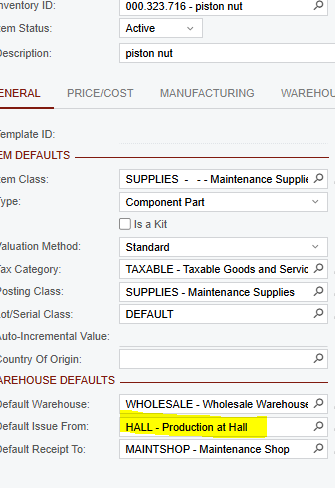
We need to remove the Default Issue From location from 18,000 SKUs. I have set up an import scenario but I can’t get it to remove the value that is currently there.


Here is the import scenario:
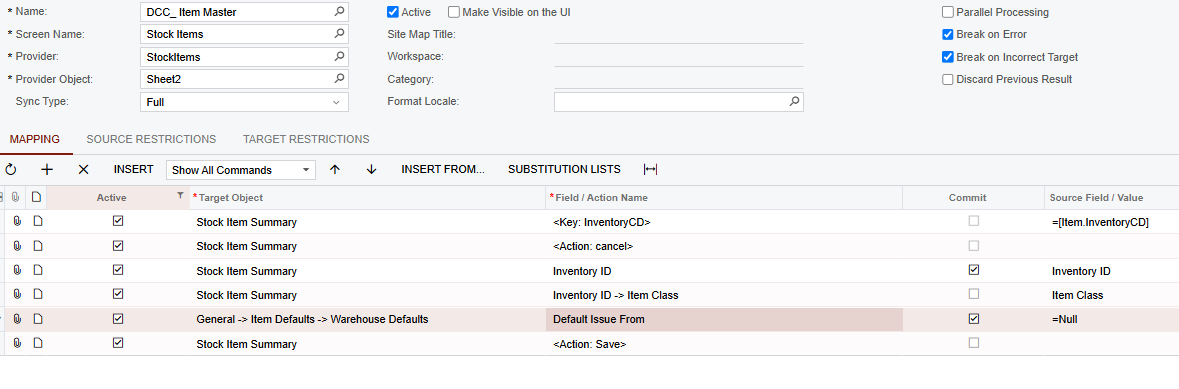
When I run the scenario, it says Processed but the prior location remains. Can anyone advise?



Best answer by jwarren

Thanks Ed - I figured it out. I had exported the item classes directly from the Stock Item screen which, when imported back in, had different formatting. I have manually updated the item class field and re-imported without issue.


Jack

5 replies

ed.goodman
Acumatica Employee
Forum|alt.badge.img+4
  • Acumatica Employee
  • February 7, 2025

@jwarren 

Hello.

I mapped the item class a little differently as it is actually part of the item defaults section, not the stock item summary.

I was able to get the following mapping to function properly and remove the default issue from location from four different items.

Hope this helps.

Ed


Forum|alt.badge.img
  • Author
  • Semi-Pro I
  • February 7, 2025

@jwarren 

Hello.

I mapped the item class a little differently as it is actually part of the item defaults section, not the stock item summary.

I was able to get the following mapping to function properly and remove the default issue from location from four different items.

Hope this helps.

Ed

That’s odd - not sure how you are getting that field to work for item class, I simply get errored out unless I use the one in my prior scenario. I am importing the Item Class ID fyi - not the description.

All of the fields under General → Item Defaults seem to throw me the same error. Item Class, Item Class -> Item Class ID and Item Class → Description.


ed.goodman
Acumatica Employee
Forum|alt.badge.img+4
  • Acumatica Employee
  • February 7, 2025

@jwarren

I use the item class description because it’s just easier in sales demo data.

There is no right or wrong way to map the item class as long as the data in the data provider matches the item class ID or the item class description.

It’s clear from the error in the screenshot that the item class is not correct in your data provider, or possibly you have restriction groups configured and do not have access to this particular item class?

I was curious, so I did another test without the item class in the mapping and it still worked, so maybe you can just remove that from the mapping as it seems like you may be able to get this to work with just the inventory ID.

Ed


Forum|alt.badge.img
  • Author
  • Semi-Pro I
  • Answer
  • February 7, 2025

Thanks Ed - I figured it out. I had exported the item classes directly from the Stock Item screen which, when imported back in, had different formatting. I have manually updated the item class field and re-imported without issue.


Jack


ed.goodman
Acumatica Employee
Forum|alt.badge.img+4
  • Acumatica Employee
  • February 7, 2025

@jwarren 

You are welcome!

Glad I could help!

Ed