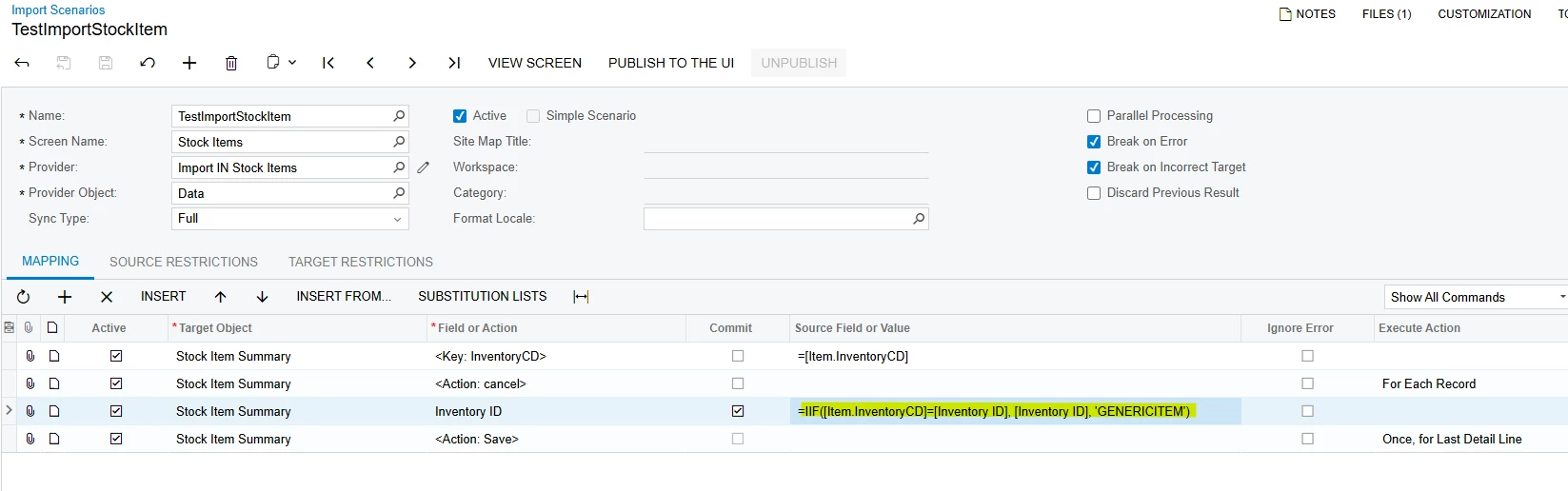
Hey, gang - our client gets an excel file monthly from one their customers to be imported into their system. The issue is that the file may have Stock Items included within that are NOT in our Clients instance, nor should they be. Nevertheless, they need the data associated with the item to be imported, but under a generic item. In this case, the client wants the nonexistent Stock Item that’s in the Excel file to be renamed to a generic item (say, “GENERICITEM”) during the import scenario. The client would prefer not to cross reference the existing stock item list with the monthly customer provided list and have the import scenario do the heavy lifting. Is there a formula or a combination of formulas that can determine if a stock item is in the system and, if not, return a generic value?
Note: Yes, you could cross-reference and update the spreadsheet beforehand or intentionally error it out and replace the errored items - I’m curious if there is a way to let the system handle this process completely. Thanks!