Answer

Import Scenario for Opening/Closing Periods

  • November 16, 2023
  • 11 replies
  • 240 views

Forum|alt.badge.img

Hello! We currently have the “centralized period management” option enabled in our environment, however would prefer to have the option to close individually at different times of the month instead. Our problem with this is we have 55 Companies and it would be very time consuming, especially since they will all be closed by the same person. Is there a way to create an import scenario for this instead?

Best answer by ashleyb

Hi @johnh3 unfortunately when I reached out to Acumatica, I was told this was a bug that would be fixed in 24R1 and that there wasn’t a workaround in the current build. 

11 replies

Forum|alt.badge.img
  • Author
  • Varsity II
  • November 28, 2023

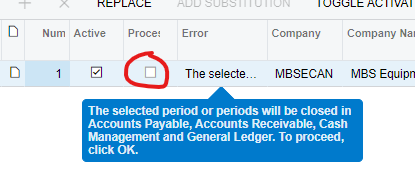
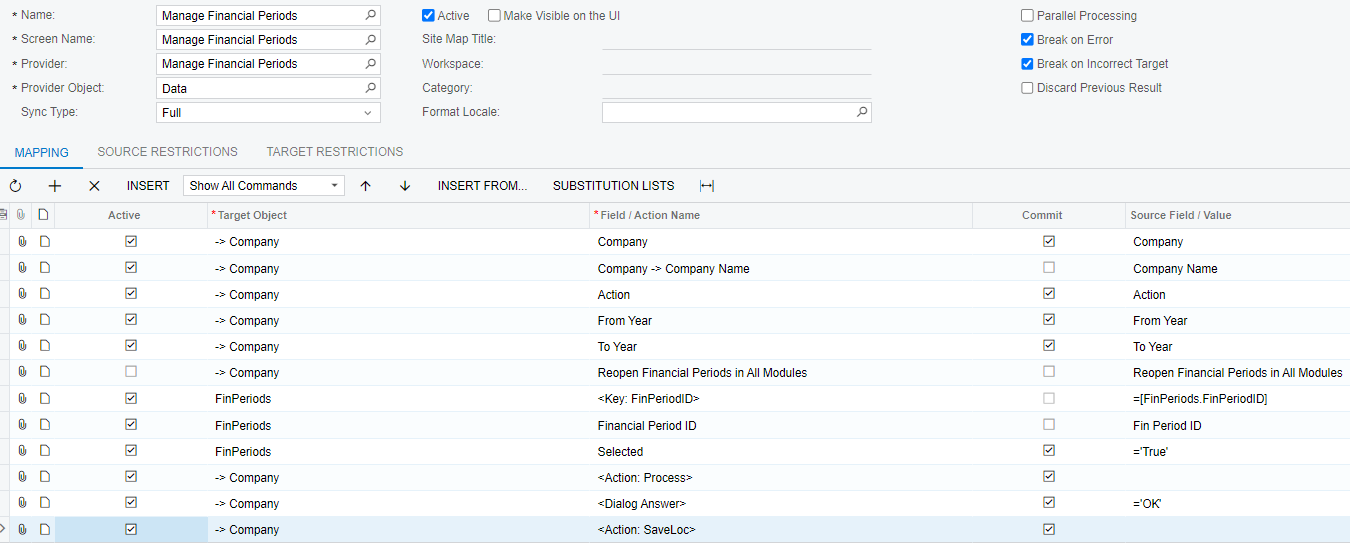
I feel like I am close, but cannot get it to Process:


Forum|alt.badge.img
  • Jr Varsity III
  • March 6, 2024

Hi there! Did you figure this out? I would be keen to leverage off your work here as we also have 60+ entities that opening/activating periods for is currently cumbersome. 


Thank you.


Forum|alt.badge.img
  • Author
  • Varsity II
  • Answer
  • March 7, 2024

Hi @johnh3 unfortunately when I reached out to Acumatica, I was told this was a bug that would be fixed in 24R1 and that there wasn’t a workaround in the current build. 


Forum|alt.badge.img
  • Jr Varsity III
  • March 7, 2024

Hi @johnh3 unfortunately when I reached out to Acumatica, I was told this was a bug that would be fixed in 24R1 and that there wasn’t a workaround in the current build. 

Thanks heaps @ashleyb!


CourtHagerDI
Freshman II
  • Freshman II
  • February 21, 2025

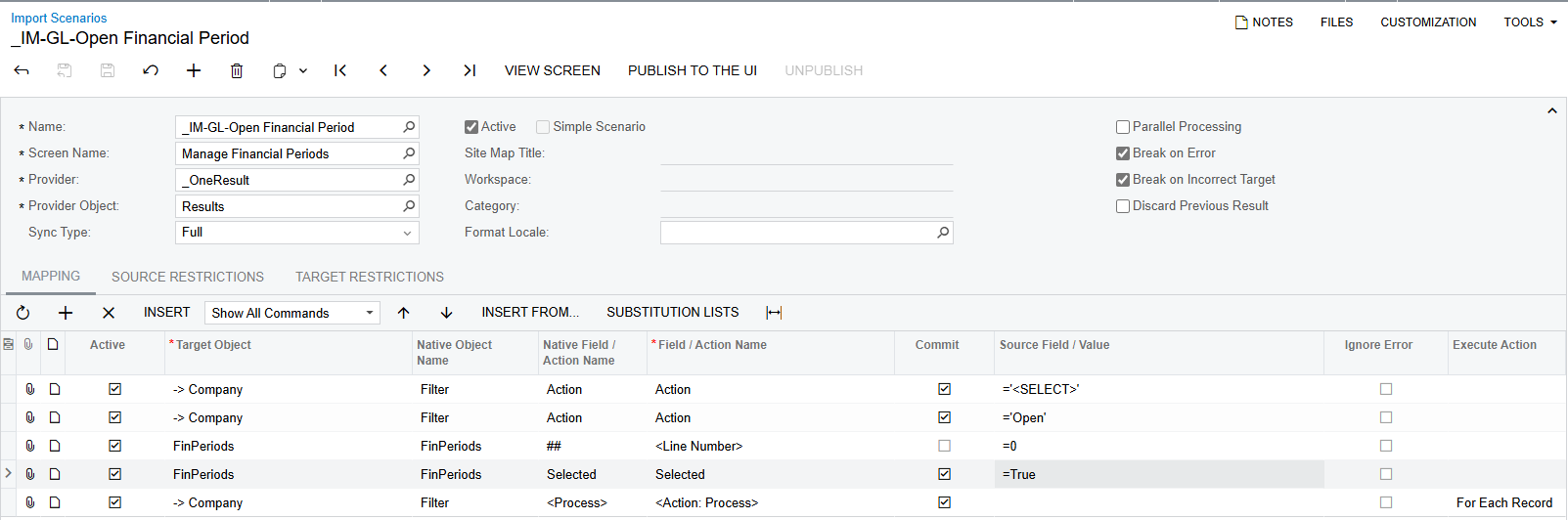
@johnh3, I have had sucess Opening the next period using this Import Scenario.
I set to <SELECT> first so the background processing of the Year fields works when I then set to Open.
That allowed me to just choose the first line (0) from below, Select it, and Process.


I wanted to share incase you were still in need of this.  I’m on 24R1.


Forum|alt.badge.img
  • Jr Varsity III
  • February 28, 2025

@johnh3, I have had sucess Opening the next period using this Import Scenario.
I set to <SELECT> first so the background processing of the Year fields works when I then set to Open.
That allowed me to just choose the first line (0) from below, Select it, and Process.


I wanted to share incase you were still in need of this.  I’m on 24R1.

Excellent! Thanks ​@CourtHagerDI - we are on the 23 version so hoping to use this next year. In the meantime, do you have the .xml file to share? 


Forum|alt.badge.img
  • Author
  • Varsity II
  • March 14, 2025

Hi ​@CourtHagerDI - thank you for sharing this! assuming it also works for closing? how does it know the company or to year? and sounds like it just defaults to the “next” actionable period, right? i am hoping to find something that allows us the option to populate and import all of the above information.


CourtHagerDI
Freshman II
  • Freshman II
  • March 16, 2025

@johnh3, I’m attaching one example of the scenario that closes an individaul module (Inventory in this case).  I set up one schedule to run a scenario for each module’s Close Finacial Periods Screen.  I then setup a second schedule to run a few minutes later to run the Close on the Manage Financial Periods screen.  I could never get it to work consistently from a schedule if I tried to just close all the modules running a scheduled import on the Manage Financial Periods screen, but having the modules closed first is working.  I also attached the scenario I’m using for Open.  That one doesn’t seem to required any workarounds.

@ashleyb, we don’t have multiple companies, so I can’t really test your sceanario or include all the fields in my setup.  I think that since the Company should be part of the filter at the top of the screen, I’d use a datasource that includes all my companies, probably just a GI based on that table.  We only keep the one previous period open, so relying on Acumatica’s logic of populating the fields when we switch the Action always chooses correctly for us.


Forum|alt.badge.img
  • Jr Varsity III
  • March 21, 2025

@johnh3, I’m attaching one example of the scenario that closes an individaul module (Inventory in this case).  I set up one schedule to run a scenario for each module’s Close Finacial Periods Screen.  I then setup a second schedule to run a few minutes later to run the Close on the Manage Financial Periods screen.  I could never get it to work consistently from a schedule if I tried to just close all the modules running a scheduled import on the Manage Financial Periods screen, but having the modules closed first is working.  I also attached the scenario I’m using for Open.  That one doesn’t seem to required any workarounds.

@ashleyb, we don’t have multiple companies, so I can’t really test your sceanario or include all the fields in my setup.  I think that since the Company should be part of the filter at the top of the screen, I’d use a datasource that includes all my companies, probably just a GI based on that table.  We only keep the one previous period open, so relying on Acumatica’s logic of populating the fields when we switch the Action always chooses correctly for us.

Thanks for the detailed write up ​@CourtHagerDI - when I give this a go, I’ll let you know.


Forum|alt.badge.img
  • Jr Varsity III
  • March 21, 2025

Hi @johnh3 unfortunately when I reached out to Acumatica, I was told this was a bug that would be fixed in 24R1 and that there wasn’t a workaround in the current build. 

Hi ​@CourtHagerDI - thank you for sharing this! assuming it also works for closing? how does it know the company or to year? and sounds like it just defaults to the “next” actionable period, right? i am hoping to find something that allows us the option to populate and import all of the above information.

Hi ​@ashleyb I assume you are on 24R1 now, but the bug is yet to be fixed?


dominicpolicicchio03
Freshman I
Forum|alt.badge.img

Hi. Did anyone figure out how to close financial periods? I can easily open financial periods via import scenario. However, when I try to do the same with closing financial periods, I get the following error: “The selected period or periods will be closed in Accounts Payable, Accounts Receivable, Cash Management and General Ledger. To proceed, click OK.”


When I try to edit the import to account for the dialog answer I still cannot get it to work. ​@ashleyb , do you know if it was ever fixed in 24R1? The version I am working on is currently 24R1.


Thanks!

Dom