Answer

Import Scenario Creates One Order instead of Multiple Orders

  • January 13, 2023
  • 4 replies
  • 305 views

Forum|alt.badge.img

Good day,

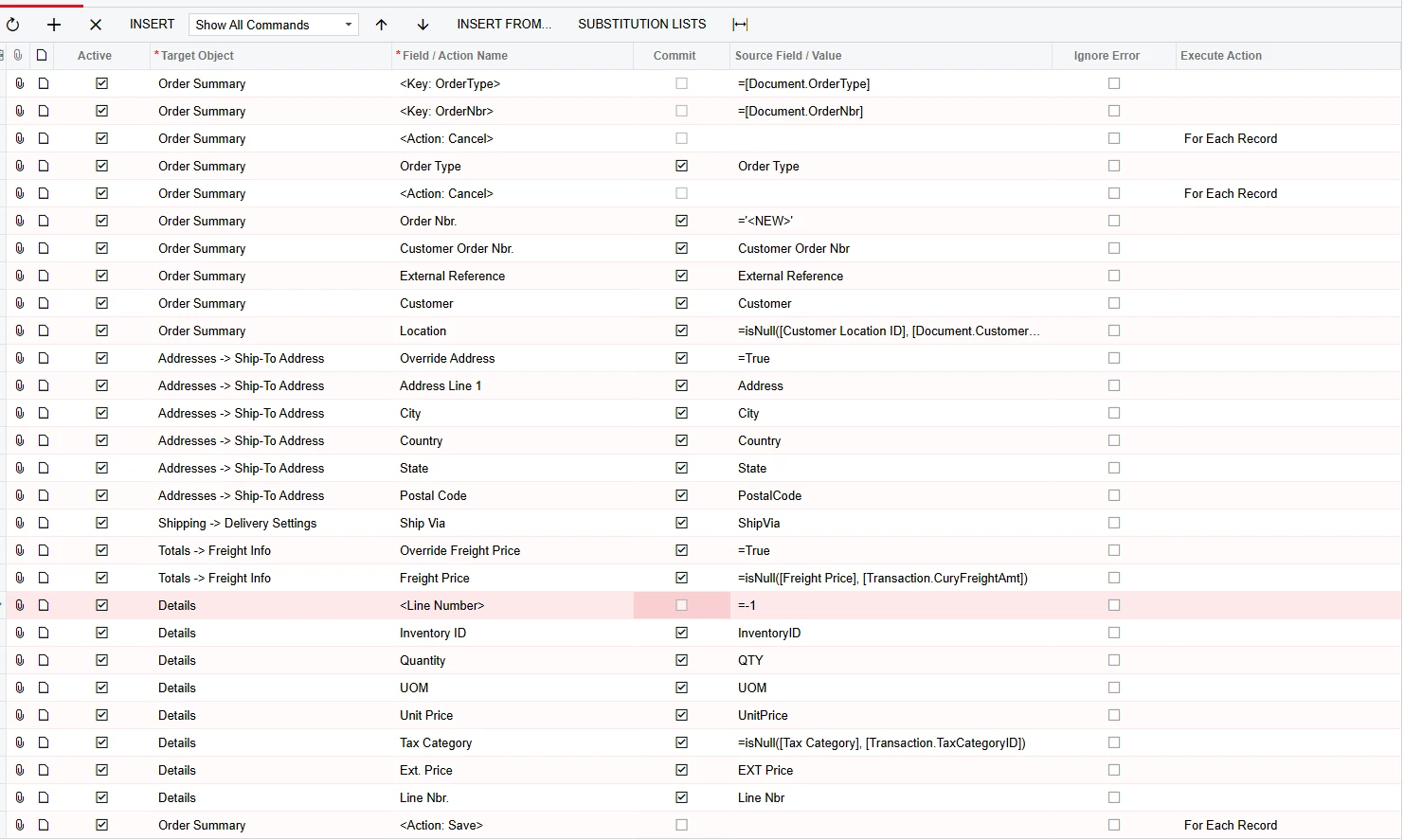
I could use some assistance with the review the attached Import Scenario; it worked before we upgraded to 2022R1.  The scenario creates the sale order.  However it creates only one order with all the items in it rather than create a separate order.  The file has 55 orders.  When I tested it created one big order.  I can figure out what changed after we upgraded.

Have a nice day.

@Evan G 

Best answer by RoyceLithgo

You have Order Nbr = ‘1’ - this means all lines imported belong to the same order and so the system only creates one order. Have a Look at the “Import Sales Orders” Import Scenario. You need the Order Nbr to come from the input file. If you have auto-numbering enabled, you just need to use values in the field that differentiate the orders. eg. 1,2,3,4 etc. 

4 replies

Forum|alt.badge.img+3
  • Pro II
  • Answer
  • January 17, 2023

You have Order Nbr = ‘1’ - this means all lines imported belong to the same order and so the system only creates one order. Have a Look at the “Import Sales Orders” Import Scenario. You need the Order Nbr to come from the input file. If you have auto-numbering enabled, you just need to use values in the field that differentiate the orders. eg. 1,2,3,4 etc. 


Manikanta Dhulipudi
Captain II
Forum|alt.badge.img+15

Hello @EvanG 

Please find the attached Import scenario for sales order.


SamMemar
Freshman II
  • Freshman II
  • October 3, 2024

Thank you @RoyceLithgo, it worked for me.


  • Freshman I
  • October 23, 2025

@RoyceLithgo, I can see above that you suggested to use 1,2,3 to enable the import to create individual SOs with the lines for each, However, I am doing that, but all the lines are still being created on one SO. See the attached Import scenario.