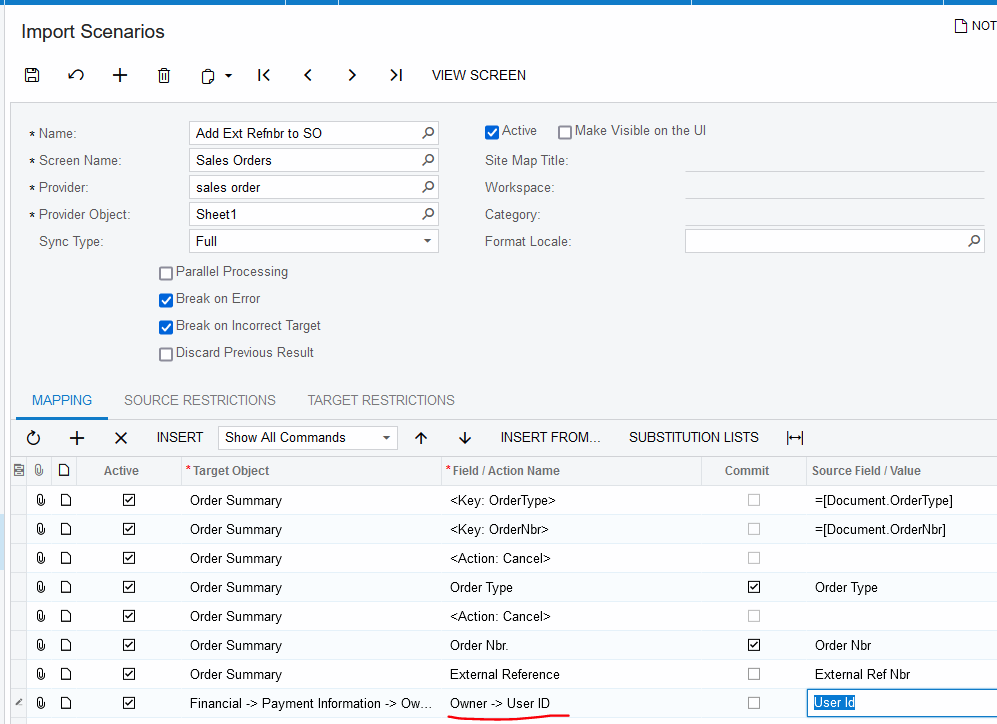
I am trying to import sales orders and all is going fine until I try to import the Owner. No matter what I try it doesn’t work with what was exported as Owner from a GI with the SOOrder DAC as the source. When exporting it shows the name rather than the numeric ID.
I worked out it will work if I can give the numeric ID for the Owner but I can’t find how to get that out using a GI.
If you have any ideas I’d be happy to hear them,
Phil
Best answer by Laura03
Hello @PPowell,
What Field Name are you using to represent the Owner? In the Field/Action Name column, when you see Owner → User ID this means find the Owner using the User ID of the employee. (Excel has User ID but Owner is the field to be updated) There are several choices, Owner → “Something”:. Are you saying, you have tried them all and none worked, or are you saying, perhaps, that you had Field/Action name set to Owner (alone) while using different values in the spreadsheet?
What Field Name are you using to represent the Owner? In the Field/Action Name column, when you see Owner → User ID this means find the Owner using the User ID of the employee. (Excel has User ID but Owner is the field to be updated) There are several choices, Owner → “Something”:. Are you saying, you have tried them all and none worked, or are you saying, perhaps, that you had Field/Action name set to Owner (alone) while using different values in the spreadsheet?
Sorry, I’ve been busy on other things and then was way for a while. I tried both Owner and Owner→ UserID. It was the Owner on the Order Summary that I was trying to fill. As we currently have not gone live yet with Acumatica and are still testing/preparing to go live there are still a small number of employees so I can manually find the numeric IDs and create a VSLookup to populate my excel file before importing. We only hopefully need to do this one time so it’s faster to just add them manually to the excel file before importing than to troubleshoot at the moment. Thanks for your advice though.