

Question

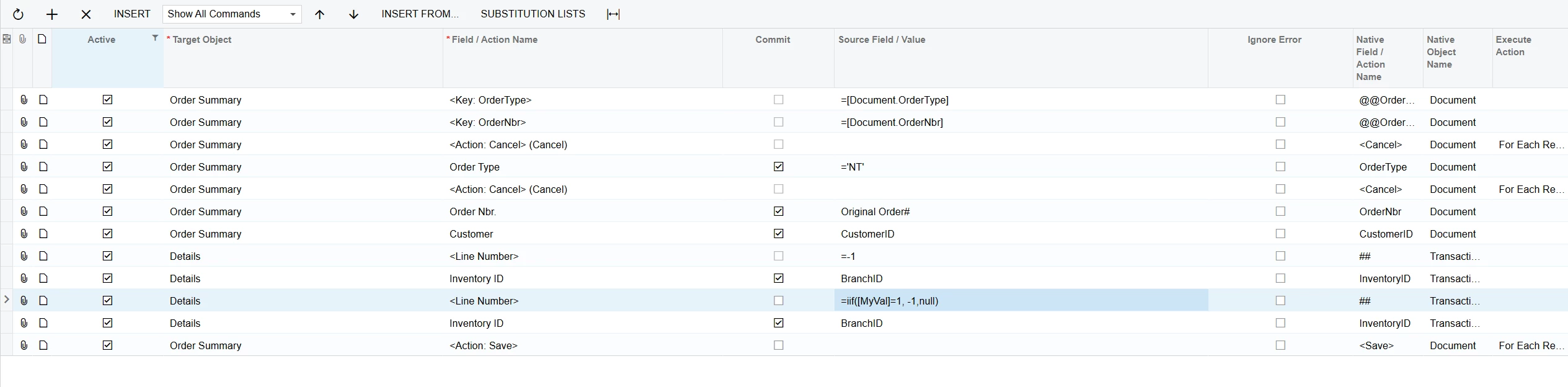
Conditional addition of lines in import scenario (add condition to the < Line Number > action)

  • March 13, 2025
  • 1 reply
  • 113 views

Forum|alt.badge.img+1

In an import scenario, is it possible to add a condition on an action row, specially the <Line Number> action?
Use case:
In an import scenario for sales order, the data provide has a single row per sales order. Based on a value in one of the columns, sometimes we need to create 1 line item and sometimes 2 line items.
The idea would be to add a condition on the second <Line Number>, something like =iif([MyVal]=1, -1,null), where the -1 adds a row, and if the condition is not met the null will ensure no rows are added.
So far, I have not been successful adding any formulas in there. Not even a single Cint() formula without conditions.


1 reply

plambert
Semi-Pro I
Forum|alt.badge.img+2
  • Semi-Pro I
  • July 24, 2025

Did you find an answer to this? I have a similar situation, though specifically I want to either delete the row (-2) or keep it (0) depending on if a new Stock Item being created has a Vendor Part Number cross-reference or not.
I’d love to know more about what’s going on under the hood with the Line Number action when you use the -1 and -2 codes as commands for Add Line and Delete Line.

Edit: I have found that you can use formulas for the <Line Number> (##) action, just that -1 and -2 do not work the same way. Putting a formula of =(-1) selects the last row, =(-2) selects the first row from the bottom.

