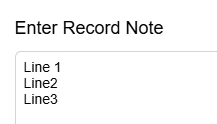
Hi, I have some data that I’m trying to import into the Note section on Stock items. I have used and am familiar with the approach when you have multiple lines to add the CStr(‘\r\n’) in between the data elements to get the data to look correctly formatted.
The situation I’m having trouble with is that I am being given a note field in an excel spreadsheet where the actual data already has the \r\n within the data. If I just map to that field and create the note, the \r\n seem to be ignored and it’s just one long note with no formatting.
Is there some trick or adjustment I have to make in the source data or import scenario to get the data imported in the formatted multi line way I want? The data is variable, it could have 2 lines of data or 20, so I’m thinking trying to break apart the actual data elements into separate cells wouldn’t be an option.
Thanks Bob