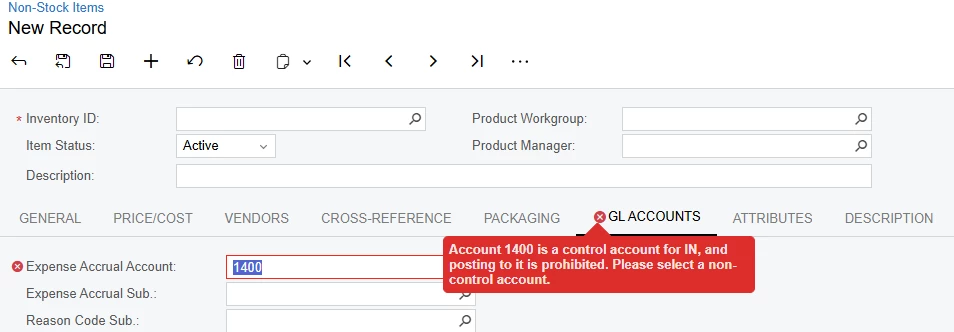
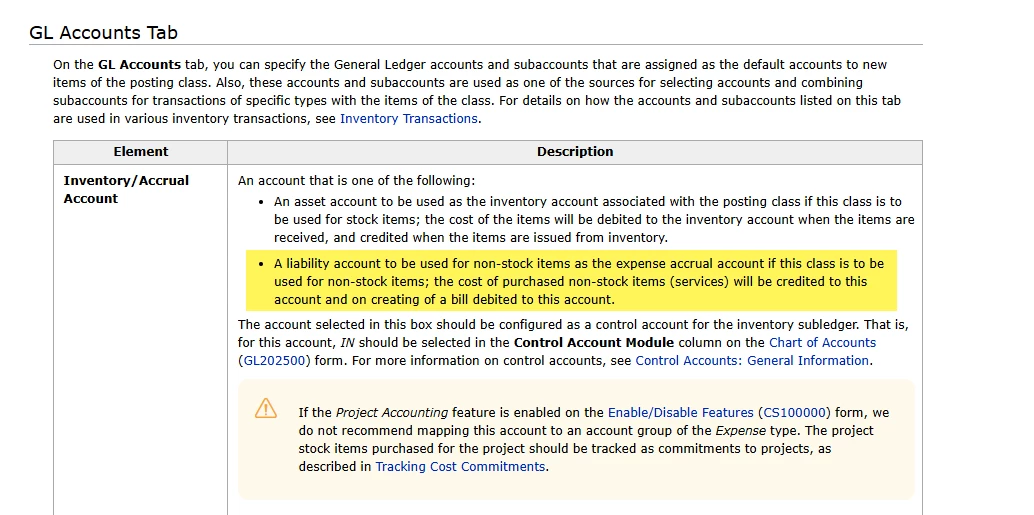
When creating a new non-stock item, the IN Control Account cannot be specified in the Expense Accrual Account field. The Acumatica form reference specifies that this field is for the IN Control Account. Selecting the IN Control Account creates an error but changing the Type field in the General tab clears the error. It doesn’t seem to matter what is initially selected for the Type and the Type can be changed back to the initial selection without the error returning.
I created an import scenario for non-stock items and it can’t get past the error even after specifying Ignore Error and having the import scenario change the Type and then change it back.
Has anyone else encountered this? inventory
Best answer by dgranger70
HI @dgranger70 ,
Check account on Chart of accounts form if Allow Manual Entry checkbox is selected.
By default, users cannot post transactions directly to a control account. So that, if this check box is cleared, users cannot post transactions directly to this account; only transactions generated in the subledger specified in the Control Account Module column can be posted.
Thank you for your reply @olgakonanykhina22. I created a support case for this issue and received help. The help article for the Expense Accrual Account is a little misleading. A control account should be selected for Stock items but not for non-stock items. A liability type account for expense accrual should be selected instead.
I also didn’t understand that a posting class shouldn’t be used for both stock and non-stock items.
Check account on Chart of accounts form if Allow Manual Entry checkbox is selected.
By default, users cannot post transactions directly to a control account. So that, if this check box is cleared, users cannot post transactions directly to this account; only transactions generated in the subledger specified in the Control Account Module column can be posted.
Check account on Chart of accounts form if Allow Manual Entry checkbox is selected.
By default, users cannot post transactions directly to a control account. So that, if this check box is cleared, users cannot post transactions directly to this account; only transactions generated in the subledger specified in the Control Account Module column can be posted.
Thank you for your reply @olgakonanykhina22. I created a support case for this issue and received help. The help article for the Expense Accrual Account is a little misleading. A control account should be selected for Stock items but not for non-stock items. A liability type account for expense accrual should be selected instead.
I also didn’t understand that a posting class shouldn’t be used for both stock and non-stock items.