Solved

Business Event Usage

  • December 17, 2021
  • 12 replies
  • 301 views

Michaelh
Pro I
Forum|alt.badge.img+2

I’m new to business events and was wondering if the following is even possible.

I want to add a business event to take an inquiry and upload it as a new document (sales order of type TR). Not to edit an existing one, which is the use-case I keep seeing online.

I’m creating Sales Orders of type TR from Purchase Order data.

Here’s the hooks:

The inquiry MUST have a user defined parameter (container number)

I then want my user hit some kind of button to trigger the upload from the data that now exists in the inquiry.

Is this possible?

Best answer by Yuri Karpenko

@Michael Hansen , I think this aricle answers your question, including changed needed to be done on the GI, and how to set up Import Scenario, Business Event, and tie all of them together:


12 replies

Forum|alt.badge.img+8
  • Semi-Pro I
  • December 17, 2021

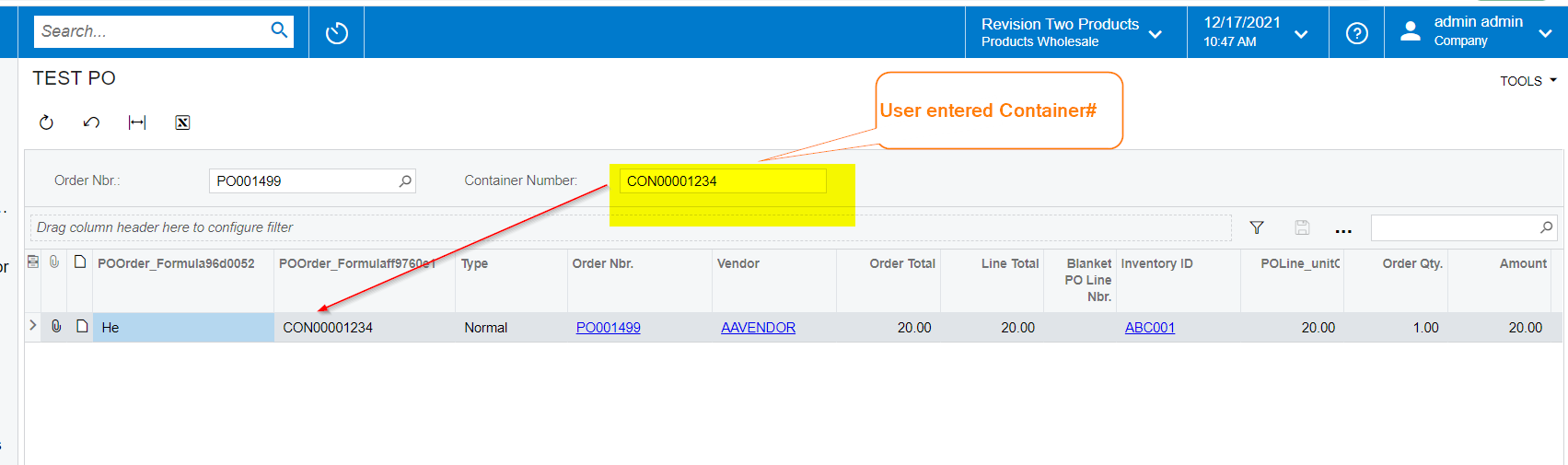
Hi @Michael Hansen There is no direct way of having a input Text field. I will shortly provide a workaround with the generic inquiry to show the Container number from the Parameter to be Shown in the Inquiry record. 


Michaelh
Pro I
Forum|alt.badge.img+2
  • Author
  • Pro I
  • December 17, 2021

I have the parameter set on the GI. I just have no clue how to link it to the import scenarios via business events.

My inquiry takes in a container and outputs all purchases on that container. Without the parameter, you get way too many records. I was hoping to slap in my parameter and then hit “import” or something to have it create a new SO of type TR with the data in the inquiry.


Forum|alt.badge.img+8
  • Semi-Pro I
  • December 17, 2021

Hi @Michael Hansen Thanks for the additional details.


Forum|alt.badge.img+8
  • Semi-Pro I
  • December 17, 2021

Hi @Michael Hansen Here is the screenshot of the Inquiry created for this purpose. Do you think this is similar to what you have created? I can share the Inquiry XML with you if required.


Michaelh
Pro I
Forum|alt.badge.img+2
  • Author
  • Pro I
  • December 17, 2021

100% correct. I have that inquiry. I then spend a couple minutes copy-pasting various fields into a brand new sales order of type TR. This is why I want to leverage the import scenario modules, no need for a human when it’s a direct mapping to various fields.


Forum|alt.badge.img+8
  • Semi-Pro I
  • December 17, 2021

Hi @Michael Hansen Did you try Business events triggering an import scenario? Can you post the one you tried?


Michaelh
Pro I
Forum|alt.badge.img+2
  • Author
  • Pro I
  • December 17, 2021

That is where I’m lost. I’m not sure how to properly link everything.

I can make a business event that “sees” the GI, but I’m not certain what filters to apply on the dropdowns.

I assume it’s TRIGGER BY ACTION? But I’m not seeing a good walkthrough for this. Also, when I do select that, I can see IMPORT SCENARIO in the table below, but my subscriber ID selector is empty. Again, I am completely ignorant here, so ELI5 (Explain like I’m 5) please. 


Chris Hackett
Community Manager
Forum|alt.badge.img
  • Acumatica Community Manager
  • January 25, 2022

Hi @ChandrasekharM would you have any further to offer @Michael Hansen ? Thank you!


Forum|alt.badge.img+8
  • Semi-Pro I
  • January 28, 2022

Hi @Chris Hackett  Will review and keep posted.


Yuri Karpenko
Captain II
Forum|alt.badge.img+6
  • Captain II
  • Answer
  • February 4, 2022

@Michael Hansen , I think this aricle answers your question, including changed needed to be done on the GI, and how to set up Import Scenario, Business Event, and tie all of them together:


Michaelh
Pro I
Forum|alt.badge.img+2
  • Author
  • Pro I
  • February 4, 2022

This is awesome, thank you!


Michaelh
Pro I
Forum|alt.badge.img+2
  • Author
  • Pro I
  • February 12, 2022

That amazing link covers everything except how to roll in line items on a new Sales Order document using auto-numbering. Anyone know how to set an import scenario properly in this regard?

Using the business events and a GI, I can only get one line on a sales order and every row creates a new Sales Order rather than adding all the lines together into a single document.

Attached is my import scenario, am I doing something stupid here?

I am using the container number as my temporary ID for the Sales Order document Order Number. This value is what we use to filter the source inquiry, so I KNOW they are the same value in all the rows.